How to maximize security in building API
Your Ultimate Guide to Building Secure APIs, Safeguarding Data and Preventing Attacks

Imagine you’ve created an API that’s crucial to your app’s success. It’s moving data, connecting apps and ensuring everything runs smoothly. But just when things seem to be going well, cyber threats lurk, aiming to exploit any vulnerability. A single breach could tarnish your company’s reputation, lose your users’ trust and cost you profits.
The best way to avoid this disaster is to secure your API from the start. In this guide, we’ll show you the best practices and key tools to protect your API from attacks. Whether you’re a seasoned developer or new to the field, this guide will give you practical steps to secure your API.
Let’s dive in and learn how to build a safe API that keeps your data, users and business protected.
Table of Contents
- Custom HTTP request headers
- CORS Protection
- Validate Request Referer / Origin & Port
- Sanitize Input
- Blacklist & Whitelist IP Address
- Avoid Search Engine Crawler
- Endpoint Throttle
- Authentication Throttle
- API Token Validation
- Request Checksum
- Roles & Permission
- Proper Error Handling
- Proper Information Handling
- API Monitoring
- Audit
- Security Testing
Custom headers are a useful way or i might say the simplest protection to add an extra layer of security to your APIs. They provide unique identification for each request and can help prevent unauthorized access. This is actually good for preventing any crawler that tried to dig the API directly.
Here are some ideas:
- X-API-KEY: A custom key assigned for each request.
- X-Powered-By: A client application name
- Client-Service: A tagging for client application eg: Mobile, Portal, Microservice, etc.
- X-Device-ID: To track each request, making it easier to monitor traffic.
- Change normal Accept
application/jsonheader content into your signature header. For example:-ACCEPT=application/client.dev.api+json;channel=v1
After you implemented it in the API middleware, if someone try to open your API in their browser directly, your API would throw some error demanding those custom request headers.
Here are the example in Laravel where its validate the headers in Middleware
Validator::make($this->getHeaders($request), [
    'client-service' => ['required', new HeaderMustHave(config('api.header.client_service'))],
    'x-powered-by' => ['required', new HeaderMustHave(config('api.header.powered_by'))],
    'accept' => ['required', new HeaderMustHave(config('api.header.accept'))],
], [
    'client-service.required' => 'Client Service is Required',
    'x-powered-by.required' => 'Powered By is Required',
    'accept.required' => 'Accept Header is Required',
])->validate();
Then, if the request headers doesn’t met the requirement, it will throw the error message.
{
    "error": true,
    "code": 470,
    "type": "ValidationException",
    "message": "Validation Error",
    "reference": [
        {
            "name": "client-service",
            "validation": [
                "Client Service is Required"
            ]
        },
        {
            "name": "x-powered-by",
            "validation": [
                "Powered By is Required"
            ]
        },
        {
            "name": "accept",
            "validation": [
                "Authorization header failed"
            ]
        }
    ],
    "debug_message": "Client Service is Required (and 2 more errors)",
    "data": []
}
CORS Protection: Cross-Origin Resource Sharing
CORS (Cross-Origin Resource Sharing) protects your APIs from unwanted access by only allowing trusted domains to make requests. Here is the situation:-
When a web page hosted on domain A makes a request to a resource hosted on domain B, the browser sends an HTTP request with an Origin header indicating the domain A from which the request originated. The server then checks whether the requesting domain A is allowed to access the requested resource. If the server’s CORS policy permits access from the requesting domain A, it responds with the requested resource along with appropriate CORS headers. However, if the requesting domain A is not allowed, the server denies the request and the browser prevents the response from being accessed by the requesting page.
For best practice, make sure to:-
- Proper configure Pre-flight request (OPTIONS method) — Built-in in modern WEB API
- Set up a whitelist of allowed origins.
- Specify the allowed methods (GET, POST, etc.).
- Limit allowed headers to only the ones you trust.
- Carefully specify exposed header the ones you need to exposed.
Indeed, modern frameworks like Laravel, GO Echo, NestJS come pre-equipped with built-in CORS protection mechanisms, reducing the hassle of manual configuration. This integrated feature make the security development process easy and ensures default security measures are in place, enhancing overall API security.
Nest is a framework for building efficient, scalable Node.js server-side applications. It uses progressive JavaScript…docs.nestjs.com
Laravel is a PHP web application framework with expressive, elegant syntax. We've already laid the foundation - freeing…laravel.com
Validate Request Referrer Link & Port
Referrer link is the request header contains the address of the previous web page from which a link to the currently requested page was followed. In more simple terms, the referer is the URL from which came a request received by a server.
Referer: https://developer.mozilla.org/en-US/docs/Web/JavaScript
Referer: https://example.com/page?q=123
Referer: https://example.com
Validating the request Referrer and Port is crucial for API security. Its actually can be covered by CORS but most default framework does not cover validating request Referer & Port.
When you check the Referer or Origin header, you’re basically making sure that requests are coming from allowed places. This prevents sneaky attacks where bad actors trick browsers into sending requests from harmful sites. For more info about this referer vulnerability, you may visit here.
Similarly, checking the port number adds another layer of security. It ensures that requests are coming from the right places and not from random or suspicious ports.
Sanitize Input: Guard Against Injection Attacks
When considering “inputs” for your application, the first thing that comes to mind is usually forms and form data. You prompt users to provide information or answer questions and then you process and store the input they’ve given.
However, one common oversight among developers is that end user can actually manipulate the HTML in their browser, allowing input fields to accept virtually anything which leads to SQL injection and XSS.
How SQL Injection works — https://portswigger.net/web-security/sql-injection
How XSS Injection works — https://owasp.org/www-community/attacks/xss/
This is where the important of the system to validate both of client and server side. We should validate and sanitize all input to prevent malicious code execution and protect against injection attacks.
For best practice, make sure to:-
- Using prepared statements and parameterized queries.
- Encoding output correctly to prevent XSS and SQL Injection.
- Validating and sanitizing inputs on the server side.
- Avoid complex logic when creating and altering data.
- Use built-in features in framework as much as possible. Customize when only you know what are you doing.
- Run realtime antivirus to scan any incoming file upload to the system.
Despite the advanced security features integrated into modern frameworks, there are chance of vulnerabilities from malicious input still persist. This is often where developers misconfigurations or overly complex processes that can be exploited with relative ease.
You’re not trusting the user data at any step of the process. That’s the key to keeping your app secure: Never trust your users. — Stephen Rees-Carter
As a developer, we absolutely cannot trust our users. Ever! In this tutorial learn tips and tricks to keep your…laravel-news.com
Blacklist/Whitelist IP Addresses
Controlling access based on IP addresses is a crucial layer of security for your APIs. By maintaining a list of whitelist or blacklistIP addresses, you can significantly reduce the risk of unauthorized access. This approach is especially beneficial in scenarios where your API should only be accessible from specific known networks or IP addresses.
Hence, we all know that filtering an IP address can be handle in network infrastructure firewall. BUT some of them can’t and some of them can by bypassed. This is where implementing firewall middleware at the code level offers an additional layer of security. This middleware monitors incoming HTTP requests directly within your application, allowing for more granular control over who can access your API.
Why Implement at Code-Level Firewall?
- Granular Control and Flexibility
- Real-time Decisions
- Layered Security
- Contextual Awareness
Implementation example:-
This is the example of simple IP address control made in Laravel middleware.
class IPBlacklistMiddleware
{
    /**
     * Handle an incoming request.
     *
     * @return mixed
     */
    public function handle(Request $request, Closure $next)
    {
        $requestIp = $request->ip();

        $ips = BlacklistIp::query()->get('ip_address')->pluck('ip_address')->toArray();
        foreach ($ips as $ip) {
            if (Str::contains($ip, '/') && Utils::isIPinRange($requestIp, $ip)) {
                throw new UnauthorizedHttpException('Your IP has been blacklisted');
            }

            if ($requestIp === $ip) {
                throw new UnauthorizedHttpException('Your IP has been blacklisted');
            }
        }

        return $next($request);
    }
}
Implementation Tip: Use middleware frameworks available in your development environment such as Laravel, Node.js or middleware in other backend framework to create custom firewall rules that monitor and filter incoming requests based on IP address, request patterns and other criteria. DONT over complicated the middleware and it will lead to the slow response time and performance in your API .
Avoid Indexing by Search Engines: Keep APIs Hidden
Preventing search engines from indexing your API endpoints can protect them from being discovered by malicious actors. When APIs are indexed by search engines, they become visible to anyone who performs relevant search queries, potentially exposing your endpoints to unwanted traffic and abuse.
The API main threat is the Google Dorking which involves using advanced search techniques to find hidden information on the web. Attackers use specific search queries to uncover exposed APIs, sensitive data, or security vulnerabilities.
Exploring Google Dorking Queries to Enhance API Security 🔒medium.com
How to prevent it?
To prevent search engines from indexing your API, the easiest way is we can use X-Robots-Tag in our web services setting.
In NGINX
server {
   ...
   add_header X-Robots-Tag "noindex, nofollow, nosnippet, noarchive" always;
   ...
}
In Apache
Header always set X-Robots-Tag "noindex, nofollow, nosnippet, noarchive"Here is the directives breakdown for the terms use in the X-Robots-Tag for references:-
- noindex: This tells search engines not to index the content of the page. It ensures that the page does not appear in search engine results.
- nofollow: This instructs search engines not to follow any links on the page. It prevents the transfer of link equity to linked pages.
- nosnippet: This directive prevents search engines from displaying a snippet (a summary or description) of the page in search results.
- noarchive: This tells search engines not to store a cached copy of the page. It ensures that users cannot access an older, archived version of the page from search engines.
Manage Request Frequency with Throttling
Throttling requests in API helps prevent abuse by limiting the number of requests a user can make in a given time period. This is crucial for mitigating distributed denial-of-service (DDoS) attacks and preventing abuse from automated scripts.
Why Throttling Requests is Essential
- DDoS Mitigation: By limiting the number of requests a single IP address can make in a given timeframe, you can mitigate the impact of such attacks.
- Preventing Abuse: Throttling helps to control your API from making excessive requests, consuming resources and potentially leading to service degradation.
- Resource Management: Better manage server resources, running-cost protection, ensuring that API remains responsive and available to legitimate users.
Authentication Throttling: Prevent Brute Force Attacks
Similar to request throttling, authentication throttling is a critical security measure to protect against brute force attacks on your API. Brute force attacks involve attempting numerous combinations of usernames and passwords to gain unauthorized access. By limiting the number of login attempts from a single IP address or account within a specified time frame, you can significantly reduce the risk of such attacks.
Why Authentication Throttling is Essential
- Preventing Brute Force Attacks: Brute force attacks rely on repeatedly trying different login credentials. Throttling login attempts makes this process much slower and less effective, discouraging attackers.
- Protecting User Accounts: Limiting the number of failed login attempts helps protect user accounts from being compromised by automated attacks.
- Improving Security Posture: Throttling authentication attempts adds an additional layer of security, making your API more resilient to unauthorized access attempts.
Additional Measures for Authentication Throttling
In addition to rate limiting, you can implement other measures to further protect your authentication endpoints:
- Captcha Verification: After a certain number of failed login attempts, require the user to complete a captcha. This helps distinguish between human users and automated bots. Example of best captcha is:- Turnstile Cloudflare and Google reCaptcha.
- Account Lockout: Temporarily lock user accounts after a certain number of failed login attempts. Notify the user of the lockout and provide a way to unlock the account.
- Logging and Alerts: Log failed login attempts and trigger alerts for suspicious activity such as multiple failed attempts from the same IP address or username.
API Token Validation
Tokens are the standard for API authentication. Make sure to:
- Set expiration times to minimize token misuse.
- Validate User Agent and IP to bind the token to the client.
Verify Request Integrity with Checksum
A request checksum is a security measure used to ensure the integrity of the data being transmitted in API requests. By generating a checksum (a unique string) based on the request data and a secret key, you can verify that the data hasn’t been tampered with during transmission. This adds a layer of security by protecting against man-in-the-middle attacks, data corruption and other forms of data integrity breaches.
Checksum is not widely use when developing an API most probably because of the complexity of developing it. Its needed both party front-end and back-end to understand the checksum algorithm.
Why Implement a Request Checksum?
- Data Integrity: Ensures that the data received by the server is exactly what was sent by the client. Any alteration in transit will result in a mismatched checksum, indicating potential tampering.
- Security: Helps protect against man-in-the-middle attacks, where an attacker intercepts and modifies the data being transmitted between the client and server.
- Trust: Builds trust in your API by ensuring that data integrity is maintained, thereby improving the overall security posture of your application.
Mechanisms to Implement a Request Checksum
The mechanisms to generate a request checksum is based on your own checksum algorithm and mixed with either Asymmetric encryption or Symmetric encryption. Here the common checksum algorithm used:-
A user submit a form containing name, email and password:
Name: Joe
Email: johndoe@gmail.com
Password: ABC@1234
The client side sort alphabetically the key and concat the value into 1 string.
let concatenatedString = "johndoe@gmail.comJoeABC@1234"Then, perform either 1 of encryption method or more according to your needs. For this example, we use HMAC + Symmetric Key + Base64
var signature = CryptoJS.HmacSHA512(concatenatedString, key);
var base64Signature = CryptoJS.enc.Base64.stringify(CryptoJS.enc.Utf8.parse(signature.toString()));
Finally, append to the original request body
Name: Joe
Email: johndoe@gmail.com
Password: ABC@1234
Checksum: $base64Signature
For the backend job, the backend need to reconstruct the same thing as constructed by the client side with the same algorithm. IF both checksum is the same, then the request consider trustworthy.
Note that:- if you are using Symmetric encryption, make sure both side store the secret key safely and consider to obscure the key to eliminate chances from being reverse engineer.
Roles and Permissions: Enforce Access Control
Imagine an e-commerce API where different roles — such as administrators, customers and vendors — require different levels of access. Administrators might have full CRUD (Create, Read, Update, Delete) permissions on all resources, while customers can only view and update their own account information.
Access control is fundamental to API security, ensuring that only authorized users and systems can interact with specific resources and functionalities. Role-Based Access Control (RBAC) and Attribute-Based Access Control (ABAC) are 2 widely adopted models for managing access rights.
Advantages:
- Granular Control: RBAC allows administrators to assign roles and permissions based on job responsibilities, ensuring users have access only to the resources necessary for their tasks.
- Scalability: As your API grows, RBAC simplifies access management by categorizing permissions into roles, reducing the complexity of individual user permissions.
- Compliance: RBAC frameworks help organizations comply with regulatory requirements by enforcing access controls and minimizing the risk of data breaches.
Implementing RBAC in an API
Here are the short snippet to give you an idea how to implement it:-
// Define roles and permissions
$roles = [
    'admin' => ['create', 'read', 'update', 'delete'],
    'editor' => ['read', 'update', 'delete'],
    'guest' => ['read']
];
Implement Access Control in API Endpoints
function updateArticle(Request $request, Article $article)
{
    // check the permissions if user is allowed to update
    Gate::authorize('update', $post);

    // Example: Update article in database
    $article->update($request->validated());

    return ['success' => true, 'message' => 'Article updated successfully'];
}
This implementation demonstrates how RBAC can be integrated into API endpoints to enforce access control based on roles and permissions. In a real-world scenario, you would integrate more robust authentication and authorization mechanisms, handle edge cases and ensure secure handling of user roles and permissions across your API ecosystem.
Proper Error Handling: Limit Information Disclosure
Error messages can inadvertently leak sensitive information about the system’s architecture or user data. Proper error handling practices mitigate this risk by standardizing error messages and limiting the details exposed to users and potential attackers.
Instead of revealing specific details like :-
“Invalid username” or “Incorrect password” ❌
“Your username or password is incorrect” ✅
This approach prevents attackers from gaining insights into the system’s authentication mechanisms.
Another improper error handling that can expose the entire structure of the system is error stack trace like below:-
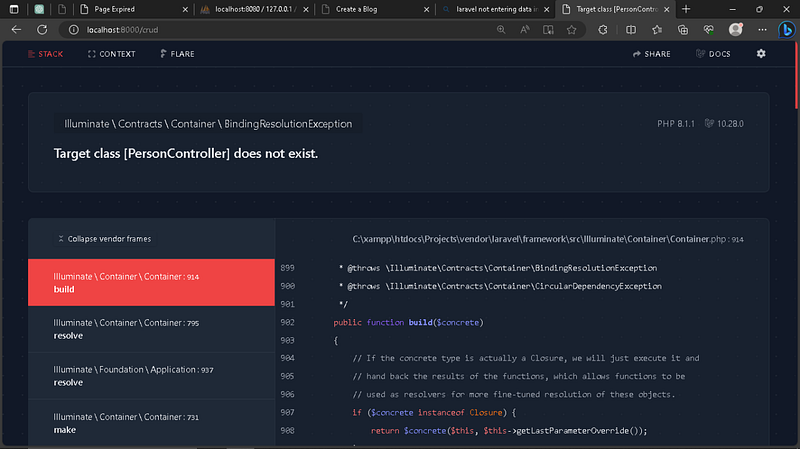
Improper system error handling can led to expose your entire system:-
- API keys stealer.
- RCE vulnerability.
- Launch attacks.
- Gain wormhole to unauthorized access to sensitive data.
There are a few steps you should take to ensure your API apps are safe:
- Protect Your .env File
Ensure your.envfile is outside the web-accessible directory, or if you can’t do that, configure Nginx/Apache to block access to dot files (.*). - Disable Debug Mode on World-Accessible Apps
Ensure you keep debug mode off on world-accessible apps — which includes staging and testing sites. Debug mode leaks all sorts of sensitive information and triggering errors is fairly easy. - Keep API Dependencies Updated
Ensure you keep up with API releases and are always using a supported version. Anything older should be considered insecure and a risk.
If you do these 3 things, then your app is safe from this vulnerability.
Proper Information Handling: Avoid IDOR
Insecure Direct Object References (IDOR) occur when an application exposes internal object references in its APIs, allowing attackers to manipulate parameters to access unauthorized data. This also could related to improper error handling.
We should encrypting Personally Identifiable Information (PII) stored in databases and transmitting data over HTTPS are essential practices to protect sensitive information from interception or unauthorized access.
Advantages:
- Data Protection: Encryption and HTTPS ensure data confidentiality and integrity during transmission and storage, reducing the risk of data breaches and unauthorized access.
- Compliance: Implementing data masking techniques for specific fields further protects sensitive information, ensuring compliance with data privacy regulations such as HIPAA or PCI DSS.
- Trust Building: By prioritizing data protection, organizations build trust with users and stakeholders, demonstrating a commitment to safeguarding sensitive information.
So, let’s consider an API that retrieves user profile information. Instead of exposing direct references (like user IDs) to clients, we will use secure tokens or ensure proper authorization checks. Below are the example in Laravel:-
Wrong approach ❌
public function getProfile(Request $request, $id)
{
     $user = User::find($id)

     return response()->json([
          'name' => $user->name,
          'email' => $user->email,
          ...
          ...
     ]);
}
Explanation on why this is wrong:
- Direct Object Reference: This approach takes a user ID (
$id) as a parameter from the request and uses it to fetch the user information. - Security Risk: This method is prone to IDOR vulnerabilities. A malicious user could manipulate the ID parameter to access information of other users by simply changing the ID in the request.
- Example: If an authenticated user knows their own user ID is
1, they might attempt to access another user’s profile by changing the URL from/profile/1to/profile/2.
Correct Approach ✅
public function getProfile(Request $request)
{
     $user = $request->user();

     return response()->json([
          'name' => $user->name,
          'email' => $user->email,
          ...
          ...
     ]);
}
Explanation on why this is the best way:
- Authorization Check: This approach relies on the authenticated user information provided by the request object. The
Requestobject contains the currently authenticated user, which is retrieved using$request->user(). - Enhanced Security: By using
$request->user(), you ensure that only the authenticated user can access their own profile information. This eliminates the possibility of IDOR vulnerabilities because there is no user ID parameter that can be manipulated. - Example: Regardless of the URL or parameters, the endpoint will always return the profile information of the currently authenticated user.
API Monitoring: Keep an Eye on Usage
Monitoring API usage is crucial for detecting abnormal behavior or unauthorized access attempts, which could indicate potential security incidents or breaches.
For example, logging and monitoring access patterns, such as unexpected spikes in requests or access from unusual IP addresses, can help identify and respond to suspicious activities promptly.
Use a tool like Sentry, you can monitor API usage and get alerts for any anomalies, detect unusual activity, track performance and ensure the overall health of your API.
Using WAF like Cloudflare is an excellent way to monitor and protect your API from malicious activity and unusual usage patterns. WAF usually provides various security features, real-time monitoring and detailed analytics to help you keep your API secure and performance.
Audit: Track Changes and Access
Maintaining an audit trail of API endpoint access, user actions and configuration changes allows organizations to trace security incidents, identify potential vulnerabilities and demonstrate regulatory compliance.
Advantages:
- Security Oversight: Regular audits provide insights into API usage patterns, highlighting potential security weaknesses or deviations from established security protocols.
- Compliance Verification: Audits verify that security controls and access permissions are enforced consistently across the API ecosystem, supporting compliance with industry standards and regulations.
- Incident Response: In the event of a security breach or incident, audit logs facilitate forensic analysis, helping organizations understand the scope and impact of the incident and implement remediation measures.
Security Testing: Stay Ahead of Vulnerabilities
Regular security testing, including vulnerability assessments and penetration testing, is essential to identify and mitigate potential vulnerabilities before they can be exploited by attackers.
Here are some essential practices and tools for effective security testing:
Automated Vulnerability Scans
Automated vulnerability scanning tools can quickly identify known vulnerabilities in your API. These tools scan your API endpoints, configurations and codebase to detect common security issues such as SQL injection, cross-site scripting (XSS) and insecure configurations.
Penetration Testing
Penetration testing involves simulating real-world attacks on your API to identify and exploit vulnerabilities. Pentesting provides a deeper understanding of your API’s security posture and helps uncover complex vulnerabilities that automated tools might miss.
Secure Code Reviews
Secure code reviews involve examining your codebase for security issues. This can be done manually or with the help of static analysis tools that automatically analyze your code for potential vulnerabilities. I would recommended SonarQube since it provides intensive and continuous inspection of code quality and security vulnerabilities.
Continuous Security Testing (DevSecOps Implementation)
Integrate DevSecOps into your CI/CD pipeline to ensure that security tests are automatically run every time code is committed or deployed. This helps in identifying and fixing vulnerabilities early in the development process.
Conclusion
By integrating these practices into your API development and maintenance processes, you can significantly enhance the security of your APIs. This comprehensive approach not only protects your data and systems but also builds trust with your users, demonstrating a commitment to maintaining high security standards. Implementing these measures is crucial for creating a secure APIs that can withstand the ever-evolving landscape of cyber threats.
If you found this article insightful and want to stay updated with more content on system design and technology trends, be sure to follow me on :-
Twitter: https://twitter.com/hafiqdotcom
LinkedIn: https://www.linkedin.com/in/hafiq93
BuyMeCoffee: https://paypal.me/mhi9388 /
https://buymeacoffee.com/mhitech