
Laravel Sanctum provides a simple token based authentication system suitable for any SPAs, mobile application integration and APIs. Sanctum allows each user of your application to generate multiple API tokens for their account. These tokens may be granted abilities / scopes which specify which actions the tokens are allowed to perform.
Sanctum also provide expiration for token which can be set in sanctum config. Once applied, the expiration affected for all token and compared with creation date of the token.
This’s great but, what if we want to differentiate expiration time for each of our guard? Current sanctum config is restricted and applied for all guards.
The Problem
The current situation is when we set 120 minutes in sanctum config
Guard A - 120 Minutes
Guard B - 120 Minutes
Guard C - 120 Minutes
What we want is like below which is dynamic
Guard A - 60 Minutes
Guard B - 120 Minutes
Guard C - 60 * 24 * 30 Minutes (1 month)
The Solution
The solution is quite easy with some manipulation on the current sanctum flow. Here is the idea,
- Add expiry date column in sanctum migration or create new migration to add the expiry date column
- Overwrite “
createToken” method in “HasApiTokens” traits to accept new column - Register new token model with extend of current PersonalAccessToken model and put expiry date column in fillable
- Add sanctum authenticate callback to validate the date expiration with the new column
Lets get started
Step 1
For the first timer, you may install Laravel Sanctum via the Composer package manager. If already install you may skip this step
composer require laravel/sanctumNext, publish the Sanctum configuration and migration files.
php artisan vendor:publish --provider="Laravel\Sanctum\SanctumServiceProvider"Don’t run migration because we need to modify it
Step 2
New migration
You might notice the migration file for personal access token. Open the file
Schema::create('personal_access_tokens', function (Blueprint $table) {
    $table->bigIncrements('id');
    $table->morphs('tokenable');
    $table->string('name');
    $table->string('token', 64)->unique();
    $table->text('abilities')->nullable();
    $table->timestamp('last_used_at')->nullable();
    $table->timestamps();
});
Add another column name “expired_at” after “last_used_at” column. Make it as nullable because expiry in sanctum is optional
....
$table->timestamp('expired_at')->nullable();
....
Next, run the migration command
Existing migration
Don’t worry. For those who already migrated, we can create a new migration file to add the expiry column. Just run a make:migration command
php artisan make:migration alter_personal_access_tokens_table
Edit the migration and add column name “expired_at” after “last_used_at” column with nullable type.
Schema::table('personal_access_tokens', function (Blueprint $table) {
    $table->timestamp('expired_at')->after('last_used_at')->nullable();
});
Next, run the migration command
Step 3
Now, we need to overwrite “HasApiToken” traits method. If we go through trait code, we will notice that the creation of the token happen in “createToken” method.
public function createToken(string $name, array $abilities = ['*'])
{
    $token = $this->tokens()->create([
        'name' => $name,
        'token' => REDACTED,
        'abilities' => $abilities,
    ]);

    .....
}
Here is the part where we need to overwrite and put our new column includes in the token creation.
Let’s say we have model named User using Sanctum trait
class User extends Authenticatable
{
    use HasApiTokens;
}
Overwrite the createToken method inside User model and put the “expired_at” field with value of expiration in 3 hours for example
class User extends Authenticatable
{
    use HasApiTokens;
    ...
    ...
    public function createToken(string $name, $abilities = ['*'])
    {
        $token = $this->tokens()->create([
            'name' => $name,
            'token' => REDACTED,
            'abilities' => $abilities,
            'expired_at' => now()->addHours(3)
        ]);

        return .....;
    }
}
Step 4
Next, because of we added new column in personal_access_token table, we need to overwrite Sanctum Personal Access Token model to add expired_at column in mass assignment fillable.
Create a model with the same name of simplicity and easy to remember
php artisan make:model PersonalAccessToken
After model created, extends the model with the Sanctum Personal Access Token model. Overwrite the fillable and casts variable. Add expired_at column into it like below
use Laravel\Sanctum\PersonalAccessToken as Model;

class PersonalAccessToken extends Model
{
    protected $casts = [
        'abilities' => 'json',
        'last_used_at' => 'datetime',
        'expired_at' => 'datetime'
    ];

    protected $fillable = [
        'name',
        'token',
        'abilities',
        'expired_at'
    ];
}
Then, based on Sanctum documentation, if you want to use your own Personal Access Token model, you need to register is into Sanctum inside AuthServiceProvider.php at boot method
Sanctum::usePersonalAccessTokenModel(PersonalAccessToken::class);
So, the Sanctum will now use your model instead of default model
Step 5
Finally, register the callback for sanctum authentication. Why? because current Sanctum guard only validate the hash of the token and scopes. Luckily, Sanctum provides callback where we can put our own logic for validation. Here is the snippet of current Sanctum guard
protected function isValidAccessToken($accessToken): bool
{
    if (! $accessToken) {
        return false;
    }

    $isValid =
        (! $this->expiration || $accessToken->created_at->gt(now()->subMinutes($this->expiration)))
        && $this->hasValidProvider($accessToken->tokenable);

    if (is_callable(Sanctum::$accessTokenAuthenticationCallback)) {
        $isValid = (bool) (Sanctum::$accessTokenAuthenticationCallback)($accessToken, $isValid);
    }

    return $isValid;
}
It’s show the valid of access token depends on this method. If a callback is assigned, the valid of the token depends on it. Here where we can put our logic to validate the expiration date with expired_at column
Edit the AuthServiceProvider.php class. On boot method, add after model registration
Sanctum::authenticateAccessTokensUsing(
    static function (PersonalAccessToken $accessToken, bool $is_valid) {
        // your logic here
    }
);
Because of the add custom callback, it will affect all the usage whom using sanctum authentication. So, to overcome this, the logic is where if expired_at is not null, check with validity of the token and check if expired_at is past or not, else just return the actual validation value.
return $accessToken->expired_at ? $is_valid && !$accessToken->expired_at->isPast() : $is_valid;
Now we finish all the steps. Let’s test it
Testing
Create a simple api controller where to request a token
php artisan make:controller ApiAuthController
Add a method inside controller. You may follow the Laravel doc for token creation
class ApiAuthController extends Controller
{
public function token(Request $request)
{
if (!Auth::attempt($request->only(['email', 'password']))) {
abort(403);
}
$token = auth()->user()->createToken('Our Token');return response()->json([$token->accessToken->expired_at
'token' => $token->plainTextToken,
'expired_at' =>
]);
}
}
Here is the sample output if you succeed.
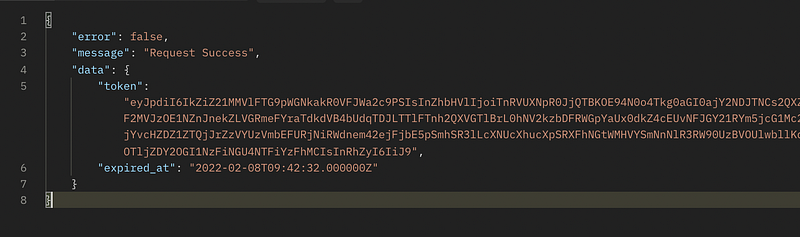
You might notice that, my sample output token is longer. It’s because of since we can overwrite createToken method, i decide to make it my own token style.
Conclusion
This solution doesn’t applied for one model only. You may applied for other model that you want to use Sanctum to authenticate. All you need is to overwrite with the thing as we learn.
It might not be the best practice since there is no other way we can do this. So, cheers 🍺
References
- Laravel Documentation
- Laravel API