Kubernetes has become the default infrastructure choice. For most teams, that default is an engineering mistake.
There is a version of this conversation happening in engineering teams right now. Someone proposes deploying a new service. A senior developer asks, “Are we running this on Kubernetes?” The answer is almost always yes, because the alternative feels like admitting defeat.
This is the infrastructure equivalent of buying a semi-truck to pick up groceries. The truck works. It is technically capable of completing the task. But you are paying for the license, the fuel, the insurance and the mental overhead of a vehicle designed for problems you do not have.
Kubernetes is an extraordinary piece of infrastructure. It is also, for most teams below a certain size, the wrong tool.
What Kubernetes Actually Costs
Everyone knows Kubernetes has a learning curve. Fewer people track what that curve actually costs in practice.
On AWS, an EKS cluster starts at $0.10 per hour for the managed control plane alone. That is roughly $73 per month before you have attached a single node or deployed a single workload. Add EC2 instances for your worker nodes, EBS volumes for persistent storage and a load balancer for ingress. The bill climbs to $200-$350 a month for a modest production cluster depending on node sizes and traffic. A realistic multi-environment setup (staging and production) doubles that figure before you have written a line of business logic.
The money is not the real problem. The real cost is operational complexity that compounds over time.
Kubernetes introduces a new vocabulary at every layer: pods, deployments, services, ingress controllers, persistent volume claims, config maps, secrets, service accounts, namespaces, resource quotas and more. A developer who wants to check why a deployment is failing needs to know the difference between a pod in CrashLoopBackOff and one in ImagePullBackOff, understand which logs are relevant and identify whether the issue is at the container level, the pod level or the cluster level.
That cognitive overhead does not disappear once your team has learned the basics. It becomes the background noise of every infrastructure decision. You now have a Kubernetes problem on top of every application problem.
What Docker Compose Actually Gives You
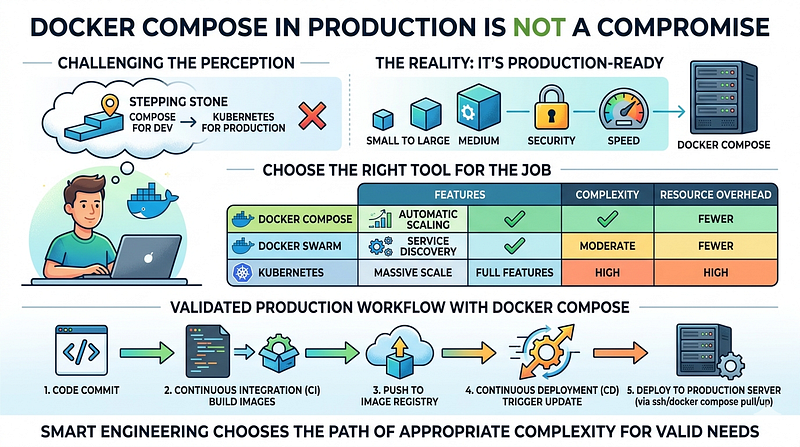
Docker Compose has a reputation problem. It is perceived as a development tool, the thing you spin up locally so your app can talk to Redis and Postgres without installing them natively. Running Compose in production feels like something you do before you figure out the real answer.
This perception is outdated. It was not fully accurate when it formed, and it has aged poorly.
Docker Compose v2, which became the standard CLI plugin starting in 2021 and replaced the legacy Python-based docker-compose command, closed most of the gap that made it feel unsuitable for production workloads. The Compose specification merges what used to be separate version 2.x and 3.x formats. You get resource limits, healthchecks with condition-based dependencies, profiles for managing multiple environments, restart policies and structured logging.
Here is what a production-ready service definition looks like:
services:
  api:
    image: myapp/api:${IMAGE_TAG}
    restart: unless-stopped
    healthcheck:
      test: ["CMD", "curl", "-f", "http://localhost:8000/health"]
      interval: 30s
      timeout: 10s
      retries: 3
      start_period: 40s
    deploy:
      resources:
        limits:
          cpus: "1.0"
          memory: 512M
        reservations:
          cpus: "0.25"
          memory: 128M
    environment:
      - DATABASE_URL=${DATABASE_URL}
      - REDIS_URL=${REDIS_URL}
    depends_on:
      db:
        condition: service_healthy
    logging:
      driver: "json-file"
      options:
        max-size: "10m"
        max-file: "3"
    networks:
      - app-network
    db:
    image: postgres:17-alpine
    restart: unless-stopped
    healthcheck:
      test: ["CMD-SHELL", "pg_isready -U ${POSTGRES_USER}"]
      interval: 10s
      timeout: 5s
      retries: 5
    volumes:
      - postgres_data:/var/lib/postgresql/data
    environment:
      - POSTGRES_DB=${POSTGRES_DB}
      - POSTGRES_USER=${POSTGRES_USER}
      - POSTGRES_PASSWORD=${POSTGRES_PASSWORD}
    networks:
      - app-network
volumes:
  postgres_data:
networks:
  app-network:
    driver: bridge
This is not a prototype configuration. This is production infrastructure: healthchecks with startup grace periods, resource constraints that prevent runaway containers from taking down the host, proper restart behavior and log rotation. The service only starts after Postgres reports healthy.
The operational experience of working with this is straightforward. Deploying a new version is docker compose pull && docker compose up -d. Checking logs is docker compose logs -f api. Scaling the worker process is docker compose up -d --scale worker=3. Any developer on your team can reason about what is happening without a dedicated infrastructure certification.
The Kamal Option
DHH and the team at 37signals built and open-sourced Kamal (previously MRSK) in 2023 after migrating their own infrastructure off the cloud onto owned hardware. Kamal is a deployment tool that wraps Docker with zero-downtime deploys, rolling restarts and integrated asset bridging.
It reads like what a senior engineer would write if asked to solve “deploy a containerized app to a VPS without the K8s overhead.” The configuration is a single YAML file:
service: myapp
image: myapp/api

servers:
  web:
    - 192.168.0.1
    - 192.168.0.2
  job:
    hosts:
      - 192.168.0.3
    cmd: bundle exec sidekiq
proxy:
  ssl: true
  host: myapp.com
registry:
  username: DOCKER_REGISTRY_USER
  password:
    - DOCKER_REGISTRY_PASSWORD
env:
  secret:
    - DATABASE_URL
    - REDIS_URL
Running kamal deploy pushes the image to your registry, pulls it on each server, starts the new container and switches traffic with zero downtime using Kamal Proxy (a lightweight HTTP proxy included with Kamal 2). Rolling back is kamal rollback.
37signals runs Hey, Basecamp and their other applications on this setup in production. These are not toy workloads.
Kamal does not replace Kubernetes for every scenario. It does not solve multi-region failover, sophisticated autoscaling or multi-tenant workload isolation. What it solves is the actual problem most teams face: deploying a web application reliably to a fleet of servers without standing up a distributed orchestration platform.
The Decision Framework
Kubernetes is the right choice under a specific set of conditions. It is not the right default.
You need Kubernetes when your workloads genuinely require multi-node scheduling, such as GPU isolation across machines, or when per-workload autoscaling based on custom signals is a hard requirement. You need it when you have dedicated platform or SRE capacity to own the cluster, upgrade cadence and security posture. You need it when your availability requirements make single-host failure unacceptable and you need automated rescheduling across nodes.
That is a real list of real requirements. It is also a description of infrastructure problems that most early-stage companies, mid-sized startups and even some mature product teams have not yet reached.
Docker Compose (or Compose plus Kamal) covers the other side: services running comfortably on one or two hosts, teams with fewer than seven or eight engineers touching infrastructure, deployments where iteration speed matters more than automatic bin-packing and applications where the operational model needs to be accessible to developers who are not infrastructure specialists.
The Compose model has a hard ceiling. If your traffic profile is bursty and unpredictable at a scale that exceeds what vertical scaling can handle, or if you are running dozens of microservices that need independent scaling, Compose will fight you. Know where that ceiling is before you need to hit it.
For most teams running a web application with a background job queue, a database and a cache, that ceiling is further out than you think. A $48/month DigitalOcean Droplet with 4 vCPUs and 8 GB of RAM handles substantial traffic. Two of them behind a load balancer, with read replicas for the database, covers the infrastructure needs of products that most engineering teams would consider a successful launch. Vertical scaling is not glamorous. It is also fast, cheap and predictable.
The Migration Path Is Real
A common objection to Docker Compose in production is the migration cost when you eventually need to move. The assumption is that containerizing with Compose commits you to a fundamentally different path from the K8s-native approach.
This is not accurate. Your Docker images work in Kubernetes without modification. Your environment variable conventions carry over. The main migration effort is in translating Compose service definitions to Kubernetes manifests, which tools like Kompose can assist with, and in learning the operational model.
Starting with Compose does not lock you in. It gives your team time to build the application without carrying the infrastructure complexity before that complexity is justified. It is far cheaper to migrate to Kubernetes when you actually need it than to operate Kubernetes for two years before you need it.
Tools like Coolify and Dokploy have also emerged to give Compose-based setups a management UI, monitoring and automatic SSL without the full orchestration layer. These are not toys. They are reasonable choices for teams that want a product-quality operational experience without a cluster.
The Conversation Nobody Is Having
In 2026, the default position in most engineering teams is that Kubernetes is what serious infrastructure looks like. Job descriptions list it. Conference talks center on it. The assumption is that if you are not running K8s, you are either not at scale or not doing things properly.
This assumption does active damage. It pushes teams toward infrastructure complexity before they have validated their product, inflates hiring requirements for roles that do not need Kubernetes expertise and creates a maintenance burden that grows independent of business value.
The engineers who benefit most from Kubernetes are the ones who adopted it because their requirements drove them there, not the ones who adopted it because it felt like the expected answer. Those two groups work at very different companies.
If your team is smaller than ten engineers, your traffic fits on two servers and your deployment pipeline is a source of friction rather than a point of pride, spending two weeks simplifying to Compose and Kamal is probably a better use of engineering time than the next Kubernetes upgrade.
The truck analogy holds. Kubernetes is a remarkable tool. It solves genuinely hard problems at scale. The problem is that we have built a culture that treats the truck as the default vehicle and makes small-car drivers feel like they are doing something wrong.
Pick the tool that matches your actual problem. Then upgrade when the problem changes. That is not a compromise. That is engineering judgment.
References:
- AWS EKS Pricing: https://aws.amazon.com/eks/pricing/
- Docker Compose Deploy Specification: https://docs.docker.com/reference/compose-file/deploy/
- Kamal: https://kamal-deploy.org/
- “How to Exit the Complexity of Kubernetes with Kamal” (The New Stack): https://thenewstack.io/how-to-exit-the-complexity-of-kubernetes-with-kamal/