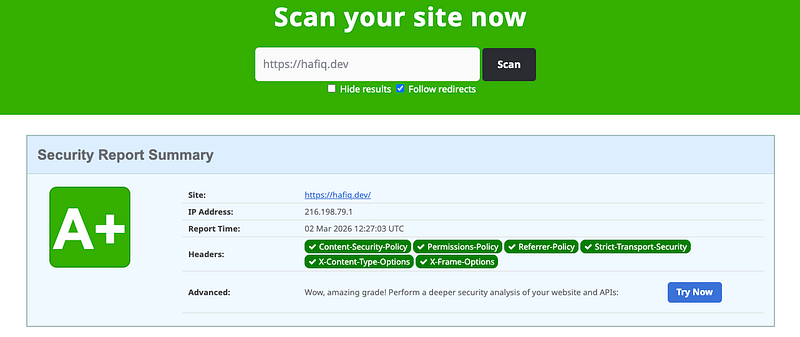
I ran my own site, hafiq.dev, through securityheaders.com this morning and it came back with an A+.
That did not happen by accident. It happened because at some point I sat down and actually read what these headers do and why they matter. Before that, my server was sending responses with half of them missing and had no idea.
This article is about what those headers are, what attacks they stop and how to get your own site to A+. Every example is backed by the actual headers my site sends right now, which you can verify in that scan.
How to Check Your Site Right Now
Go to securityheaders.com, enter your domain and scan it. You will get a grade from A+ down to F and a list of exactly which headers are present and which are missing.
The graded headers the scanner checks for are:
- Content-Security-Policy
- Permissions-Policy
- Referrer-Policy
- Strict-Transport-Security
- X-Content-Type-Options
- X-Frame-Options
If any of these are missing, your grade drops. All six present gets you to A. The jump to A+ requires no additional headers but a clean, well-configured set of the above with no obvious weaknesses in the values.
Content-Security-Policy
This is the most powerful header on the list and the one with the most room to get wrong.
A Content Security Policy tells the browser exactly which sources of content are allowed to load on your page. Scripts, stylesheets, fonts, images and frames each have their own directive. If a source is not on the list, the browser blocks it.
The primary threat it addresses is Cross-Site Scripting (XSS). If an attacker finds a way to inject malicious script into your page, a well-configured CSP can stop that script from executing or phoning home even after the injection succeeds.
Here is the actual CSP my site sends:
content-security-policy: default-src 'self';
  script-src 'self' 'nonce-NDUxMDRiOWMt...' 'strict-dynamic' https://www.googletagmanager.com;
  style-src 'self' 'unsafe-inline';
  img-src 'self' data: blob: https:;
  font-src 'self' data:;
  connect-src 'self' https:;
  frame-ancestors 'self';
  base-uri 'self';
  form-action 'self'
A few things worth understanding here.
default-src 'self' is the fallback. Any resource type you have not explicitly configured falls back to this, meaning only content from your own domain is allowed.
nonce-... is a randomly generated value that gets injected into every request server-side. Only script tags that carry the matching nonce value are allowed to execute. An attacker who injects a script tag without the correct nonce gets blocked. The nonce is regenerated on every single request so it cannot be predicted or reused.
'strict-dynamic' works together with the nonce. It tells the browser to trust any scripts loaded by a nonce-verified script, which allows dynamically injected scripts from trusted sources to work without you having to whitelist every CDN URL individually.
frame-ancestors 'self' means your page can only be embedded in an iframe by pages on your own domain. This is your clickjacking protection. More on that below.
Start with report-only mode
A CSP that breaks your own site is worse than no CSP. Before enforcing, use the report-only header to observe what would be blocked without actually blocking anything.
Content-Security-Policy-Report-Only: default-src 'self'; report-uri /csp-violations
Violations are sent to your endpoint as JSON. Watch it for a few days, adjust the policy to allow your legitimate sources and then switch to enforcement.
The biggest mistake developers make is using unsafe-inline to silence errors quickly. This allows all inline scripts and event handlers which defeats most of what CSP is designed to do. If you need inline scripts, use nonces instead of opening that hole.
Strict-Transport-Security (HSTS)
HTTPS is a given in 2026. But just serving over HTTPS is not enough. If a user navigates to yoursite.com without typing https://, their browser sends the first request over plain HTTP. That first request is the window an attacker on the same network needs to intercept traffic or serve a fake certificate.
HSTS closes that window. Once a browser has seen this header over a valid HTTPS connection, it will never connect to that domain over HTTP again. All future requests are upgraded to HTTPS before the connection is even attempted.
My site sends:
strict-transport-security: max-age=63072000
max-age=63072000 is two years in seconds. That is a solid value for a production site you intend to keep on HTTPS permanently.
You will commonly see two optional additions recommended: includeSubDomains and preload.
includeSubDomains extends the policy to every subdomain. Only add this if every subdomain on your domain has a valid HTTPS certificate. If even one does not, that subdomain becomes inaccessible.
preload opts your domain into a hardcoded list that ships inside Chrome, Firefox and Safari. Browsers that have never visited your site will know to use HTTPS from the very first request. To get on the list you submit your domain at hstspreload.org. Note this is a separate step from just setting the header.
Both are optional enhancements. My site does not use either and still scores A+. Add them only when you are certain your entire domain is committed to HTTPS permanently with no exceptions.
X-Frame-Options and CSP frame-ancestors
A clickjacking attack works by loading your site inside a transparent iframe on an attacker-controlled page. The attacker’s decoy elements sit underneath your invisible interface. When a user thinks they are clicking the decoy, they are actually clicking your page, confirming transactions, granting permissions or deleting their account without knowing.
OWASP documents real-world clickjacking attacks against Adobe Flash’s plugin settings page, against Twitter in the form of a retweet worm and against Facebook’s Like button. These were not theoretical scenarios.
Two things protect against this. X-Frame-Options is the older header:
X-Frame-Options: SAMEORIGIN
DENY prevents your page from being loaded in any iframe anywhere including your own domain. SAMEORIGIN allows it only within your own domain. My site uses SAMEORIGIN and that is perfectly valid for most applications.
The modern approach is using the frame-ancestors directive in your CSP which is what my site also has set:
Content-Security-Policy: frame-ancestors 'self'
'self' is equivalent to SAMEORIGIN. Setting both the CSP directive and X-Frame-Options provides the best coverage: modern browsers use the CSP directive and older browsers fall back to X-Frame-Options.
X-Content-Type-Options
Browsers have a behaviour called MIME type sniffing where instead of trusting the Content-Type header, they look at the actual bytes of a file and guess what type it is. This exists to handle misconfigured servers gracefully.
An attacker can exploit this. If they get a file with a Content-Type of text/plain onto your server but the content looks like JavaScript, some browsers will execute it as JavaScript regardless of what the header says.
x-content-type-options: nosniff
This tells the browser to trust the Content-Type header and not second-guess it. There is only one valid value for this header and that is nosniff. My site has it set correctly.
Referrer-Policy
When a user clicks a link from your site to an external site, the browser includes a Referer header in that outgoing request telling the destination exactly which URL the user was on. If your URLs contain session tokens, user IDs or search queries, you are sending that information to every external site your users navigate to.
referrer-policy: strict-origin-when-cross-origin
This is the recommended default and what my site uses. For same-origin requests it sends the full URL. For cross-origin requests it sends only the origin (your domain with no path). For any downgrade from HTTPS to HTTP it sends nothing at all.
If your application handles genuinely sensitive data in URLs, you can go stricter with no-referrer which sends nothing anywhere.
Permissions-Policy
This header controls which browser features and APIs your page is allowed to use. Camera, microphone, geolocation, payment APIs and others.
If your application does not need access to the user’s camera, explicitly say so. If an attacker manages to execute code on your page, that code cannot silently start streaming without this protection.
My site sends:
permissions-policy: camera=(), microphone=(), geolocation=(), interest-cohort=()
An empty value () disables the feature entirely for your page and all content embedded within it. Note the interest-cohort=() directive which opts the page out of Google's FLoC tracking. It is worth including.
Be intentional about what you allow. The default is that most browser features are available to any code running on your page including third-party scripts you did not write.
The Headers You Should Remove
Security is not only about what you add. It is also about what you stop broadcasting.
By default, most servers and frameworks include headers that tell the world exactly what software you are running:
Server: nginx/1.18.0
X-Powered-By: PHP/8.1.2
X-AspNet-Version: 4.0.30319
These narrow down which known vulnerabilities an attacker should try against you. There is no reason to send this to anyone.
My site still has x-powered-by: Next.js in its responses. The securityheaders.com scan flagged it, noting it "could still be removed." It does not affect the A+ grade but it is an easy improvement. The value has been altered from something like Next.js 14.2.1 to just Next.js so the version is hidden, but removing it entirely is better.
In Nginx, suppress server version info with:
server_tokens off;
In Apache:
ServerTokens Prod
ServerSignature Off
For framework headers like X-Powered-By, check your framework's documentation for the setting to suppress it. In Next.js you can add this to next.config.js:
module.exports = {
  poweredByHeader: false,
}
What About X-XSS-Protection?
You will come across this header in older articles and security guides. Do not add it.
OWASP explicitly recommends setting it to X-XSS-Protection: 0 to disable the browser's built-in XSS auditor entirely, because the auditor can introduce new XSS vulnerabilities in otherwise safe sites. The feature has been removed from Chrome and is deprecated across modern browsers. Use a proper Content-Security-Policy instead. It does the job correctly.
Going Beyond A+: The Upcoming Headers
The securityheaders.com scan shows three additional headers under “Upcoming Headers” that my site does not yet have. These are not required for an A+ grade today but they represent where the security baseline is heading.
Cross-Origin-Embedder-Policy (COEP) prevents your page from loading any resources that have not explicitly granted cross-origin permission via CORS or CORP headers. This is a prerequisite for accessing high-resolution timers and certain APIs that could be abused in speculative execution attacks like Spectre.
Cross-Origin-Opener-Policy (COOP) isolates your browsing context from other windows. It prevents an attacker from opening your page in a popup and accessing its window object, or from you being able to access theirs.
Cross-Origin-Resource-Policy (CORP) lets a resource owner specify who is allowed to load it. It protects your assets from being included by malicious third-party sites.
These three together enable what browsers call Cross-Origin Isolation, which unlocks access to features like SharedArrayBuffer that browsers locked down after Spectre was discovered in 2018.
The Baseline That Gets You to A+
Here is the complete set of headers my site sends that resulted in the A+ score. Use this as your starting point:
Strict-Transport-Security: max-age=63072000
X-Content-Type-Options: nosniff
X-Frame-Options: SAMEORIGIN
Referrer-Policy: strict-origin-when-cross-origin
Permissions-Policy: camera=(), microphone=(), geolocation=(), interest-cohort=()
Content-Security-Policy: default-src 'self'; frame-ancestors 'self'; base-uri 'self'; form-action 'self'
Your CSP will expand from there as you add CDNs, analytics and third-party scripts. The key is starting from default-src 'self' and opening only what you genuinely need, rather than starting open and trying to lock down later.
Run your domain through securityheaders.com. Look at the grade. Fix what is missing. Then run it again.
These headers are free to add. The attacks they prevent are not theoretical. The gap between an unprotected site and an A+ site is an afternoon of configuration. Your browser is ready to defend your users. You just have to tell it to.