Why developers keep leaving 1 million combinations unprotected after authentication succeeds
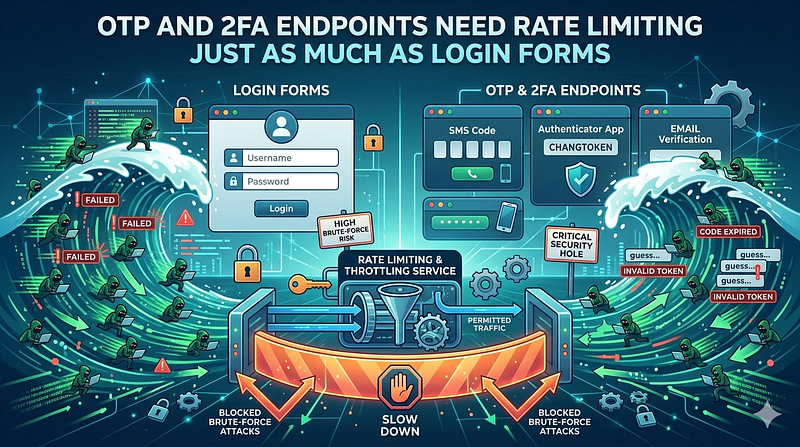
Your login form has rate limiting. Your password reset endpoint has rate limiting. Your API has rate limiting. So why does your 2FA endpoint treat OTP verification like it’s unhackable? It’s not, and the security research from 2025 proves it costs companies millions.
The pattern is consistent across organizations: rate limiting is bolted onto authentication endpoints as a security reflex, but the moment someone clears the first factor, that discipline disappears. Developers seem to believe that requiring a valid username and password for the second factor is enough. It isn’t. A six-digit OTP is trivially brute-forceable with 1 million possible combinations, and without rate limiting on the verification endpoint, an attacker who has already passed the password check can try them all in seconds or minutes, not hours.
This isn’t theoretical. In early 2025, researchers demonstrated that Microsoft’s own TOTP implementation, later dubbed the “AuthQuake” vulnerability, could be bypassed through brute force because the TOTP window remained valid for approximately 3 minutes instead of the standard 30 seconds. When you combine an extended validity window with no rate limiting, the math becomes grim: attackers achieved a 50% breach probability within 70 minutes of continuous attempts. CVE-2025–60424, affecting Nagios Fusion through version 2024R2, exposed the exact same gap: missing rate limiting on the OTP verification endpoint allowed attackers to automate brute-force attempts after passing initial authentication, potentially compromising critical monitoring infrastructure with CVSS 9.8 severity.
The cost of inaction is real. In 2024, account takeover (ATO) fraud reached $15.6 billion in losses, affecting 29% of U.S. adults. By 2025, losses climbed to $17 billion. Some reports show 83% of organizations experienced at least one ATO incident in 2024, with 26% facing attempts weekly. More damning: 65% of breached accounts already had MFA enabled, which means attackers are systematically bypassing the second factor once they have credentials for the first.
The solution isn’t complex, but it requires intentional design. Rate limiting on OTP endpoints needs to work differently than login rate limiting because the threat model is different. Your users don’t make typos on OTPs; they type them in seconds or lose the code. The rate limit window must be tight and relentless.
Why this happens (and why it’s worse than you think)
The mental model most developers carry is roughly this: “Rate limiting is for endpoints that don’t require authentication, or endpoints that are trying to prevent brute force on weak secrets.” By the time you’re at the OTP verification step, the user has already authenticated with a username and password. The false assumption follows naturally: “They’ve already passed one strong factor, so the second factor is the last line of defense and should only be brute-forced if they’re actively logged in and typing.”
This reasoning collapses when you understand the actual attack vector. An attacker with valid credentials (either purchased from a breach, stuffed from a compromised database, or sprayed across usernames) doesn’t need to be logged in at all. They can use automated tools to POST directly to the OTP endpoint with a valid username and any guessed code. Many implementations don’t even require an active session at this stage. The endpoint just takes username and code and returns pass or fail.
Nagios Fusion’s CVE-2025–60424 is the canonical example of this gap. The application uses 2FA. It works normally. But the 2FA endpoint did not implement rate limiting or account lockout after failed attempts. An attacker authenticating with stolen credentials could brute-force the OTP through sheer automation: 10 attempts per second, 600 per minute, until one hit. The window of opportunity was completely open. The fix, implemented in version 2024R2.1, sounds obvious in retrospect: add rate limiting and account lockout.
Microsoft’s AuthQuake situation is subtly different but equally damning. The vulnerability wasn’t missing rate limiting alone; it was a combination of extended TOTP validity window (the code remained valid for ~3 minutes instead of 30 seconds) plus lack of rate limiting. This gave attackers a 3% success probability within a single validity window, which, while small, becomes statistically reliable over hundreds of attempts in the 3-minute window. After running multiple sessions over 70 minutes, attackers exceeded 50% breach probability. The architecture assumed the time window itself provided security. It didn’t.
Real-time OTP relay attacks amplify the problem. Attackers now deploy sophisticated phishing kits that capture credentials and OTP codes simultaneously. Kits like BlackForce, first detected in August 2025, are designed specifically to steal credentials and capture one-time passwords in real time, then relay them to the legitimate service before expiration. JokerOTP, shut down by European authorities in early 2025, was responsible for over 28,000 phishing attacks across 13 countries, netting an estimated $10 million in fraudulent transactions through this exact technique.
The problem isn’t unique to niche platforms. WordPress plugin vulnerability databases show similar patterns. WP 2FA, a widely deployed two-factor authentication plugin with over 800,000 installations, had a “Second Factor Bypass” vulnerability (CVSS 4.8) in versions before 3.0.0, discovered in November 2025. The “Two Factor (2FA) Authentication via Email” plugin experienced a “Broken Authentication” vulnerability (CVE-2025–13587, Medium severity) patched in version 1.9.9. These aren’t fringe edge cases.
What the numbers actually look like
The math is simple but revealing. A six-digit OTP code has 10⁶ = 1,000,000 possible combinations.
If you can make one request per second (a conservative estimate for automated tooling), you can exhaust the entire keyspace in about 11–12 days of continuous attempts. If you make five requests per second, you’re down to 2–3 days. If you can parallelize or run multiple attempts simultaneously from different IP addresses or sessions, the timeline shrinks further.
Now consider typical user behavior: most people enter an OTP within 10–30 seconds of receiving it. If your TOTP window is 30 seconds standard, or 3 minutes when misimplemented (like AuthQuake), the brute-force window is finite but exploitable. An attacker making 100 attempts per second on a 30-second window has a 0.3% success rate. That’s vanishingly small per attempt. But if they run 10 parallel sessions, or if your system doesn’t properly invalidate codes across multiple attempts, the probabilities shift quickly.
The 65% statistic is the real warning sign: 65% of compromised accounts in 2024 had MFA already enabled. This means attackers are getting past the second factor at scale. Some of this is credential stuffing against accounts where users reuse passwords, but much of it is likely exploitation of weak OTP endpoint security, relay attacks, or SIM-swapping combined with predictable SMS OTP patterns.
How to rate limit OTP endpoints properly
Rate limiting on OTP verification requires a different approach than login rate limiting. Your login endpoint probably locks out an account after 5–10 attempts over a few minutes, then requires a password reset or admin intervention. That’s appropriate for passwords. OTP codes expire fast, and users should have the ability to request a new one if they make mistakes.
The per-attempt rate limit is the critical control. Implement rate limiting on two dimensions: per-user and per-IP address.
Per-user rate limiting: Limit OTP submission attempts to 3–5 per minute per authenticated user or per username. After 3–5 failed attempts within a rolling minute, lock the user out of 2FA for 15–30 minutes or require them to request a new code. This prevents brute-forcing against a known user while allowing legitimate retries.
WSO2 Identity Server’s recommendations align here: lock accounts after a threshold of consecutive failed OTP attempts, with configurable unlock times. If the unlock time is set to 0, only an administrator can unlock the account. This is aggressive but defensible given the attack surface.
Per-IP rate limiting: Limit OTP verification attempts from a single IP address to 10–20 per minute, regardless of which user account the attempts target. This catches distributed attacks from a single source but allows for some user clustering (office buildings, VPNs, shared networks).
Laravel’s RateLimiter provides a straightforward way to implement this. Here’s a practical example:
<?php

// In your routes/api.php or routes/web.php
Route::post('/verify-otp', function (Request $request) {
    $user = User::where('email', $request->email)->first();
    if (!$user) {
        return response()->json(['error' => 'User not found'], 401);
    }

    // Per-user rate limit: 5 attempts per minute
    if (RateLimiter::tooManyAttempts('otp_attempts_' . $user->id, 5)) {
        $seconds = RateLimiter::availableIn('otp_attempts_' . $user->id);
        return response()->json([
            'error' => 'Too many attempts. Try again in ' . $seconds . ' seconds.'
        ], 429);
    }

    // Per-IP rate limit: 20 attempts per minute globally
    if (RateLimiter::tooManyAttempts('otp_attempts_ip_' . $request->ip(), 20)) {
        $seconds = RateLimiter::availableIn('otp_attempts_ip_' . $request->ip());
        return response()->json([
            'error' => 'Too many verification attempts from your IP.'
        ], 429);
    }

    // Verify the OTP
    if (!Hash::check($request->otp, $user->otp_hash)) {
        RateLimiter::hit('otp_attempts_' . $user->id);
        RateLimiter::hit('otp_attempts_ip_' . $request->ip());
        return response()->json(['error' => 'Invalid OTP'], 401);
    }

    // On success, clear the rate limit counters
    RateLimiter::clear('otp_attempts_' . $user->id);
    RateLimiter::clear('otp_attempts_ip_' . $request->ip());

    // Invalidate the OTP immediately after successful use
    $user->update([
        'otp_hash' => null,
        'otp_expires_at' => null
    ]);
    Auth::login($user);
    return response()->json(['message' => 'Authentication successful']);
})->name('verify-otp');
This is a baseline. Additional hardening includes:
Invalidate OTP codes after failed attempts. After 3 failed attempts, invalidate the code entirely and force the user to request a new one. Don’t allow an attacker to keep guessing the same code across multiple sessions.
Implement progressive delays. After the first failed attempt on an OTP, introduce a 1-second delay. After the second, 2 seconds. After the third, 5 seconds. This slows brute-force attempts without needing to lock the user entirely.
Enforce TOTP standard windows strictly. If you’re using TOTP, stick to RFC 6238: 30-second validity windows with at most one additional 30-second grace period for clock skew. Don’t implement 3-minute windows like Microsoft did. The shorter the window, the less time an attacker has to guess.
Require fresh OTP codes on each verification. Don’t allow the same code to be submitted twice. Store the last-used code hash and reject any reuse within the same time window. This prevents simple replay attacks.
Log and alert aggressively. Every failed OTP attempt should be logged with the username, IP address, timestamp, and the code submitted (if it’s not sensitive to log). Set up alerts for patterns: more than 10 failed attempts from any IP in 5 minutes, or more than 3 failed attempts for any single user in 2 minutes. When JokerOTP was operating, it was sending thousands of phishing emails with synchronized OTP bots. Alert systems would have caught the spike immediately.
OTP phishing and relay attacks: the threat you’re already facing
Even with rate limiting, there’s a newer attack pattern that rate limiting alone won’t stop: real-time OTP relay attacks.
Here’s how it works: An attacker sends a sophisticated phishing email that looks like it’s from your service. The link points to a clone of your login page. The user enters their username and password into the phishing site. The attacker’s automated bot relays those credentials to your real service in real time, triggering a legitimate 2FA prompt. The user, still on the phishing site, is prompted for their OTP. They enter it into the phishing page. The bot instantly relays that code to your real service before it expires, and the attacker completes the login.
This works because the attacker is using valid credentials and making a real, legitimate OTP request from your system’s perspective. Rate limiting doesn’t help because the attacker is not making repeated attempts on the same code; they’re making one successful attempt per session.
In December 2025, advanced phishing kits including BlackForce, GhostFrame, and InboxPrime AI were actively deployed to capture credentials and OTP codes through man-in-the-browser techniques. These tools hook into browser sessions and intercept authentication traffic before it’s encrypted, capturing OTPs as users type them in.
Defense against relay attacks requires a different layer:
Number matching in push notifications. If you’re using push-based 2FA (not OTP), require users to match a number shown on the login screen with a number in the push notification. This ensures the user is actively looking at your real login interface, not a phishing page.
Device fingerprinting and context. Track the device, location, and network context of login attempts. If a login attempt comes from an unexpected geographic location or new device, require additional verification steps even after the user provides a valid OTP.
Passwordless authentication. Migrate away from passwords entirely where possible. Use WebAuthn/FIDO2 or other cryptographic authentication methods that bind to specific websites. An attacker can’t relay a FIDO2 assertion to a different domain.
OTP delivery channels with confirmation. If sending OTPs via email, include a confirmation link the user must click from the email client. If via SMS, include a requirement that the user confirms the login attempt through a secondary channel (e.g., email or push notification).
Monitoring and incident response for OTP attacks
Rate limiting buys you time to detect attacks. Use it.
Set up monitoring on these metrics:
Failed OTP attempts per user per minute. A spike above 3–5 across your user base within a single minute suggests either credential stuffing or a widespread phishing campaign. Alert immediately. Consider temporarily disabling 2FA for affected users and requiring a password reset.
Failed OTP attempts per IP address per minute. A single IP making more than 20 OTP verification attempts in 5 minutes is suspicious. Block that IP temporarily. Check whether it’s coming from a known data center or VPN service (which might indicate an attacker using cloud infrastructure to rotate IPs).
Successful OTP verifications from new IPs or locations. When a user successfully completes 2FA from a new geographic location or IP address, log it. Don’t necessarily block it, but flag it for review. If you see a pattern of successful logins from new locations followed immediately by password changes or sensitive actions, that’s likely an ATO in progress.
OTP code generation rate per user. If a user requests 10 OTP codes in 5 minutes and fails to enter any of them, they may be testing the system or the codes may be intercepted. Investigate or temporarily lock the account.
Unusually short time between OTP generation and verification. If users typically take 20–30 seconds to enter an OTP but you see successful entries less than 2 seconds after generation, that’s a red flag for automation or relay attacks.
When you detect a spike in failed OTP attempts, don’t just log it. Act on it:
- Immediately slow down OTP generation for the affected user. Add a 5-minute cooldown between OTP requests.
- Notify the user via email that suspicious 2FA activity was detected and provide a link to review login activity.
- Require re-authentication on sensitive operations (password changes, security setting updates, API key generation) even if 2FA was already completed in the current session.
- Consider temporary lockout. If more than 20 failed OTP attempts are detected for a single user within 30 minutes, lock the account and send a recovery email. Don’t unlock automatically.
The goal is to make OTP brute-forcing and relay attacks slow and noisy enough that your detection system catches them before the attacker succeeds.
SMS vs TOTP vs email OTP: attack surface comparison
The choice of OTP delivery method affects your risk profile. None of them are perfect, but they have different weaknesses.
SMS OTP is the most vulnerable to interception. It requires only a SIM-swap attack or mobile carrier compromise to redirect messages. It’s also vulnerable to cell-site simulators and SS7 vulnerabilities. However, SMS OTP is what most users understand and expect. If you implement SMS OTP, enforce strict rate limiting on code generation (one code per 60 seconds per user maximum) and invalidate codes after 5 minutes.
TOTP (Time-Based OTP) using apps like Google Authenticator or Authy is more secure because the codes are generated locally on the user’s device and never transmitted over networks. However, TOTP is vulnerable to brute-force if your time window is misconfigured (like Microsoft’s 3-minute window) or if rate limiting is missing. Enforce RFC 6238 strictly: 30-second windows with minimal grace period, and implement the per-user and per-IP rate limiting outlined above.
Email OTP is a middle ground. Codes are generated on your server and transmitted via email. Email is less vulnerable to interception than SMS for most users, but depends on email account security. If an attacker has compromised a user’s email, they can intercept OTP codes. Mitigate by requiring email 2FA confirmation only if the email is accessed from a new device, and by invalidating codes quickly (5-minute maximum lifetime).
For maximum security, offer multiple methods and let users choose, or require multiple factors: TOTP plus a backup list of one-time codes, or email OTP plus push notification approval on a separate device.
The cost of not acting
The research from 2025 is clear: rate limiting on OTP endpoints isn’t optional. It’s foundational. The specific incidents — CVE-2025–60424 in Nagios Fusion, Microsoft’s AuthQuake TOTP brute-force window, the widespread deployment of OTP relay kits like JokerOTP and BlackForce — all point to the same gap: developers and product teams are building 2FA without the same rigor they apply to first-factor authentication.
The economics are damning. When an attacker with credentials can reach the OTP endpoint undefended, the 1 million possible combinations become a solvable problem. Automation handles it. A single compromised account in a financial services company might unlock access to customer data, transaction history, or funds transfer capabilities. One account at a SaaS platform might grant access to hundreds of customer accounts downstream.
The fix is straightforward:
- Implement per-user and per-IP rate limiting on OTP verification endpoints.
- Invalidate codes after a small number of failed attempts (3–5).
- Enforce strict time windows for TOTP (30 seconds, RFC 6238).
- Monitor for suspicious patterns and act on them immediately.
- Consider supplementary defenses like device fingerprinting or number matching.
This isn’t optional security theater. This is the difference between a functioning 2FA system and one that exists as a security checkbox while attackers walk right through the second door.
Sources
- Nagios Fusion CVE-2025–60424: OTP Brute-Force Vulnerability
- Microsoft’s MFA System Vulnerable to TOTP Brute Force Attack (AuthQuake)
- Account Takeover Fraud Statistics 2025–2026
- Account Takeover Fraud Statistics: 2025 Financial Impact
- Top 12 WordPress Plugin Vulnerabilities of 2025
- New Advanced Phishing Kits Use AI and MFA Bypass Tactics
- OTP Bots Explained: How Hackers Steal One-Time Passwords
- Bypassing 2FA with Phishing and OTP Bots
- Lock Accounts by Failed OTP Attempts — WSO2 Identity Server Documentation
- Brute Forcing TOTP Multi-Factor Authentication is Surprisingly Realistic
- When OTP Theft Turns MFA into a Weak Link