How I added Islamic prayer times directly into my Claude Code status line
Ramadan Mubarak. This one’s for every developer who has ever missed Maghrib because they were 300 lines deep in a bug.
The Problem Nobody Talks About
There’s a specific kind of guilt that Muslim developers know well.
You’re in flow. The bug is almost fixed. The PR is almost ready. You tell yourself five more minutes. Then the adhan rings from someone else’s phone in the next room and you realise you’ve missed Asar. Again.
Imsak creeps up on you during a late-night vibe coding session and you’ve unknowingly started the fast late. Iftar passes and you’re still staring at a compiler error.
We build tools for everything. We automate deployments, monitor uptime and get Slack pings for CI failures. But nobody thought to put prayer times where a Muslim developer actually spends most of their waking hours: the terminal.
Until now.
What We’re Building
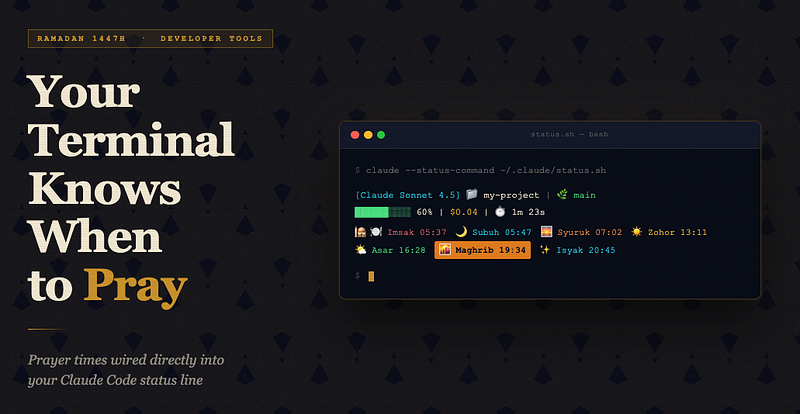
A prayer time display baked directly into your Claude Code status line using --status-command. Every time Claude finishes a response you see this:

[Claude Sonnet 4.5] 📁 my-project | 🌿 main
██████░░░░ 60% | $0.04 | ⏱️ 1m 23s
🕌 🍽️ Imsak 05:37  🌙 Subuh 05:47  🌅 Syuruk 07:02  ☀️ Zohor 13:11  🌤️ Asar 16:28  🌇 Maghrib 19:34  ✨ Isyak 20:45
The current prayer is bold. The next prayer glows with a reverse-video border. Less than 10 minutes away and it flashes red with a ⚠️.
No app switching. No phone checking. Just the prayer schedule sitting quietly where your eyes already are.
The Stack
- waktusolat.app API: a free Malaysian prayer time API that accepts GPS coordinates
- Daily file caching: prayer times are fetched once per day and read from disk on every status render
- Pure bash: no Python, no Node and no dependencies beyond
jqandcurl
The Full Script
The script uses hardcoded coordinates set to Sepang, Selangor by default. Find this line near the top and replace it with your own latitude and longitude:
LAT="2.7297"; LON="101.7044"Not sure of your coordinates? Search your city on latlong.net and paste the values in. Prayer times only vary by zone so the nearest town is close enough.
Save this as ~/.claude/status.sh, then add to your ~/.claude/settings.json:
{
  "statusCommand": "bash ~/.claude/status.sh"
}
How It Works: The Three Layers
Layer 1: Coordinates
Two values at the top of the script. Change LAT and LON to your location and the rest takes care of itself. Prayer times only vary by zone so you do not need to be precise; the nearest city or town is close enough.
If you want location to be detected automatically each day, scroll to the Bonus: CoreLocation section at the end.
Layer 2: Daily caching
The full month’s prayer schedule is fetched from the API once and written to ~/.cache/waktusolat/YYYY-MM-DD.json. On every subsequent status render the script reads from disk with no network call and no noticeable overhead. Yesterday's file is deleted automatically.
curl waktusolat API  ->  ~/.cache/waktusolat/2026-03-01.json
                              ^ read on every status render
Layer 3: Visual state
All seven prayer slots are always shown in a single compact line with three visual states at once:
- Current prayer: bold text in the prayer’s unique colour
- Next prayer: reverse-video border that makes the slot pop out of the line
- Everything else: coloured but plain giving context without noise
Each prayer has its own colour. Red for Imsak’s urgency, cyan for Subuh’s stillness, orange for Syuruk’s warmth, yellow for Zohor’s high noon and green for Asar’s afternoon calm. You don’t read the line. You feel it.
Imsak: The Hidden Feature
Notice 🍽️ Imsak in the prayer list? It is calculated as Fajr minus 10 minutes, which is the standard stopping point for suhoor. During ordinary months it sits quietly in the line. During Ramadan it becomes the most important slot on your screen.
When Imsak is the next prayer, that glowing reverse-video border is your cue to put down your coffee.
For Developers Outside Malaysia
This script uses the waktusolat.app API which covers Malaysia. If you are based elsewhere the bash logic stays exactly the same and you only need to swap the API call.
Aladhan API (global, free and no key required)
# Replace the curl line with:
RESPONSE=$(curl -sf --max-time 5 \
  "https://api.aladhan.com/v1/timings?latitude=${LAT}&longitude=${LON}&method=2" \
  2>/dev/null)

# Update jq to parse their format:
# .data.timings.Fajr, .data.timings.Dhuhr, etc.
IslamicFinder API (global)
RESPONSE=$(curl -sf --max-time 5 \
  "https://prayer.zone/api/v1/prayer_times/day.json?latitude=${LAT}&longitude=${LON}" \
  2>/dev/null)
Muslim Pro API
Requires a free API key from muslimsalat.com.
Swapping the API only requires changing one curl line and one jq parse. The rest of the display logic stays exactly the same.
Bonus: Dynamic GPS with CoreLocation (macOS)
The base script uses hardcoded coordinates. If you travel frequently and want your location detected automatically each day you can add a CoreLocation layer using inline Swift. Swift ships with Xcode CLI tools so nothing extra needs to be installed.
MacBooks have no GPS chip but CoreLocation triangulates from nearby Wi-Fi networks with accuracy typically within 50 to 100 metres. That is more than enough for prayer zones.
Replace the coordinates block with this:
# ── CoreLocation GPS (cached daily) ──────────────────────────────────────────
COORD_CACHE="$CACHE_DIR/${TODAY}.coords"
find "$CACHE_DIR" -name "*.coords" ! -name "${TODAY}.coords" -delete 2>/dev/null


if [ ! -f "$COORD_CACHE" ]; then
  COORDS=$(swift - 2>/dev/null << 'SWIFT'
import CoreLocation
import Foundation
class Locator: NSObject, CLLocationManagerDelegate {
    let manager = CLLocationManager()
    override init() {
        super.init()
        manager.delegate = self
        manager.desiredAccuracy = kCLLocationAccuracyKilometer
        manager.requestWhenInUseAuthorization()
        manager.startUpdatingLocation()
    }
    func locationManager(_ m: CLLocationManager, didUpdateLocations locs: [CLLocation]) {
        let c = locs.last!.coordinate
        print("\(c.latitude) \(c.longitude)")
        exit(0)
    }
    func locationManager(_ m: CLLocationManager, didFailWithError error: Error) { exit(1) }
    func locationManagerDidChangeAuthorization(_ m: CLLocationManager) {
        switch m.authorizationStatus {
        case .denied, .restricted: exit(1)
        default: break
        }
    }
}
let locator = Locator()
DispatchQueue.global().asyncAfter(deadline: .now() + 10) { exit(1) }
RunLoop.main.run()
SWIFT
  )
  [ -n "$COORDS" ] && echo "$COORDS" > "$COORD_CACHE"
fi
if [ -f "$COORD_CACHE" ]; then
  read -r LAT LON < "$COORD_CACHE"
else
  LAT="2.7297"; LON="101.7044"   # fallback: Sepang, Selangor
fi
On the first run macOS will ask Terminal for location permission. Grant it once and it runs silently from then on.
Using It Outside Claude Code
The prayer time section is completely standalone. You can plug it into a tmux status-right, a starship custom module or a plain cron job that sends a desktop notification.
tmux:
# ~/.tmux.conf
set -g status-right '#(~/.claude/solat_block.sh)'
set -g status-interval 60
macOS desktop notification before each prayer:
# crontab -e
*/1 * * * * ~/.claude/solat_notify.sh
Linux / WSL
On Linux you set your coordinates directly at the top of the script just like on macOS. If you want automatic location detection a few options are available:
# Option 1: whereami (if installed)
COORDS=$(whereami 2>/dev/null)

# Option 2: geoclue via Python (common on GNOME systems)
COORDS=$(python3 -c "
import gi; gi.require_version('Geoclue','2.0')
from gi.repository import Geoclue, GLib
# ... geoclue2 async call
" 2>/dev/null)
# Option 3: ipinfo.io as a simple fallback
COORDS=$(curl -sf "https://ipinfo.io/loc" 2>/dev/null | tr ',' ' ')
The Philosophy Behind This
There is a concept in Islamic thought: muraqabah, the awareness of being present in each moment. The best tools do not nag you. They sit quietly in your peripheral vision and keep you grounded without interrupting your work.
That is what this is. Not a notification. Not an alarm. Just a quiet reminder baked into your workspace that there is a rhythm to the day which exists beyond your ticket board.
During Ramadan especially, when every hour between Imsak and Iftar carries a different weight, having that rhythm visible changes how you work. You plan differently. You take breaks differently. You stay present.
Setup in 60 Seconds
# 1. Install jq if you haven't
brew install jq

# 2. Save the script
mkdir -p ~/.claude
curl -o ~/.claude/status.sh <your_gist_url>
chmod +x ~/.claude/status.sh
# 3. Edit your coordinates
nano ~/.claude/status.sh   # update LAT and LON near the top
# 4. Wire it up
echo '{"statusCommand": "bash ~/.claude/status.sh"}' > ~/.claude/settings.json
Ramadan Kareem
To every Muslim developer grinding through Ramadan, staying up after Tarawih to push commits, debugging before Suhoor and squeezing in one more PR before Asar, this is for you.
Your terminal now knows when to stop. The rest is up to you.