Since i developed both backend and mobile application, there is something i need to protect my API. So, i came out an idea where i need to restrict access from public by app package information. I have been this using for awhile now.
Yes i know, it is not secure enough — no system is safe by the way. Purpose of security layer is to block and slowing down the attackers movement.

So, Let’s get started
Create a simple table called app_versions
php artisan make:model AppVersion -m
Then, write a simple migration file. Any extra are welcome to add.
Schema::create('app_versions', function (Blueprint $table) {
    $table->id();
    $table->string('os_type');
    $table->string('app_package_name');
    $table->string('app_version');
    $table->string('update_type'); // 1 - Major 2 - Minor
    $table->text('app_link')->nullable();
    $table->timestamps();
});
Setup AppVersion Model
class AppVersion extends Model
{
    protected $fillable = [
        'app_version',
        'app_package_name',
        'update_type',
        'os_type',
    ];

    ...
    public function isMajor()
    {
         return $this->update_type == 2;
    }

    public function isMinor()
    {
         return $this->update_type == 1;
    }
 }
If you like to have your own control, just add this module in your CMS. For example like i do just below
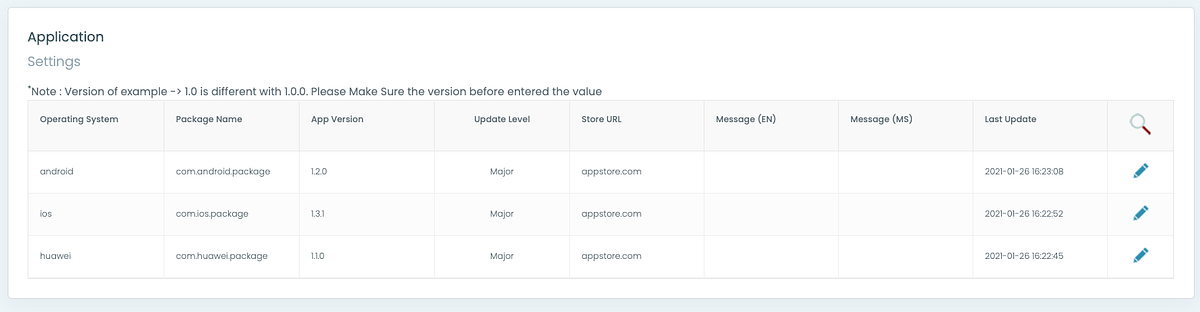
Then, create a Middleware where to validate HTTP header request. We gonna put any mobile app information in HTTP header.
Let’s say i called ApplicationPackageMiddleware.php
class ApplicationPackageMiddleware {}Define 2 constant for HTTP header.
- Package name or Bundle ID
- Current App Version
const PACKAGE_NAME    = 'X-Package-Name';
const PACKAGE_VERSION = 'X-Package-Version';
Now, create a condition to validate request from sender. For this tutorial, i use base64. Why use base64? it’s the easy way to show how its work. Please use openssl or any desire method.
On mobile side, please obscure any sensitive string to avoid readability of code after decompile
$app_package = base64_decode($request->header(self::PACKAGE_NAME));
$app_version = base64_decode(self::PACKAGE_VERSION));
$app = AppVersion::query()->where("app_package_name", $app_package)->first();
if (!$app) {
     throw new \RuntimeException('Application Invalid Access');
}
You must notice that i’m not include $app_version into query. It is because i want to use it to validate the version — is it minor or major update. So that i can prompt the user to use latest version.
The condition is where
- Server have 1.2.0 but sender sent 1.1.9. Middleware will reject it if there is major update condition. Middleware will allow if only minor update is set.
- Server have 1.2.0 but sender sent 1.2.1. Middleware will reject whether its major update or not
$flag = version_compare($app->app_version, $app_version);
if ($flag < 0 && $app->isMajor()) {
    throw new \RuntimeException("Please update your application version in order to use this API");
}
if ($flag > 0) {
    throw new \RuntimeException("App version is not allowed");
}
Note that, version_compare is included in php
Finally, the Middleware would be like below
That’s it. Hope its help 😁
Thanks for your time.