Spec-driven development is the hot new trend. We ran it on three real projects with Laravel Boost. The results were not what we expected.

Prezi Engineering published a piece this week: “We Tried Spec-Driven Development So You Don’t Have To.” Their conclusion was that it is both terrifying and exciting.
We had the same experience. Except ours was in PHP.
Spec-driven development is the idea that you write a detailed specification first, then hand it to an AI agent to implement. Not a vague prompt. Not a one-line instruction. A full spec with requirements, constraints, data models and expected behavior. The AI reads the spec and builds the feature.
In theory, this turns developers into architects. You describe what to build. The AI builds it. You review the output.
We tested this approach on three real Laravel projects over six weeks. Two client projects and one internal tool. The results taught us more about AI-assisted development than two years of casual Copilot usage.
The Setup: Laravel Boost + Claude Code
Before I explain what happened, let me walk through exactly how we set this up. Because the tooling matters more than people think.
Step 1: Install Laravel Boost
Every project runs Laravel 12 on PHP 8.4. We installed Laravel Boost on all three codebases. Boost is Laravel’s official MCP (Model Context Protocol) server. It was previewed by Taylor Otwell at Laracon US 2025. Ashley Hindle, who leads Laravel’s AI efforts, shipped the public beta two weeks later in August 2025. It is free, open source and MIT licensed. It supports Laravel 10, 11 and 12 on PHP 8.1 or higher.
composer require laravel/boost --dev
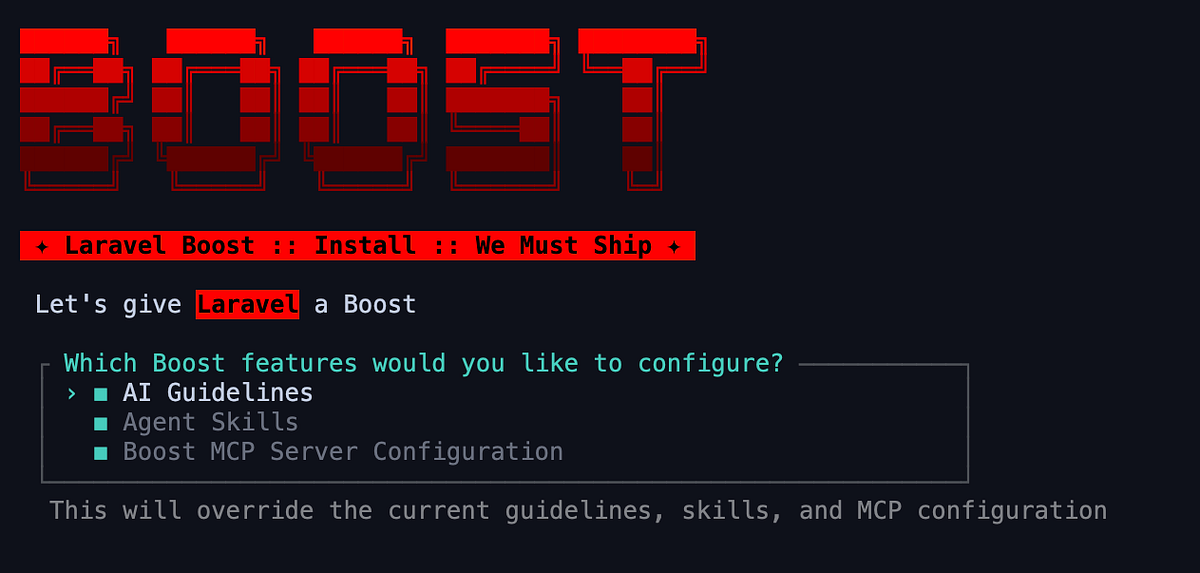
php artisan boost:install
The boost:install command is interactive. It auto-detects which IDEs and AI agents you have configured in the project. In our case it detected Claude Code and offered to set up the integration automatically. It generates several files:
.mcp.jsonis the MCP server configuration that tells your agent where to find BoostCLAUDE.mdcontains AI guidelines specifically formatted for Claude Codeboost.jsonis the Boost configuration file
If you use other agents, it generates their equivalents too: AGENTS.md for Codex, a junie/ directory for JetBrains Junie. Boost supports Claude Code, Cursor, OpenAI Codex, Gemini CLI, GitHub Copilot and Junie out of the box.
We added all generated files to .gitignore since they are regenerated automatically when you run boost:install or boost:update.
Step 2: Verify the MCP Connection
Claude Code typically picks up the MCP server automatically from .mcp.json. If it does not, you can register it manually:
bash
claude mcp add -s local -t stdio laravel-boost php artisan boost:mcpFor Cursor, open the command palette (Cmd+Shift+P), search "MCP Settings" and toggle on laravel-boost.
For Codex:
codex mcp add laravel-boost -- php "artisan" "boost:mcp"Once connected, Claude Code gains access to Boost’s 15+ MCP tools that let it inspect and interact with your application:
- Application Introspection: reads your PHP and Laravel versions, installed packages and Eloquent models
- Database Schema: inspects your complete database schema with intelligent analysis
- Database Queries: executes queries against your database directly from the agent
- Route Inspection: lists all registered routes with middleware, controllers and parameters
- Artisan Commands: discovers available commands and their arguments
- Code Execution: executes suggested code within the context of your Laravel application
- Log Analysis: reads and analyzes your application’s log files
- Browser Logs: accesses console errors when developing with Laravel’s frontend tools
- Configuration: reads config values and available keys
- Documentation Search: queries Laravel’s hosted documentation API with over 17,000 pieces of version-specific knowledge enhanced by semantic search with embeddings
This is what makes Boost different from just giving an AI agent your codebase. The agent does not just read files. It can query your database, run code via Tinker, inspect your schema and search documentation specific to your installed package versions.
Step 3: Customize the AI Guidelines
This is the step most tutorials skip. Boost ships with composable AI guidelines that are loaded upfront. These teach the agent Laravel conventions specific to your installed packages and versions. But you can extend them with your own.
We created a custom guideline file for our team conventions:
<!-- .boost/guidelines/team-conventions.md -->

## Financial Values
All monetary values must be stored as integers in cents/sen.
Column names must end with `_cents` (e.g. `total_cents`, `unit_price_cents`).
Never use float or decimal for money.

## Tenant Scoping
All tenant-aware models must use the `BelongsToTenant` trait.
Never manually add `where('tenant_id', ...)` in controllers.

## Form Requests
All store/update actions must use dedicated Form Request classes.
Name pattern: `{Action}{Model}Request` (e.g. `RecordPaymentRequest`).

## Testing
Every new feature must include at least one Feature test.
Use `RefreshDatabase` trait in all test classes.
Boost loads these guidelines upfront so the agent reads them before writing any code. You can also override Boost’s built-in guidelines if they conflict with your team’s approach. Third-party packages can ship their own guidelines too. Boost will automatically detect and load them.
The difference between guidelines and skills matters. Guidelines are loaded upfront for every interaction. Skills are pulled on demand when the agent encounters a specific task.
Step 4: Add Custom Agent Skills
We added a skill for our invoice module:
<!-- .boost/skills/invoice-module.md -->

# Invoice Module Conventions

When working with invoices:
- Invoice numbers are auto-generated per tenant: `{TENANT_PREFIX}-{YEAR}-{SEQUENCE}`
- All amounts use integer cents. Display formatting uses `RM` prefix
- Invoice status flow: draft → sent → partial → paid → void
- Partial payments must track `paid_cents` against `total_cents`
- All invoice operations must be wrapped in database transactions
When Claude Code encounters a task related to invoices, Boost pulls this skill into context. This keeps the upfront prompt lean while ensuring the agent has specialized knowledge when it needs it.
Step 5: Keep Boost Updated
When you update Laravel or your packages, run:
php artisan boost:updateThis regenerates guidelines and skills to match your current package versions. The documentation API also stays in sync. If you upgrade from Livewire 2 to Livewire 3, the agent’s documentation search will return Livewire 3 results, not outdated Livewire 2 patterns.
Why This Setup Matters
Without Boost, asking Claude Code to add a feature to our invoicing module was a coin flip. Sometimes it would generate code using a package we did not have installed. Sometimes it would create a migration with column types that did not match our existing schema. Sometimes it would ignore our naming conventions entirely.
After Boost, the AI agent knows our application. It can query our database to understand the data. It can search version-specific Laravel documentation. The custom guidelines enforce our financial conventions and tenant scoping patterns automatically.
The difference is not subtle. It is the difference between hiring a contractor who has never seen your codebase and hiring one who spent a week reading it first.
Project 1: Payment Reminder System (Internal)
The spec: 847 words. Covered reminder intervals, tenant configuration, email templates, tracking sent reminders, handling partial payments and scheduling via Laravel’s task scheduler.
What the AI generated in one pass:
A migration with payment_reminders and reminder_configs tables. An Eloquent model with relationships to invoices and tenants. A SendPaymentReminders scheduled command. Three Mailable classes for 7-day, 14-day and 30-day reminders. A Form Request for configuring reminder settings. A controller with CRUD operations.
What was correct:
The migration structure was solid. Column types matched our existing pattern of using integer cents for monetary values because Boost gave the agent access to our schema and our custom guideline specified the cents convention. The BelongsToTenant trait was applied automatically because our team guideline told the agent to use it. Relationships were eager-loaded in the controller. The scheduled command was registered properly in routes/console.php.
What was wrong:
The scheduled command loaded all overdue invoices into memory at once. No chunking. For a tenant with 10,000 overdue invoices, this would crash. The reminder logic did not account for invoices that were partially paid. It checked status === 'unpaid' but our system has three states: unpaid, partial and paid. Our invoice skill mentioned the status flow, but the agent only partially applied it. The email templates used inline styles instead of our Blade component library. Minor, but it meant the emails would not match our existing design system.
Time to generate: 4 minutes. Time to review and fix: 2.5 hours. Time without AI: Estimated 6–7 hours.
Net savings: About 50%.
Project 2: Document Approval Workflow (Client)
The spec: 2,100 words. Multi-step approval workflow for government document submissions. Four approval levels, each with different permissions. Documents could be returned for revision at any stage. Full audit trail required.
This was the complex one. State machines, role-based permissions and audit logging across multiple models.
What the AI generated:
A state machine using an enum for document statuses. An ApprovalStep model tracking each approval action. Policies for authorization at each level. A service class handling state transitions. Events and listeners for notifications.
What was correct:
The overall architecture was surprisingly good. The state machine pattern was clean. The separation between the service class (business logic) and the controller (HTTP layer) was exactly how we would have structured it. The ApprovalStep model correctly stored the approver, action, comments and timestamp.
What was wrong:
This is where it got interesting. The AI missed three critical business rules that were clearly stated in the spec.
First, it allowed the same person to approve a document at consecutive levels. The spec explicitly said that an approver at Level 2 cannot be the same person who approved at Level 1. The AI generated the state transitions but did not implement this constraint.
Second, the “return for revision” flow was broken. When a document was returned from Level 3, it should go back to the submitter, not to Level 1. The AI sent it back to Level 1 because that was the logical “start” of the workflow. The business logic was different.
Third, the audit trail did not capture the document’s content at the time of each approval. It only stored a reference to the document. If the document was revised after approval, the audit trail would show the wrong version. We needed to snapshot the content at each step.
Time to generate: 7 minutes. Time to review and fix: 5.5 hours. Time without AI: Estimated 12–14 hours.
Net savings: About 55%.
Project 3: Inventory Dashboard with Real-Time Updates (Client)
The spec: 1,600 words. Real-time inventory dashboard showing stock levels, recent transactions and low-stock alerts. WebSocket updates via Laravel Reverb.
What the AI generated:
A Livewire component for the dashboard. Eloquent queries with aggregate functions for stock summaries. A broadcast event for inventory changes. A listener that dispatches the broadcast when a stock transaction is recorded.
What was correct:
The Livewire component was well-structured. The aggregate queries used withSum and withCount correctly. Boost deserves credit here. The documentation API gave the agent accurate, version-specific information about Reverb's configuration because it searched the docs for our installed version, not a generic tutorial from two years ago.
What was wrong:
The real-time updates did not work. The AI generated the broadcast event and registered the channel, but it did not configure the Reverb connection in the Livewire component correctly. The event fired, but the frontend never received it. This took 45 minutes to debug.
The dashboard also loaded all inventory items without pagination. With 15,000 SKUs, the page took 8 seconds to load. We added cursor pagination and lazy loading for the transaction history.
The low-stock alert threshold was hardcoded to 10 units. The spec said it should be configurable per product category. The AI read “low-stock alerts” and picked a reasonable default, but missed the “per category” requirement that was two paragraphs later in the spec.
Time to generate: 3 minutes. Time to review and fix: 3 hours. Time without AI: Estimated 8 hours.
Net savings: About 60%.
What We Learned
After six weeks and three projects, here is what we know.
Spec-driven development works. But “works” needs a definition.
The AI saved us roughly 50–60% of implementation time across all three projects. That is significant. A feature that takes two days now takes one. Over a quarter, that adds up to weeks of reclaimed time.
But the time savings are concentrated in the boilerplate layer. Migrations, CRUD controllers, basic validation, model relationships, route registration. The AI handles this perfectly. This is the 80% that is tedious but straightforward.
The remaining 20% took almost as long as it always does. Business rule validation. Edge cases. Performance optimization. Integration between multiple systems. State machine constraints that reflect how a real organization operates, not how a tutorial would model it.
The spec quality determines the output quality.
Our first spec was 847 words and the output needed moderate fixes. Our second spec was 2,100 words with detailed business rules and the output was architecturally better, even though it still missed domain-specific constraints. The more you invest in the spec, the less you fix afterward.
Laravel Boost is not optional.
We tried running the same experiment on one project without Boost installed. The difference was dramatic. Without Boost, the AI generated migrations with float columns for prices (we use integer cents). It created a controller that imported a package we do not use. It ignored our tenant scoping pattern entirely.
With Boost, the agent reads your actual schema, your actual packages and your actual conventions through the MCP tools. The custom guidelines and skills we wrote amplified this further. The generated code fits into your codebase. Without Boost, you are getting generic Laravel code that needs to be reshaped by hand.
The developer’s role changed. It did not shrink.
None of us wrote less code. We wrote different code. Instead of typing out CRUD boilerplate, we spent that time writing specs, writing guidelines, reviewing generated code and fixing the parts the AI got wrong.
The work shifted from production to quality assurance. From “build this from scratch” to “verify this is correct and fix what is not.”
Some developers on my team found this energizing. They could focus on the interesting problems. Others found it disorienting. They were used to building everything themselves and the review-first workflow felt less creative.
Both reactions are valid. The workflow is genuinely different.
Would I Recommend It?
Yes. With conditions.
Use spec-driven development for features with clear requirements and well-defined data models. CRUD operations. Standard workflows. Dashboard views. Notification systems. These are the sweet spot.
Do not use it for features where the requirements are still being discovered. If you are prototyping, exploring or iterating on a design, spec-driven development adds overhead. You will spend more time updating the spec than the AI saves you on implementation.
And install Laravel Boost. That is not negotiable. Invest the 30 minutes to write custom guidelines and skills for your team. The setup cost pays for itself on the first feature.
The spec is the new commit message. Write it well and the output follows.