Locust is Open-source Python-based load testing. All you need is to write a script using locust library. Its very simple and easy-to-use which for me as python beginner easier to understand. For more info, you can read here.
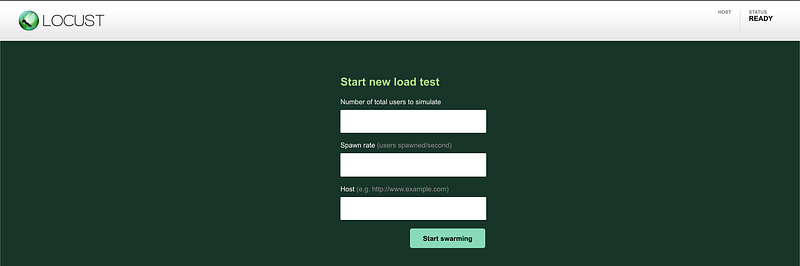
Locust currently only support admin view which the page with input like below

When it goes to public or internal network and you want to show to your colleagues or clients, you might want to prevent them from tampering the input from their side. For example, if spectators open the IP/URL for the locust, they will see like below

Okay, here’s the trick.
- Custom locust path
- Adjust Nginx for Reverse Proxy
Custom Locust Path
Create a static folder at the root directory and create file named as extend.js. Add this code in it
$('#swarm_form,#edit,#new_test,#box_stop,.edit_test').remove();
$('.padder').find('h2').css({
    'font-size' : '33px',
    'text-align' : 'center',
    'position' : 'absolute',
    'top' : '50%',
    'transform' : 'translate(0%, -50%)'
}).text("Please wait for administrator to start stress test");

$('#start').css('height', '500px');
After that, create a folder name templates and create 2 file named as extend.htmland admin.html. It used to extend the current web ui to add extend.js at the bottom of the page.
extend.html
{% extends "index.html" %}

{% block extended_script %}
<script src="./extend/static/extend.js"></script>
{% endblock extended_script %}
admin.html
{% extends "index.html" %}Finally, from the normal locust file, write this below the user class
path = os.path.dirname(os.path.abspath(__file__))
view = Blueprint(
    "view",
    "view_only",
    static_folder=f"{path}/static/",
    static_url_path="/extend/static/",
    template_folder=f"{path}/templates/",
)
admin = Blueprint(
    "admin",
    "admin_view",
    static_folder=f"{path}/static/",
    static_url_path="/extend/static/",
    template_folder=f"{path}/templates/",
)
@events.init.add_listener
def locust_init(environment, **kwargs):
    if environment.web_ui:
        @admin.route("/admin")
        def admin_view():
            environment.web_ui.update_template_args()
            return render_template("admin.html", **environment.web_ui.template_args)

        @view.route("/view")
        def view_only():
            environment.web_ui.update_template_args()
            return render_template("extend.html", **environment.web_ui.template_args)

        environment.web_ui.app.register_blueprint(view)
        environment.web_ui.app.register_blueprint(admin)
Suppose all will be inline right now. So, let’s try to run the locust and go to the path /view. Suppose to be like this
After that, lets configure the NGINX
Nginx Reverse Proxy
By default, if you runs the locust, http://your.domain/ is the admin page. All we need is point http://your.domain/view to http://your.domain
....
....
 location  /  {
     proxy_pass http://192.168.1.9:2045/view;
     proxy_set_header X-Real-IP $remote_addr;
     proxy_set_header X-Forwarded-For $proxy_add_x_forwarded_for;
     proxy_set_header Host $http_host;
     proxy_set_header X-Forwarded-Proto $scheme;
}

location /admin/ {
     proxy_pass http://192.168.1.9:2045/;
     proxy_set_header X-Real-IP $remote_addr;
     proxy_set_header X-Forwarded-For $proxy_add_x_forwarded_for;
     proxy_set_header Host $http_host;
     proxy_set_header X-Forwarded-Proto $scheme;
}
location /exceptions {
     proxy_pass http://192.168.1.9:2045/;
}
location /stats {
     proxy_pass http://192.168.1.9:2045/stats/;
}
location /static {
     proxy_pass http://192.168.1.9:2045/static/;
}
location /extend {
     proxy_pass http://192.168.1.9:2045/extend/;
}
...
...
Save and restart the NGINX. Now you good to go!