We do understand the dilemma while choosing a proper technology stack for software development projects. You must be wondering if Laravel is good enough for your large-scale applications, right? Well, it sure is!. As a Laravel enthusiast, you know that Laravel is a powerful PHP framework which have capability to build various type of applications. Laravel provides a rich set of features and tools that enable developers to build a scalable and high performance applications quickly and easily.
However, as your application got complex and your user growth unexpectedly, you may encounter performance issues and scalability challenges. Every technology stack other than Laravel will facing this same issues. In order to meet the demands of a growing users, you’ll need to scale your application effectively.
Scaling a Laravel application can be a complex and challenging process but with the right strategies and considerations, you can improve the performance, scalability and reliability of your application. In this article, we’ll explore 10 strategies for scaling a Laravel application. By following these strategies, you can ensure that your Laravel application can handle the increasing demands of a growing users and provide a great user experience.
Here are the 10 strategies for scaling a Laravel application for to meet high availability applications: -
Database Optimization

As your application grows, the amount of data stored in your database may also grow. This can lead to performance issues if your database is not properly optimized. Here are some tips for optimizing your database:
- Indexes: Use indexes to speed up database queries. Indexes help the database find the data it needs faster.
- Normalization: Normalize your database schema to reduce redundancy and improve data integrity.
- Query Optimization: Optimize your database queries to reduce the amount of time it takes to retrieve data from the database.
You can also consider using a database clustering solution to distribute your database across multiple servers for improved performance and scalability. For more information how should we design a database to handle millions of data, refer belows link :-
Have you ever been wondering why your application slow even tough you already fix your application code?hafiqiqmal93.medium.com
Load Balancer

One common strategy for scaling web applications is to use a load balancer. A load balancer distributes incoming traffic to multiple servers to help distribute the load and prevent any single server from becoming overwhelmed. This strategy can help improve the overall performance and reliability of your application.
The most simple to implement load balancer is using Nginx server as proxy. You can configure Nginx to distribute incoming requests to your application servers based on various factors such as server load or server response time.
Here the example configuration of Nginx load balancer with IP hash:-
http {
   upstream backend {
      ip_hash;
      server 10.10.0.1;
      server 10.10.0.2;
      server 10.10.0.3;
   }

   # This server accepts all traffic to port 443 and passes it to the upstream.
   # Notice that the upstream name and the proxy_pass need to match.

   server {
    listen 443 ssl;
    server_name example.com;

    ssl_certificate /path/to/cert.pem;
    ssl_certificate_key /path/to/privkey.pem;

    location / {
        proxy_pass https://backend;
        proxy_set_header Host $host;
        proxy_set_header X-Real-IP $remote_addr;
        proxy_set_header X-Forwarded-For $proxy_add_x_forwarded_for;

        # Other proxy configuration here
    }
  }
}
Use a Content Delivery Network (CDN)
A Content Delivery Network (CDN) is a network of geographically distributed servers that work together to deliver content to users. The main purpose of a CDN is to improve the speed and reliability of content delivery by reducing the distance between the user and the server hosting the content. This is achieved by caching and distributing content across multiple servers located in different regions allowing users to access the content from the server closest to them.
When it comes to web applications, a CDN can be used to store and distribute static assets such as images, videos and other files. This can help improve the performance of the application by reducing the load on the application server and improving the speed at which assets are delivered to users.
In Laravel, you can easily configure your application to use a CDN for storing and distributing static assets. There are many popular CDN providers available, including Amazon CloudFront, Cloudflare and many other providers. These providers offer a range of features and pricing options, so it’s important to choose the one that best suits your needs.
To use a CDN with Laravel, you first need to sign up for a CDN service and configure it to work with your application. Once you have done this, you can configure Laravel to use the CDN by modifying the asset function in the config/app.php file. For example, to use Amazon CloudFront as your CDN provider, you would modify the asset function as follows:
'asset_url' => env('ASSET_URL', 'https://your-cloudfront-domain.cloudfront.net'),This tells Laravel to use the CloudFront domain as the base URL for static assets instead of the default public directory. With this configuration, Laravel will automatically generate URLs that point to the CloudFront distribution for all static assets, making it easy to use a CDN with your application.
Cache Your Application

Caching is a technique that is commonly used to improve the performance of web applications. It involves storing frequently accessed data in memory or on disk, so that it can be retrieved quickly without the need to recompute or fetch it from a slower data source such as a database or an external API. By reducing the amount of time it takes to retrieve data, caching can help improve the speed and responsiveness of your application.
In Laravel, you can use a variety of caching strategies on application level to improve the performance of your application. Some of the most commonly used caching strategies include:
- Memcached/Redis caching: This caching strategy involves storing frequently accessed data in a memory-based key-value store such as Memcached or Redis. Laravel includes support for both Memcached and Redis out of the box, making it easy to configure and use these caching solutions in your application.
- File caching: This caching strategy involves storing cached data in a file on disk. While file caching is not as fast as memory-based caching, it can still be an effective caching strategy for applications with a small amount of cached data or where memory-based caching solutions are not feasible.
- Database caching: This caching strategy involves storing cached data in a database table. While database caching can be slower than memory-based caching solutions, it can be useful for applications where persistent caching is needed or where data needs to be shared between multiple servers.
Redis is an open source, advanced key-value store. It is often referred to as a data structure server since keys can…hafiqiqmal93.medium.com
To improve more performance of you application, you can implement this caching strategies on server level. Some of the most commonly used are:-
- OpCache: OpCache is a PHP extension that caches compiled PHP code in memory, reducing the amount of time it takes for PHP to parse and compile your application code. By enabling OpCache, you can significantly improve the performance of your application.
- HTTP caching: HTTP caching involves caching the response to an HTTP request in the browser or in a proxy server. This can help reduce the amount of data that needs to be transferred over the network, improving the speed and responsiveness of your application. Laravel provides support for HTTP caching through the
Cache-ControlandETagheaders.
Queue System Implementation

Queue system is where allowing you to offload long-running or resource-intensive tasks from your application server to a dedicated queue server. This strategy can help improve the scalability and reliability of your application by allowing you to process tasks asynchronously.
In Laravel, the queue system is implemented through the use of queues which are a way of managing long-running or resource-intensive tasks in a separate process or server. Laravel provides a unified API for working with different queue backends, including RabbitMQ, Beanstalkd, Amazon SQS, Redis, and others.
To use a queue in Laravel, you first need to define a job which is a class that encapsulates the work that needs to be done. Jobs can be dispatched to a queue using the dispatch method which adds the job to the queue and returns a unique identifier. The queue worker process then retrieves jobs from the queue and executes them in the background.
We would like to start this article with a real-life example. Imagine an ice cream van. It is a very hot day, and…www.honeybadger.io
Use Cloud-Based Services

Scalability is one of the most important considerations for any modern web application and Laravel applications are no exception. As your application grows and attracts more users, you’ll need to ensure that it can handle the increased traffic and demand on its resources. Here is where Cloud-based services such as AWS, Alibaba Cloud and Azure Cloud provide a flexible and scalable infrastructure that can help you meet these needs.
When scaling a Laravel application using cloud-based services, there are several key strategies and considerations to keep in mind:
- Choose the right cloud provider: There are many cloud providers available, each with its own strengths and weaknesses. When selecting a cloud provider, consider factors such as pricing, performance, reliability and ease of use.
- Use auto-scaling: Auto-scaling allows your application to automatically adjust its resource usage based on demand. By setting up auto-scaling rules, you can ensure that your application always has the resources it needs without over-provisioning and wasting money.
- Use a load balancer: A load balancer distributes traffic across multiple instances of your application, ensuring that no single instance becomes overloaded. This can help improve performance and reliability, especially during peak traffic periods.
- Use caching: Caching can help improve performance and reduce the load on your application servers. Consider using a caching layer such as Redis or Memcached to store frequently accessed data and reduce database queries.
- Monitor your application: It’s important to monitor your application’s performance and resource usage, especially when scaling up or down. Use monitoring tools such as CloudWatch or APM to track key metrics and identify bottlenecks or performance issues.
By following these steps, you can ensure that your Laravel application is scalable and able to handle the demands of your growing user base. Cloud-based services provide a powerful and flexible infrastructure that can help you achieve this scalability while also providing cost savings and ease of use.
Use a Microservices Architecture
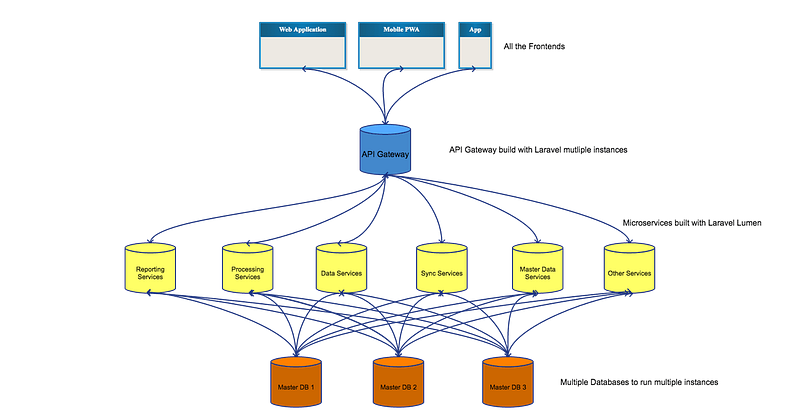
A microservices architecture is a way of building applications as a collection of small, independent services that communicate with each other through APIs. This architecture allows you to break down your application into smaller, more manageable components that can be independently scaled and deployed.
In Laravel, you can use a microservices architecture by building each service as a separate Laravel application that communicates with other services through APIs. You can use tools such as Laravel Passport or JSON Web Tokens (JWT) to authenticate and authorize requests between services.
There are several benefits of using a microservices architecture in Laravel:
- Scalability: With a microservices architecture, you can scale each service independently based on its own needs. This means you can add more resources to a service that is experiencing high traffic or usage, without affecting other services in your application.
- Flexibility: By breaking down your application into smaller, independent services, you can easily replace or update individual services without affecting the entire application. This allows you to evolve your application over time to meet changing requirements or business needs.
- Maintainability: With smaller, more focused services, it’s easier to maintain and update your application. You can test and deploy each service independently, without affecting other parts of the application.
- Resilience: With a microservices architecture, you can avoid having a single point of failure in your application. If one service fails, it won’t affect other services and the rest of the application can continue to function.
- Security: By using APIs to communicate between services, you can better control and secure access to your application. You can use tools like Laravel Passport or JWT to authenticate and authorize requests between services and ensure that only authorized users or services can access sensitive data or functionality.
What is Microservice Architecture? It is a method of developing software applications as a suite of independently…www.linkedin.com
Monitor Your Application

Monitoring your application is an important aspect of scaling. By monitoring your application, you can identify performance issues and take corrective action before they become critical.
In Laravel, you can use tools such as Kibana APM or Laravel Telescope to monitor your application. These tools allow you to track application metrics such as response times, error rates and resource utilization. You can also set up alerts to notify you when certain thresholds are reached or when specific errors occur.
Plan for Growth
When planning to scale your Laravel application, it’s important to consider future growth. You should anticipate future traffic and user demand and design your application with scalability in mind.
Consider the following when planning for growth:
- Use scalable architecture patterns such as microservices.
- Use cloud-based services that can easily scale up or down.
- Monitor your application to identify areas that may need to be optimized.
- Perform load testing to identify potential bottlenecks and determine how your application performs under heavy load.
Consider Horizontal and Vertical Scaling

Horizontal and vertical scaling are two common strategies for improving the performance and scalability of your Laravel application and the choice between horizontal and vertical scaling depends on your specific use case and requirements.
Horizontal scaling involves adding more servers to your application’s infrastructure to distribute the load across multiple machines. This can be achieved by setting up a load balancer which can evenly distribute incoming traffic across multiple servers. This approach is useful when you have a large number of users or high traffic volumes and can help you avoid bottlenecks and single points of failure.
Vertical scaling involves adding more resources, such as CPU or memory, to a single server. This can be achieved by upgrading your server hardware or by using cloud-based services that allow you to scale your resources up or down as needed. This approach is useful when you have specific performance bottlenecks on a single server and can help you improve performance without having to add more servers.
When considering which scaling strategy to use, it’s important to weigh the costs and benefits of each approach. Horizontal scaling can be more expensive to set up and maintain as you will need to manage multiple servers and a load balancer. On the other hand, vertical scaling can be limited by the capacity of a single server and may not be effective in certain scenarios.
If your application requires high availability and redundancy, then horizontal scaling may be a better choice. With horizontal scaling, you can add more servers to your infrastructure and use a load balancer to distribute the traffic, which can provide better fault tolerance and ensure that your application remains available even if one server fails.
If your application requires high performance and processing power, then vertical scaling may be a better choice. With vertical scaling, you can upgrade the resources on your existing server, such as increasing the CPU or memory, which can provide better performance for your application.
In general, a combination of horizontal and vertical scaling may provide the best results. You can use horizontal scaling to distribute the traffic and ensure high availability and vertical scaling to improve the performance of individual servers. Additionally, you can use tools like auto-scaling to automatically adjust your infrastructure based on the current demand and traffic patterns.
Conclusion
Scaling a Laravel application for high availability requires careful consideration and planning. By following the best practices outlined in this article, you can effectively scale your application to handle increasing traffic and ensure that it remains available to users. It’s important to keep in mind that the process of scaling is an ongoing one and requires regular monitoring and maintenance. You should regularly evaluate your application’s performance and make adjustments as necessary to ensure that it continues to meet the needs of your growing user base.
Finally, it’s also important to have a solid understanding of your application’s infrastructure and to work with experienced developers and system administrators who can help you design and implement a scalable architecture. With the right strategies and considerations in place, you can successfully scale your Laravel application and provide a high-quality user experience for your users.
Reference
I was reading some tweets about scaling and how Laravel was a bit behind other frameworks and I remembered I have a…mateusguimaraes.com
Download this checklist to learn how to evaluate your cloud environments running in AWS or if you are planning to…www.clickittech.com
Best Practices to Scaling your Laravel applications. I don't want to have to worry (too much) about Scaling Laravel…morioh.com
Found this helpful?
If this article saved you time or solved a problem, consider supporting — it helps keep the writing going.
Originally published on Medium.
View on MediumYou might also like
I Joined the AI Parade. My Laravel Monolith Is Still Marching.
February 26, 2026
I Rebuilt a Failing Vibe-Coded Laravel App. Here’s What Was Actually Wrong With the Code.
February 25, 2026