Understanding DNS Queries: Keeping Your Online Searches Private
Understanding DNS Queries and Malaysia’s Transparent DNS Proxy Issue, Privacy Concerns and Secure Browsing Techniques

Have you ever wondered how your computer finds websites on the internet?
It all starts with a DNS query. This behind the scenes process translates website names into IP addresses, making it possible for you to visit your favourite sites. But recently, Malaysia has stirred the pot by implementing a transparent DNS proxy across all internet providers, raising eyebrows and concerns.
In this article, we’ll break down what DNS queries are, explore the different types and show you how to keep your online searches secure.
Basically, a DNS query is when you ask for directions. Now, when you want to type the address of a website in your browser, then your computer wants to know where it is going. The DNS query goes from your computer to the server that translates that Web address to an IP address of a Website, which is a numerical address. In that way, you are directed to the right place on the Internet.
This normally happens quite fast and is not visible for the user of the web.
The Issue in Malaysia
Recently, Malaysian ISPs (Internet Service Providers) have started implementing a transparent DNS proxy. This means that even if you configure your device to use alternative DNS servers like Google Public DNS (8.8.8.8) or Cloudflare (1.1.1.1), your DNS queries are intercepted and redirected to the ISP’s own DNS servers.
Websites blocked by MCMC are inaccessible on Malaysian telcos even with Google and Cloudflare DNS. Is this a move to…soyacincau.com
Transparent DNS Proxy Implemented by Malaysian ISPs on Cloudflare and Google Public DNS Serversimap.sinarproject.org
This means that all DNS queries will be routed through a government-controlled server before reaching their destination. The goal is to monitor and potentially filter internet content, but it raises concerns about privacy. With all DNS queries being scrutinised, there’s a risk that personal browsing habits could be exposed.
This move has been linked to efforts by the Malaysian Communications and Multimedia Commission (MCMC) to “enforce internet censorship by blocking access to certain websites”.
If you’re worried about transparent DNS proxy system, which routes all DNS queries through government-controlled servers, there’s some good news. If you’re using a VPN, this system won’t impact your privacy. VPNs encrypt your entire internet connection, not just your DNS queries, so your browsing activity remains protected from prying eyes. 🤘
Types of DNS Queries
Enough about transparent DNS nonsense — let’s get into the good stuff! Now that you know what a DNS query is and why it matters, it’s time to break down the different ways these queries travel across the internet.
There are several methods for handling DNS queries, each with its own set of benefits and drawbacks. So, let’s dive into the types of DNS queries and see how they stack up against each other when it comes to keeping your online activity private. Here’s a quick rundown:
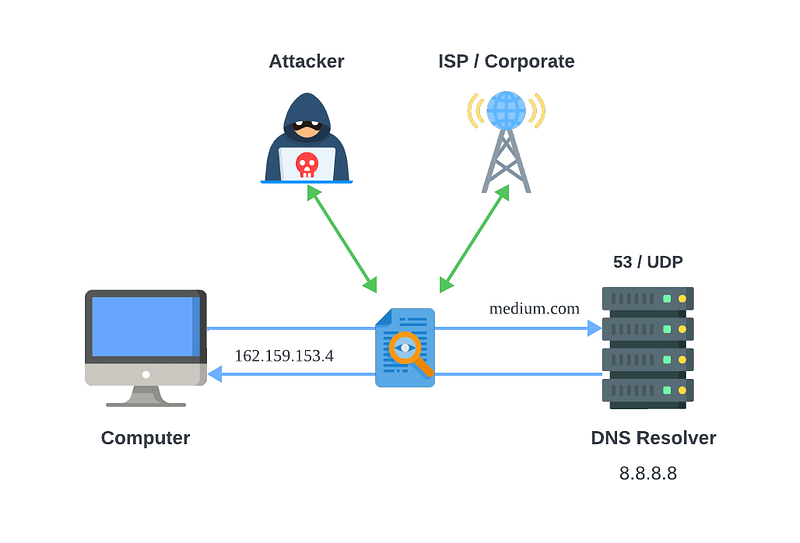
DNS Over UDP (DoUDP)
This is the most common type of DNS query. It uses UDP, which is a fast, connectionless protocol. This method uses UDP to send DNS queries over port 53. While quick, it lacks built-in security features, meaning that anyone monitoring the network could potentially see your DNS queries.
DNS Over TCP (DoTCP)
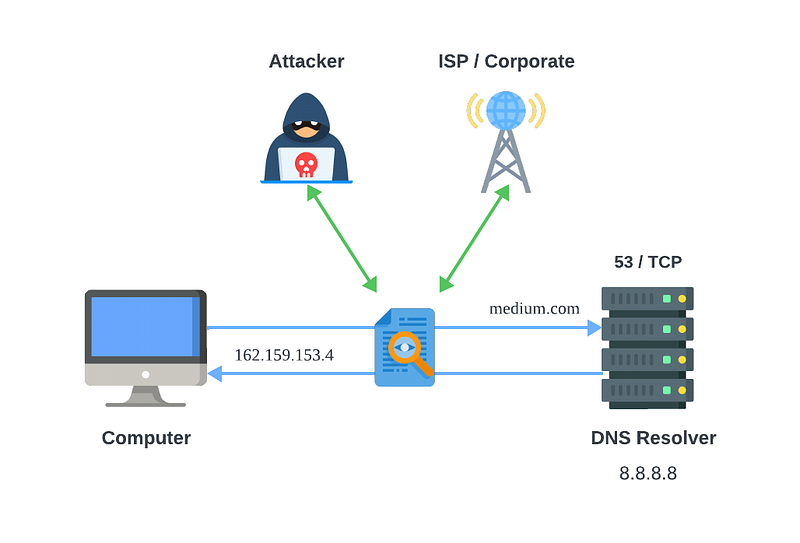
DNS over TCP is less common but more reliable for larger queries. This method also DNS queries over port 53. It establishes a connection before sending data, which makes it more secure than UDP. However, it’s generally slower and still doesn’t offer encryption.
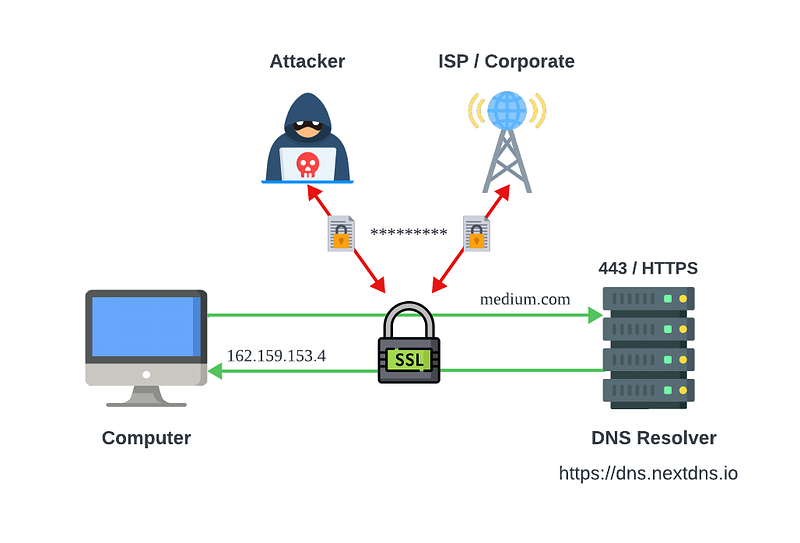
DNS Over HTTPS (DoH)
DNS Over HTTPS is like using a secure tunnel for your DNS queries. DoH encrypts DNS queries and sends them over port 443, the same port used for HTTPS traffic. By encrypting your queries, DoH ensures that no one can snoop on your browsing activities. It also helps protect against DNS spoofing attacks. Many modern browsers and operating systems support DoH, making it a strong choice for privacy-conscious users.
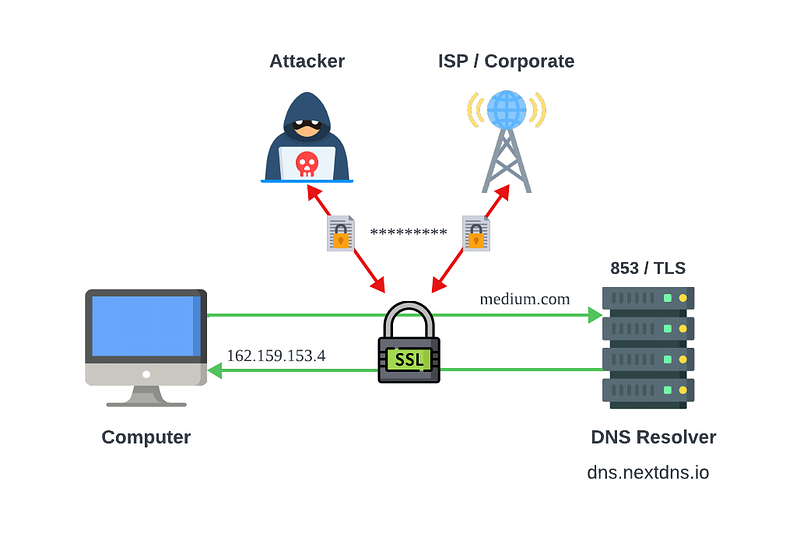
DNS Over TLS/QUIC (DoT)
Similar to DoH, DNS Over TLS encrypts your DNS queries to prevent eavesdropping and tampering. It operates over a separate port 853 and is often used in conjunction with other security measures to enhance privacy.
Which is More Secure?
When it comes to securing your DNS queries, DoH and DoT are the top contenders. Both offer encryption, making it much harder for 3rd parties to view or alter your queries. The choice between them often comes down to personal preference and the specific setup of your devices.
DoH has the advantage of being integrated into many web browsers and operating systems, providing a user-friendly way to enhance your privacy without needing to configure additional settings.
On the other hand, DoT might be a better fit for those looking to secure DNS queries at the network level, as it operates over a distinct port and can be used with DNS servers that support it.
How to Use DoH or DoT
Getting started with DoH or DoT is relatively straightforward, though it varies depending on your device and operating system. Here’s a basic guide to help you get started:
Using DNS Over HTTPS (DoH)
- In Your Browser: Most major browsers, like Firefox and Chrome, support DoH. You can enable it by going to the settings menu, finding the privacy or security section and looking for DNS settings. From there, you can choose a DNS provider that supports DoH.
- On Your Operating System: Some operating systems allow you to configure DoH directly. Check your OS’s network settings for options related to DNS and enable DoH if available.
Using DNS Over TLS (DoT)
- On Your Router: If you want to secure DNS queries for all devices on your network, you can configure DoT on your router. Check your router’s manual or settings interface for DNS options and enter the IP address of a DoT-enabled DNS server.
- On Your Device: For devices without native DoT support, you might need to use third-party apps or services that offer DoT functionality. Look for VPN services or DNS apps that support DoT and follow their setup instructions.
Tools for DNS Privacy
To make the most of DNS privacy, here are some tools and services you might find useful:
- Cloudflare: Known for its privacy-focused DNS services, Cloudflare offers both DoH and DoT. It’s easy to set up and provides a quick way to enhance your online privacy.
- Google Public DNS: Google’s DNS service supports DoH and is a reliable option for users looking to improve their DNS security.
- NextDNS: This service offers customisable DNS filtering and supports both DoH and DoT, making it a versatile choice for advanced users. Its FREE!
- VPN Services: A VPN encrypts all your internet traffic, including DNS queries, making it an effective way to ensure your online activities remain private. VPNs not only protect your DNS queries but also secure your entire connection, shielding you from various types of surveillance and censorship.
These tools and services can help you keep your online activities private and secure, even in the face of new and potentially intrusive technologies.
Conclusion
DNS queries are a fundamental part of how the internet works, translating human-friendly domain names into IP addresses that computers use to communicate. While traditional DNS queries are fast and efficient, they lack security and privacy. This is where DoH and DoT come in, providing encrypted alternatives that protect your queries from interception and tampering.
With new policies like Malaysia’s transparent DNS proxy system, it’s more important than ever to know how to protect your data. By using DNS Over HTTPS or DNS Over TLS, you can help keep your online activities private and secure.
Remember, while no system is perfect, taking these steps will go a long way in ensuring your internet experience remains as private as possible. Stay informed, stay secure and keep surfing safely!
Thank you for reading! Don’t forget to subscribe to stay informed about the latest updates in technology.
If you found this article insightful and want to stay updated with more content on system design and technology trends, be sure to follow me on :-
Twitter: https://twitter.com/hafiqdotcom
LinkedIn: https://www.linkedin.com/in/hafiq93
Buy Me Coffee: https://paypal.me/mhi9388 /
https://buymeacoffee.com/mhitech