Turning FAQs into Conversations
Breaking down the code, design choices and strategies that turned static questions into intelligent conversations.

FAQs are everywhere. They live on websites, apps and support portals, yet they often feel static. Users search, skim and sometimes leave without finding the answer they need. I wanted to go beyond that to build an FAQ system that responds like a human assistant while staying grounded in verified information.
That led me to experiment with PrismPHP, OpenAI embeddings and Laravel. What started as a simple model quickly grew into a system where embeddings meet conversation memory. In this article, I’ll share the journey: the design choices, the code strategies and why vector search was the backbone of it all.
A Simple FAQ Model
I began with a Laravel model to hold FAQ entries. Each FAQ had a translatable question, an answer and relationships to categories or sections. On its own, it was just a database table:
class FAQ extends Model {
    protected $fillable = [‘question’, ‘answer’, ‘active’];
    protected array $translatable = [‘question’, ‘answer’];
}
That worked fine for storing content but there was a problem. If a user asked a question slightly differently from how it was written, the system wouldn’t recognise it. For example:
- FAQ: “How can I pay my water bill?”
- User: “Where do I settle my payment?”
A simple keyword search would miss the connection. That’s where embeddings came in.
Why I Chose Vector Embeddings
Instead of relying on plain text search, I wanted the system to understand semantic meaning. That’s what vector embeddings give us: a way to represent text in multi-dimensional space, where “pay bill” and “settle payment” are close together.
In PostgreSQL (with pgvector), I could store these embeddings as vectors and perform similarity searches. This meant my FAQ assistant could rank the most relevant answers, even when wording didn’t match exactly.
I created a separate model to store embeddings, tied to FAQs using a morph relationship. That way, embeddings weren’t hardcoded into the FAQ table, they could be extended later for other models.
class ModelHasEmbedding extends Model {
    protected $fillable = ['referable_id', 'referable_type', 'embedding', 'language'];
    public function referable() { return $this->morphTo(); }
}
The trick was in the scope method that let me search within embeddings:
public function scopeFindInEmbedding($query, $embedding, $threshold = 0.5) {
    $vectorLiteral = 'ARRAY[' . implode(',', $embedding) . ']::vector';
    $query->whereRaw("embedding <=> {$vectorLiteral} < {$threshold}");
}
Generating Embeddings with OpenAI
To generate embeddings, I built a small service that called OpenAI’s text-embedding-3-large model through PrismPHP. I also cached results so I wouldn’t pay repeatedly for the same text.
class EmbeddingService {
    public function generateEmbedding(string $text): ?array {
        $clean = $this->cleanText($text);
        return Cache::remember(md5($clean), 86400, function() use ($clean) {
            return Prism::embeddings()
                ->using(Provider::OpenAI, 'text-embedding-3-large')
                ->fromInput($clean)
                ->asEmbeddings()
                ->embeddings[0]->embedding;
        });
    }
}
I kept the text length trimmed and normalised to avoid hitting API limits. Caching by hash was critical to avoid re-paying for the same embedding.
Automating FAQ Embedding Generation
With the FAQ and embedding models in place, I needed a way to bulk-generate embeddings. I wrote an Artisan command to loop through FAQs, clean up their content and send them for embedding.
FAQ::chunk(10, function ($faqs) {
    foreach ($faqs as $faq) {
        $faq->embeddings()->delete();
        foreach (config('app.supported_locales') as $locale) {
            $text = $faq->question[$locale] . ' ' . stripBase64Files($faq->answer[$locale]);
            $embedding = app(EmbeddingService::class)->generateEmbedding($text);
            $faq->embeddings()->create(['language' => $locale, 'embedding' => $embedding]);
        }
    }
});
Now, every FAQ had an embedding for each supported language. This was crucial for a multilingual setup.
Building the AI Service
The core of the project was the assistant service. This class tied everything together: embeddings, FAQs, media references and user memory.
Here’s a masked version of how the flow looked:
class SAMBAssistantService {
    public function generateResponse(string $userQuery): array {
        $faqs = $this->getRelevantFAQs($userQuery);
        $memory = $this->getConversationMemory();
        $prompt = $this->buildPrompt($userQuery, $faqs, $memory);

        $aiResponse = $this->callAIService($prompt);
        return $this->parseTextResponse($aiResponse, $faqs);
    }
}
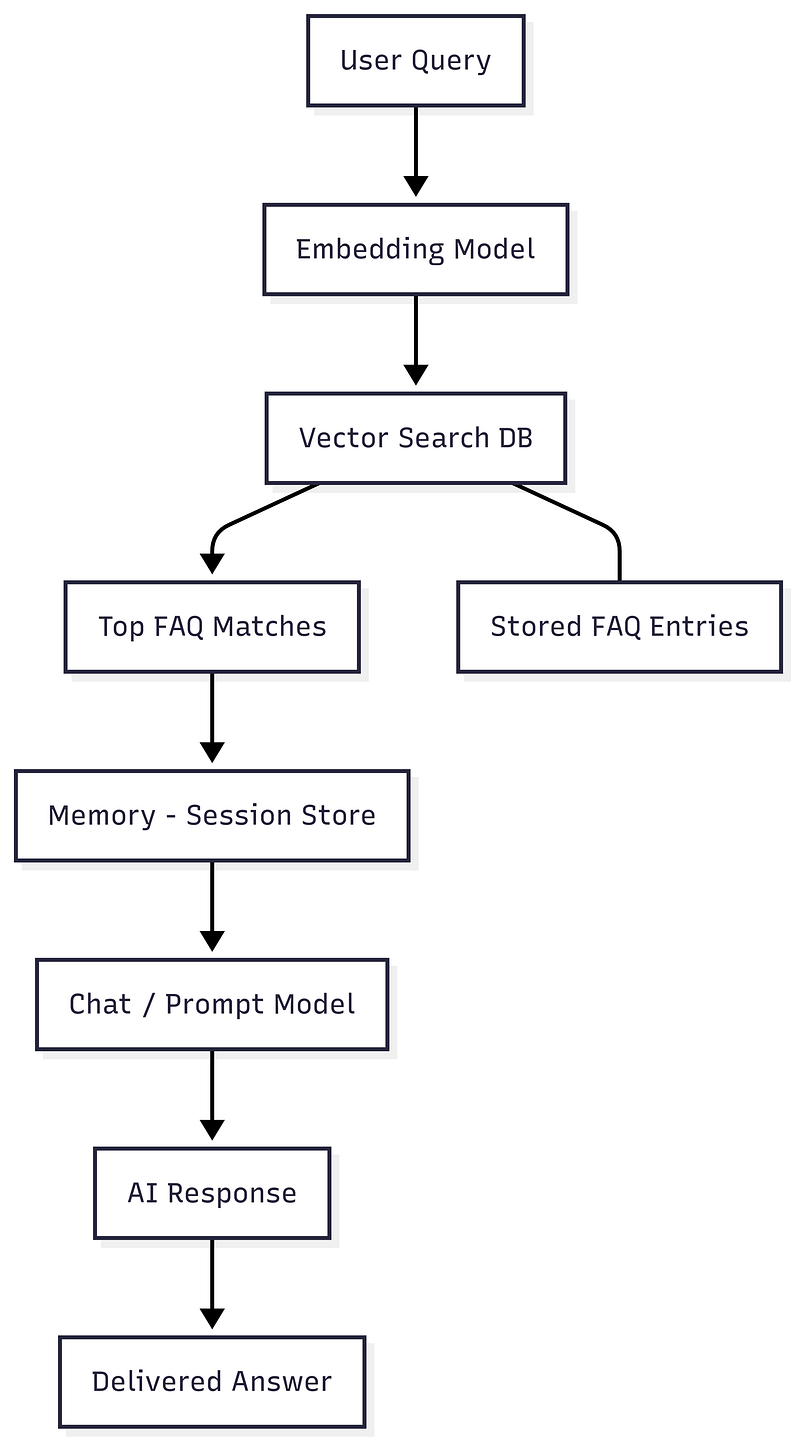
The steps were clear:
- Take the user query.
- Generate its embedding.
- Search for the closest FAQ entries.
- Pull past conversation memory.
- Build a structured prompt.
- Send it to OpenAI via PrismPHP.
- Parse the result and format it.
The flow looks like this:
Conversation Memory
One feature I really wanted was short-term memory. If a user asked, “What are the payment options?” and then followed with, “What about online?”, the assistant should connect the dots.
I stored the last five exchanges per session in a ChatMemory table. The service pulled this memory and injected it into the prompt
$memory = ChatMemory::where('session_key', $key)
    ->orderBy('created_at', 'desc')
    ->take(5)
    ->get()
    ->reverse();
This gave the assistant enough context to answer naturally without storing anything permanently.
Multilingual Vector Challenges
One issue I quickly ran into was language diversity. While embeddings work well in English, things get tricky when users ask questions in Malay, Chinese, or even a mix of languages. For example:
- “Bagaimana reset kata laluan saya?” (Malay)
- “How to reset password ?” (English)
If embeddings are English-only, these queries won’t map well to the right answers.
This happens because embeddings depend on how well the model represents different languages in a shared semantic space. If the model is weak in one language, semantically similar sentences won’t cluster properly — leading to wrong or empty matches.
To solve this, I considered 2 strategies:
- Multilingual Embedding Models: Models like
text-embedding-3-largeor certain open-source ones trained across many languages give more reliable cross-language matches. - Language Detection + Routing: Detect the query language first, then select an embedding model specialized for that language.
Both approaches have trade-offs. Multilingual embeddings are easier to manage, but routing gives you flexibility if your user base is heavily skewed toward specific languages.
Multilinguality turned out to be one of the hidden but critical challenges in building an FAQ assistant for real-world use.
Choosing the Right Models
Another key design decision was selecting models for embeddings and prompting. At first glance, it might seem like one model can do it all, but separating these roles gives better results.
- Embeddings Model → Needs to be cheap, fast and multilingual. Since embeddings are used for every query, cost efficiency matters. Smaller models like
text-embedding-3-smallare cost-friendly at scale, while larger ones liketext-embedding-3-largecapture richer semantics. - Prompting / Chat Model → Needs to handle reasoning, context windows and fluency. A model with a long context window is essential when passing multiple FAQ entries, previous conversation turns and system instructions.
I learned that picking the “latest and greatest” isn’t always right. Sometimes, a lightweight embedding model paired with a mid-tier chat model offers the best balance of speed, cost and reliability.
Designing the System Prompt
The system prompt became the heart of the assistant’s personality. I spent a lot of time refining rules to keep answers grounded. For example, the assistant must never take actions on behalf of the user (like submitting a complaint) and must always redirect them to official channels.
A portion of the system prompt looked like this:
SYSTEM PROMPT:
You are SamAI, the virtual customer service assistant...

STRICT RULES:
- Never act on behalf of the user.
- Redirect to official channels.
- Stay within verified FAQs and memory.
- Always reply in the same language as the query.
This prompt not only controlled behaviour but also ensured tone and style stayed consistent.
Media Awareness
Another interesting part was media references. Some FAQs had attachments like PDFs, images, or forms. I wanted the assistant to mention these naturally in responses.
The service extracted media details from FAQs and appended them to the prompt as “available media”. Then, during parsing, it checked if the AI response referred to a file and attached the public URL in a user-friendly way.
Example format in replies:
Payment Form: https://example.com/payment.pdfThis turned the assistant into more than just text — it could point users to the right documents directly.
Why This Strategy Worked
The combination of embeddings, conversation memory and carefully crafted prompts gave the FAQ system a human-like quality without drifting into imagination. Some key takeaways from my journey:
- Vector search is essential for flexible matching. It bridges the gap between different phrasings.
- Caching embeddings saves cost and response time.
- Conversation memory keeps the flow natural and prevents users from repeating themselves.
- Strict system rules prevent the assistant from overpromising or acting beyond scope.
- Media references make the assistant more practical and helpful.
What I Learned Along the Way
Building this system wasn’t just about writing code. It was about finding the balance between AI freedom and control. Too much freedom and the assistant could make things up. Too much control and it would feel robotic.
Using PrismPHP as the bridge made the process smoother, especially with retry logic and error handling built in. But the real challenge was in designing the conversation flow.
I learned that:
- Designing prompts takes as much thought as writing code.
- Memory has to be trimmed — too much history overwhelms the model.
- Testing with real user queries reveals blind spots quickly.
Conclusion
Turning FAQs from static text into a conversational assistant was one of the most rewarding projects I’ve built. By combining Laravel, PrismPHP, embeddings and prompt design, I created a system that answers naturally, stays grounded in facts and respects user trust.
For developers, my advice is this: don’t just copy the code. Think about the strategy why vector embeddings make sense, how to handle memory and where to draw the line for your AI assistant’s behaviour.
The real magic isn’t in a single function call. It’s in how the pieces come together to serve users better. And for me, that’s what made this project worth building.
💡 If you’re a developer curious about applying AI to real-world systems, start small. Try embeddings with your own dataset, experiment with prompt design, and see how far you can take it. The tools are here it’s about how creatively and responsibly we use them.