Revolutionizing Lawn Care: Designing a Lawn Care Booking System

From food delivery to ride-sharing, many services have been transformed by technology. But what about lawn care? Imagine a system where homeowners can effortlessly book lawn mowing services and service providers can efficiently manage their schedules.
This article explores the system design of a Lawn care booking system, covering everything from requirement gathering to best practices, including detailed cost estimation and monetization strategies.
Disclaimer: The calculations and design presented in this article are estimations and provide a rough design for educational purposes. Actual requirements may vary based on specific use cases, user behavior and system optimizations. It is recommended to conduct detailed analysis and testing tailored to your specific project needs.
Lawn Mower Demand Statistics
Before diving into the design and implementation details, it’s essential to understand the market demand for lawn care services. By examining industry statistics, we can better appreciate the potential success of this system.
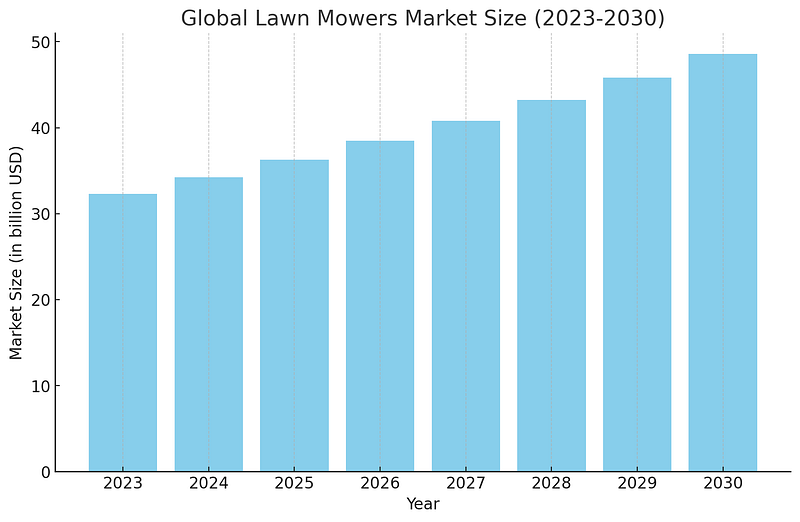
Market Size and Growth
- Lawn Care Industry Size: The global lawn mowers market size was valued at USD 32.31 billion in 2023 and is expected to grow at a compound annual growth rate (CAGR) of 6.0% from 2023 to 2030.
- Service Providers: There are over 500,000 lawn care businesses in the U.S. ranging from small operators to large companies.
- Household Demand: Households in North America increased their spending on lawn care from $317 in 2014 to $503 in 2017.
User Preferences
- Convenience: A survey by the National Association of Landscape Professionals found that 70% of homeowners prioritize convenience when selecting lawn care services.
- Digital Booking: The trend towards digital solutions is growing, with more consumers preferring online booking and payment options for various services, including lawn care.
Seasonal Demand
- Peak Seasons: Demand for lawn mowing services peaks during the spring and summer months, aligning with growing seasons. This seasonal trend supports the need for a flexible and scalable booking system to manage fluctuations in demand.
- Frequency: On average, homeowners require lawn mowing services every 1–2 weeks during peak seasons.
Potential Revenue
- Average Cost of Service: The average cost of lawn mowing services ranges from $30 to $80 per visit, depending on lawn size and region.
- Booking Volume: Given the estimated 10,000 homes in particular housing area and assuming even a conservative 10% market penetration, this could translate to 1,000 potential users. If each user books a service twice a month, this amounts to 2,000 bookings monthly.
These statistics highlight the substantial demand and growth potential for a Lawn Care Booking System. With a significant market size, increasing preference for digital solutions and seasonal peaks, building such a system is not only viable but also likely to meet a genuine market need. This context sets the stage for the system design and underscores the importance of a robust, scalable and user-friendly platform.
Requirement Gathering
Functional Requirements
Functional requirements define what the system should do. For a lawn care booking system, key functional requirements include:
- User Registration and Authentication: Users (homeowners and service providers) must be able to create accounts and log in securely.
- Profile Management: Users should manage their profiles, including personal information, payment details and service preferences.
- Booking Management: Homeowners should book lawn mowing services, specifying date, time and location. Service providers should view and manage these bookings.
- Availability Management: Service providers must update their availability to ensure accurate scheduling.
- Payment Processing: Secure and seamless payment processing for transactions between homeowners and service providers.
- Notification System: Alerts and notifications for bookings, cancellations and reminders.
- Review and Rating System: Homeowners can rate and review service providers, helping maintain quality standards.
Non-Functional Requirements
Non-functional requirements ensure the system performs efficiently and securely. For this system, important non-functional requirements include:
- Scalability: Ability to handle growing numbers of users and transactions.
- Performance: Fast response times for booking and payment processing.
- Security: Protection of user data, secure authentication and payment processing.
- Reliability: High availability and minimal downtime.
- Usability: Intuitive and user-friendly interface for all user types.
- Compliance: Adherence to legal and regulatory requirements, such as data privacy laws.
System Methodology
Choosing the right system methodology is crucial for the success of the project. For a structured and sequential approach, the Waterfall methodology is ideal.
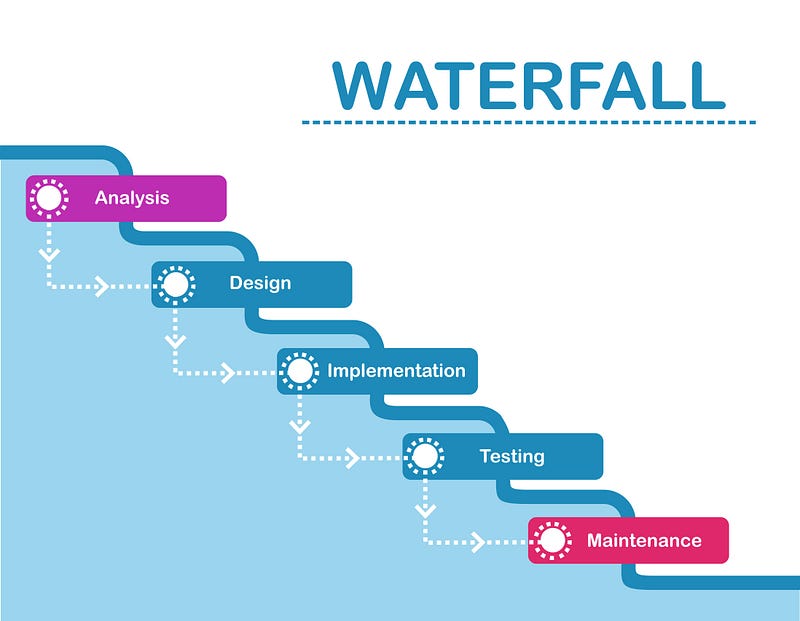
Waterfall is a linear and sequential approach to software development, with distinct phases:
- Requirement Analysis: Gather and document all system requirements.
- System Design: Create detailed system design based on requirements.
- Implementation: Develop the system according to the design specifications.
- Testing: Test the system to identify and fix defects.
- Deployment: Deploy the system to the production environment.
- Maintenance: Provide ongoing support and maintenance for the system.
Data Fact Figure and Calculation
Understanding the data requirements and performing initial calculations are vital for designing a robust system.
Estimated Starting Data Calculation
- Users: Assume 1,000 homeowners and 100 service providers at launch.
- Bookings: On average, each homeowner makes 2 bookings per month, resulting in 2,000 bookings per month.
- Reviews: Each booking generates one review, leading to 2,000 reviews per month.
- Notifications: Estimate 3 notifications per booking, resulting in 6,000 notifications per month.
Storage Calculations
- User Profiles: 1,100 users with 1KB of data each = 1.1MB.
- Bookings: 2,000 bookings per month with 1KB of data each = 2MB.
- Reviews: 2,000 reviews per month with 500 bytes of data each = 1MB.
- Notifications: 6,000 notifications per month with 200 bytes of data each = 1.2MB.
Total estimated storage for initial months: approximately 5.3MB, with growth considerations over time.
Storage Requirement
For this system, a relational database is sufficient to handle all types of structured data.
- Database: Use a relational database like MySQL or PostgreSQL to store user profiles, bookings, reviews and notifications.
- Storage Calculations:
- User Profiles: 1,100 users x 1KB = 1.1MB
- Bookings: 2,000 bookings x 1KB = 2MB
- Reviews: 2,000 reviews x 0.5KB = 1MB
- Notifications: 6,000 notifications x 0.2KB = 1.2MB
- Total Initial Storage: 5.3MB
Server Requirement and Calculation
To ensure smooth operation, calculate server requirements based on user load and expected traffic.
Server Specifications
- Web Server: Handles HTTP requests from users. An average setup might include 4 vCPUs and 8GB RAM.
- Application Server: Manages business logic and background processing. Recommended setup: 4 vCPUs and 8GB RAM.
- Database Server: Stores and retrieves data. Setup might include 8 vCPUs and 16GB RAM for high performance.
Traffic and Load Calculation
- Concurrent Users: Assuming 10% of users are active concurrently, 100 users.
- Requests per Second: If each user makes an average of 1 request per minute, that’s approximately 1.67 requests per second.
With these figures, you can scale the server infrastructure accordingly, using auto-scaling groups for dynamic resource management.
Payment Integration
Integrating a reliable and secure payment system is critical for the success of the system. Payment integration ensures seamless transactions between homeowners and service providers, fostering trust and convenience.
Recommended Payment Gateway: Stripe
Stripe is an excellent choice for payment integration due to its extensive features, ease of use and global reach. Here’s why Stripe stands out:
- Global Coverage: Stripe supports payments in multiple currencies and operates in multiple countries, making it ideal for a system that could potentially expand internationally.
- Ease of Integration: Stripe offers comprehensive APIs and extensive documentation, simplifying the integration process for developers.
- Security: Stripe is PCI DSS Level 1 certified, ensuring top-notch security for handling sensitive payment information.
- Features: Supports various payment methods, including credit and debit cards, Apple Pay, Google Pay and bank transfers. It also offers advanced features like recurring billing and subscription management.
- Scalability: Stripe’s infrastructure is designed to handle high volumes of transactions, ensuring the system can scale as demand grows.
Cost of Using Stripe
Stripe’s pricing is transparent and competitive, making it a cost-effective solution for payment processing.
- Transaction Fees: Stripe charges 2.9% + $0.30 per successful card charge for most transactions. This fee can vary slightly depending on the country and currency.
- No Setup Fees: Stripe does not charge any setup, monthly, or hidden fees, making it accessible for startups and small businesses.
- Volume Discounts: For businesses with large transaction volumes, Stripe offers customized pricing and volume discounts.
Example Cost Calculation
Assuming an average transaction value of $50 and an estimated 2,000 bookings per month:
- Monthly Transactions: 2,000
- Total Transaction Value: 2,000 x $50 = $100,000
- Stripe Fees: $100,000 x 2.9% + (2,000 x $0.30) = $2,900 + $600 = $3,500
With these fees, Stripe provides a reliable and cost-effective payment solution that can scale with the system’s growth.
High-Level Architecture
A well-designed architecture ensures the system is robust, scalable and maintainable. Here’s a high-level overview:
- Frontend: User interface built with frameworks like React or Angular, communicating with the backend via RESTful APIs.
- Backend: Decoupled architecture using microservices, handling different functionalities like authentication, booking management and payment processing.
- Database: Relational database like MySQL or PostgreSQL for efficient data management.
- Cloud Services: AWS or Google Cloud for hosting, storage and additional services like load balancing and monitoring.
- API Gateway: Manages API traffic, ensuring security and scalability.
- Authentication: Secure user authentication using OAuth or JWT.
- Payment Gateway: Integration with services like Stripe or PayPal for secure transactions.
- Notification Service: Push notifications and email alerts using services like Firebase Cloud Messaging or SendGrid.
Best Practices
Implementing best practices ensures the system is reliable, secure and efficient.
- Security First: Protect user data with encryption, secure authentication and regular security audits.
- Scalability: Design with scalability in mind, using microservices and auto-scaling infrastructure.
- Performance Optimization: Use caching, load balancing and efficient database queries to ensure fast response times.
- Continuous Integration and Deployment: Automate testing and deployment to ensure quality and reduce time-to-market.
- Monitoring and Logging: Implement robust monitoring and logging to quickly identify and resolve issues.
- User Experience: Focus on an intuitive and seamless user interface to enhance user satisfaction.
- Feedback Loop: Regularly gather and act on user feedback to continuously improve the system.
Cost Estimation
Providing a detailed cost estimation helps in budgeting and planning.
Estimated Costs
Development Costs:
- Frontend Development: $20,000/year
- Backend Development: $30,000/year
- Testing and QA: $15,000/year
Infrastructure Costs:
- Web Server: $5,000/year
- Application Server: $5,000/year
- Database Server: $10,000/year
- Cloud Services: $5,000/year
- Maintenance and Support: $10,000/year
Total Estimated Cost for the first year: $120,000
Monetization Strategy

We need to monetized the system to ensures it is profitable and sustainable right?
Monetization Methods
- Commission Fees: Charge a commission fee (e.g., 10%) on each booking made through the platform.
- Subscription Plans: Offer premium subscription plans for homeowners and service providers with additional features and benefits.
- Advertising: Allow relevant businesses to advertise their products and services on the platform for a fee.
- Referral Programs: Implement referral programs where users can earn credits or discounts for referring new users.
By implementing these monetization methods, the system can generate steady revenue while providing value to its users.
Conclusion
Designing a this system involves careful consideration of functional and non-functional requirements, choosing the right methodology and detailed planning for data, storage and server needs. By following best practices, leveraging modern technologies and implementing a solid monetization strategy, you can build a scalable, secure and user-friendly system that revolutionizes lawn care services. Whether you’re a homeowner looking for convenience or a service provider seeking efficiency, a well-designed Lawn care booking system can make lawn care simple and hassle-free.
Thank you for reading! Don’t forget to subscribe to stay informed about the latest updates in system design and e-commerce innovations. Happy designing!
If you found this article insightful and want to stay updated with more content on system design and technology trends, be sure to follow me on :-
Twitter: https://twitter.com/hafiqdotcom
LinkedIn: https://www.linkedin.com/in/hafiq93
Buy Me Coffee: https://paypal.me/mhi9388 /
https://buymeacoffee.com/mhitech