Hashcat is a password recovery tool that support multiple format and over hundreds highly optimized hashing algorithms.
So, in terms of pentest area, Hashcat is a hacking tool to the most complex of passwords, targeting multiple aspects of coding simultaneously. Hashcat support multiple attack modes such as dictionary, rule-based, combinator, mass, brute, and more.
Cracking a weak password is easy. To crack a strong password takes very long period depend how strong it is.
Using hashcat is pretty straight forward. Let’s get started
Installation
Linux / Kali
apt install hashcat
Mac
brew install hashcat
Windows
Get the download from here
After installation completed, run hashcat --help . It’s supposed to show the list of arguments for hashcat command
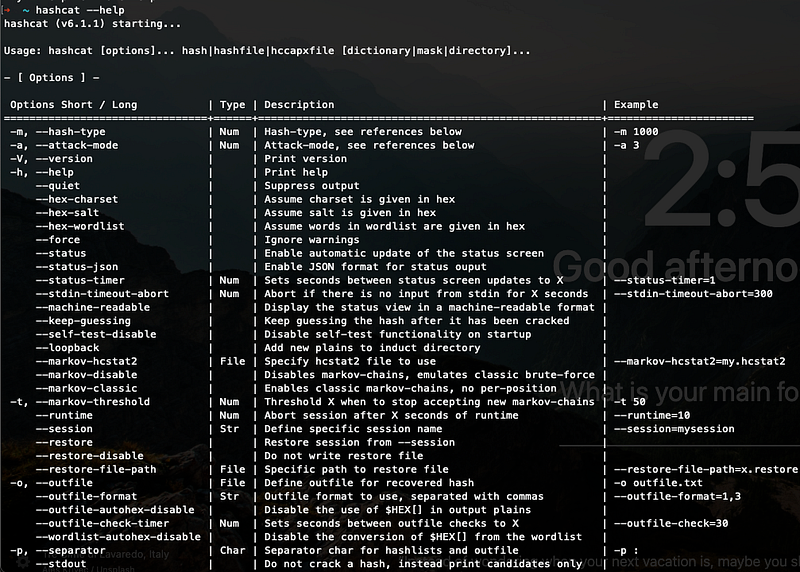
hashcat --helpUsage
So, let’s start with simple crack.
Find a md5 hash password or you can create one
# echo -n "hello" | md5
b1946ac92492d2347c6235b4d2611184
From the “hello” hash, simply write a hashcat command,
# hashcat -m 0 -a 0 "b1946ac92492d2347c6235b4d2611184" PATH_OF_DICTIONARY.txt --show
The output will show like this
b1946ac92492d2347c6235b4d2611184:hello
-a 0 is for dictionary attack. if you prefer brute-force, change to -a 3. If you prefer to write the result in a file, use argument -o path.txt
# hashcat -m 0 -a 0 "b1946ac92492d2347c6235b4d2611184" PATH_OF_DICTIONARY.txt -o ~/password_cracked.txt
How to crack multiple hash? You can create a hash file containing all the hash you want to crack. For this example, i will create some of hashes
echo -n "hello" | md5 >> hash.txt
echo -n "world" | md5 >> hash.txt
echo -n "cracking" | md5 >> hash.txt
echo -n "password" | md5 >> hash.txt
echo -n "awesome" | md5 >> hash.txt
then, use file name in the argument
# hashcat -m 0 -a 0 hash.txt PATH_OF_DICTIONARY.txt -o ~/password_cracked.txt --potfile-disable
The output of password_cracked.txt like this
# cat password_cracked.txt
5d41402abc4b2a76b9719d911017c592:hello
7d793037a0760186574b0282f2f435e7:world
4d1f35512954cb227b25bbd92e15bc7b:cracking
5f4dcc3b5aa765d61d8327deb882cf99:password
be121740bf988b2225a313fa1f107ca1:awesome
For this tutorial, i used --potfile-disable disable previous cracked password.
Simple and easy (for weak password 😅), but it is good to know right? Hashcat provide rule-based attack which is good and too long to explain. You may refer hashcat wiki yourself.
Sooo.. That’s all.. Thanks for your time.. Happy cracking all…