Implementing Load Balancing Algorithm in NGINX
Optimizing Performance and Reliability for Your Website

What is Load balancing? Imagine you’re hosting a party and guests keep pouring in through your front door. Some guests arrive alone, while others come in groups. You want to ensure everyone gets a chance to mingle and enjoy themselves without overcrowding any one area. This scenario parallels the challenges faced by web servers managing incoming traffic.
Load balancing is like a traffic management for your web applications. It ensures that incoming requests are distributed efficiently across multiple servers, optimizing resource utilization and improving performance.
In this article, we’ll explore 6 popular load balancing algorithms and demonstrate how to set them up using NGINX.
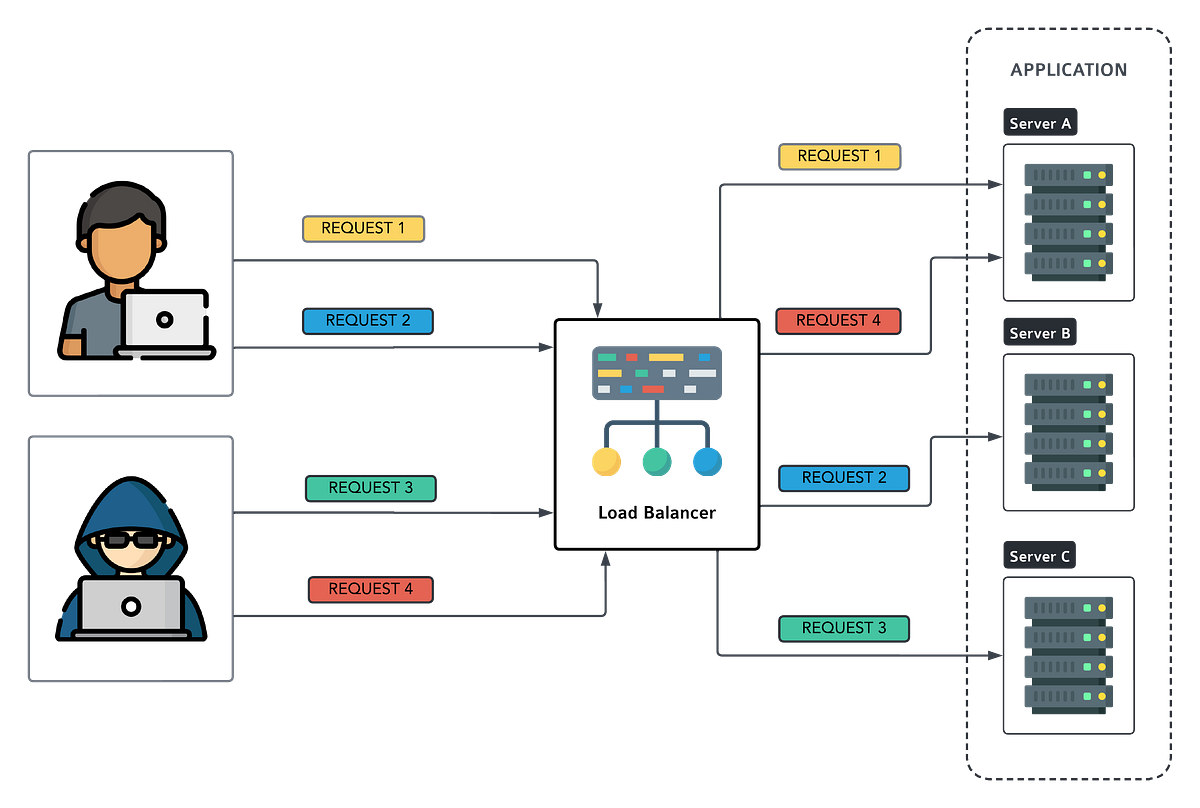
Round Robin is the default algorithm in NGINX which it sends the same amount of requests to each server. Round Robin is like taking turns at a buffet. Each guest (or in this case, each request) is served in sequence. So, if you have three dishes, each person will get one before the cycle repeats. NGINX implements this algorithm by equally distributing requests among backend servers.
Example:
Imagine a popular online shopping website with three servers handling incoming traffic. With Round Robin, the first request goes to Server 1, the second to Server 2 and the third to Server 3. Then the cycle repeats.
Best Practice:
Round Robin is excellent for distributing traffic evenly across servers without considering their load or performance. Consider to use this method when your servers are of have equal specification.
NGINX Configuration:
upstream backend {
    server backend1.example.com;
    server backend2.example.com;
    server backend3.example.com;
}
server {
    location / {
        proxy_pass http://backend;
    }
}
Weight Round Robin
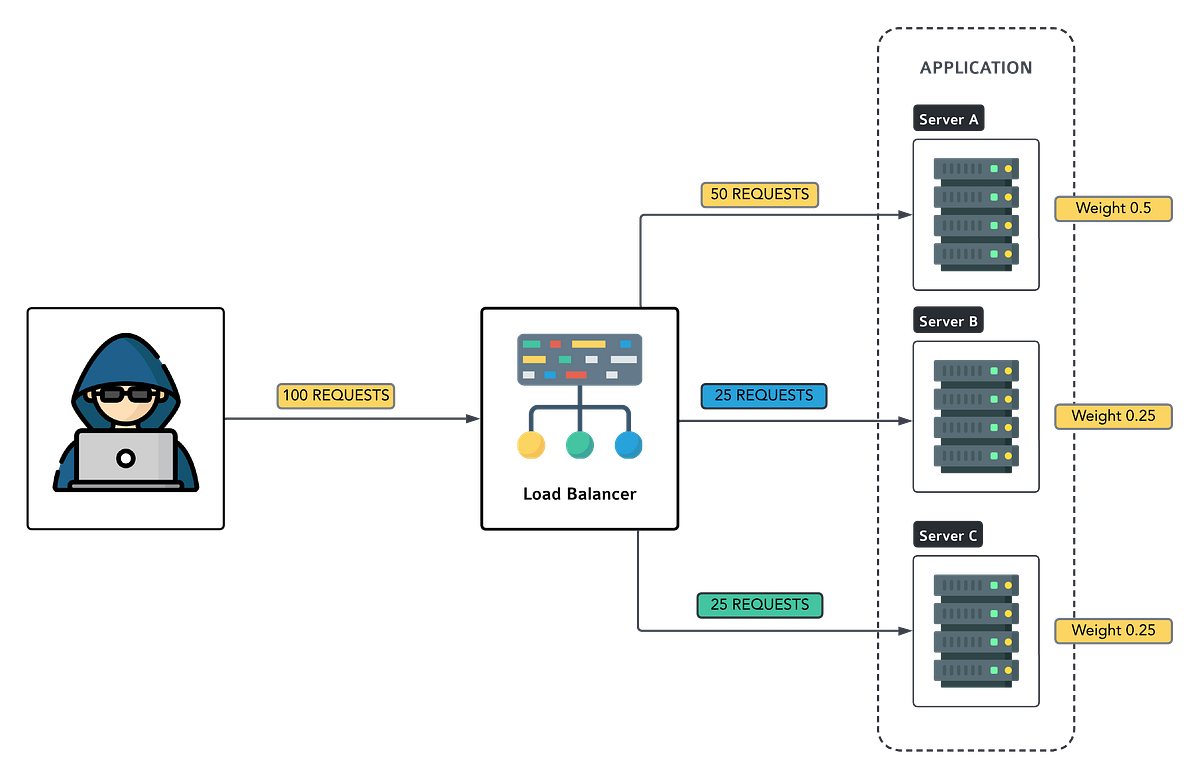
Unlike default round robin, Weight Round Robin acknowledges that not all servers are created equal. Some can handle more traffic than others. This algorithm assigns a weight to each server, determining how often it receives requests. It’s like having different-sized plates at the buffet — the bigger the plate, the more servings it gets.
Example:
Consider a streaming service with three servers. Server 1 has a weight of 3, while Servers 2 and 3 have a weight of 1 each. Server 1 will receive three times more requests than Servers 2 and 3 combined.
Best Practice:
Weight Round Robin optimizes resource utilization by directing more traffic to powerful servers. Gather your server capacity information and assign the weight based on their performance.
NGINX Configuration:
upstream backend {
    server backend1.example.com weight=3;
    server backend2.example.com weight=2;
    server backend3.example.com;
}
server {
    location / {
        proxy_pass http://backend;
    }
}
The ngx_http_upstream_module module is used to define groups of servers that can be referenced by the proxy_pass…nginx.org
Random
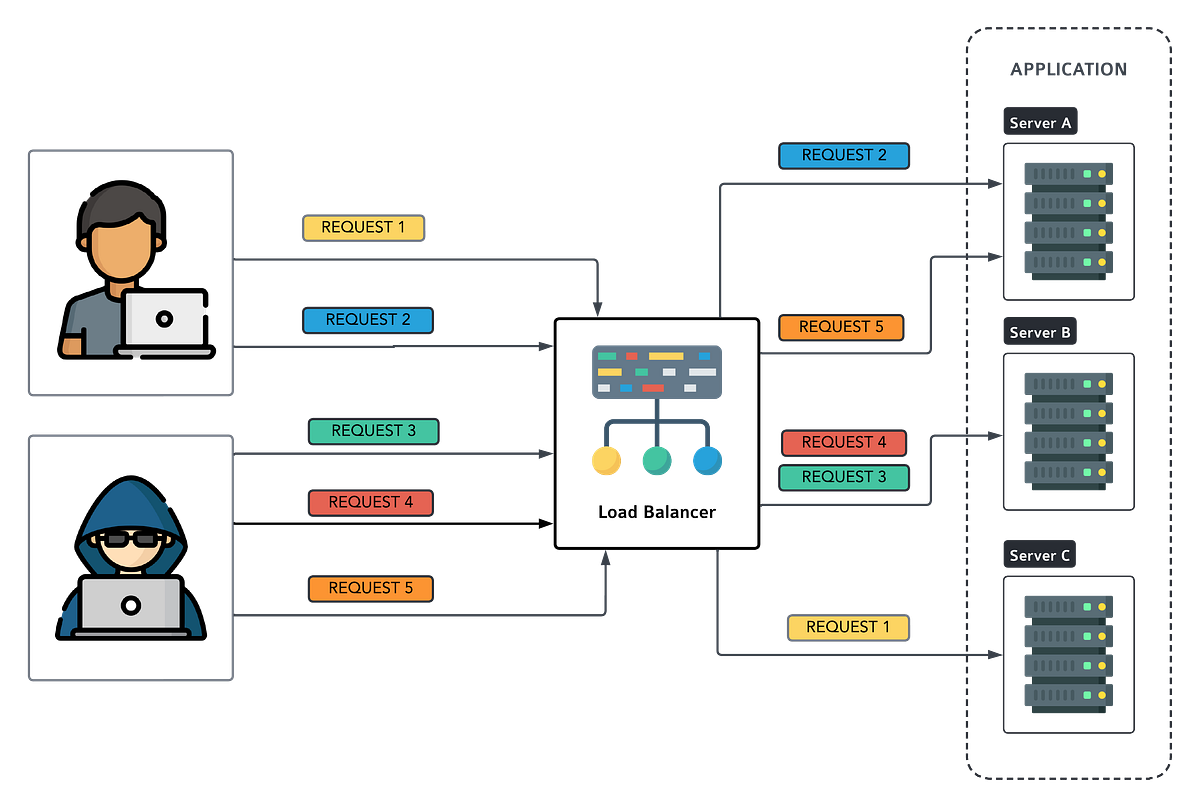
Random algorithm requests are randomly assigned to servers. Imagine it as a lottery where each server has a ticket, and requests are randomly assigned to one of those servers. When a new request arrives, the load balancer picks a server at random. There’s no specific order or pattern; it’s like rolling dice to decide which server gets the request and each server has an equal chance of being selected.
Example:
Suppose we have three servers: A, B, and C.
- Request 1 arrives. The load balancer randomly selects server B.
- Request 2 arrives. This time, server A gets picked.
- Request 3? Server C!
And so on. It’s like spinning a wheel of fortune for your servers.
Best Practice:
The Random algorithm is simple and easy to implement. Use it when all servers have similar capabilities (same hardware, same software stack). Random method are not ideal for small server sets. Make sure your deploy with a large number of similar servers.
However, it lacks predictability. You might end up with uneven loads if one server gets more requests purely by chance.
NGINX Configuration:
upstream backend {
    random [two [method]];
    server backend1.example.com;
    server backend2.example.com;
    server backend3.example.com;
}
server {
location / {
proxy_pass http://backend;
}
}The ngx_http_upstream_module module is used to define groups of servers that can be referenced by the proxy_pass…nginx.org
IP and URL Hash
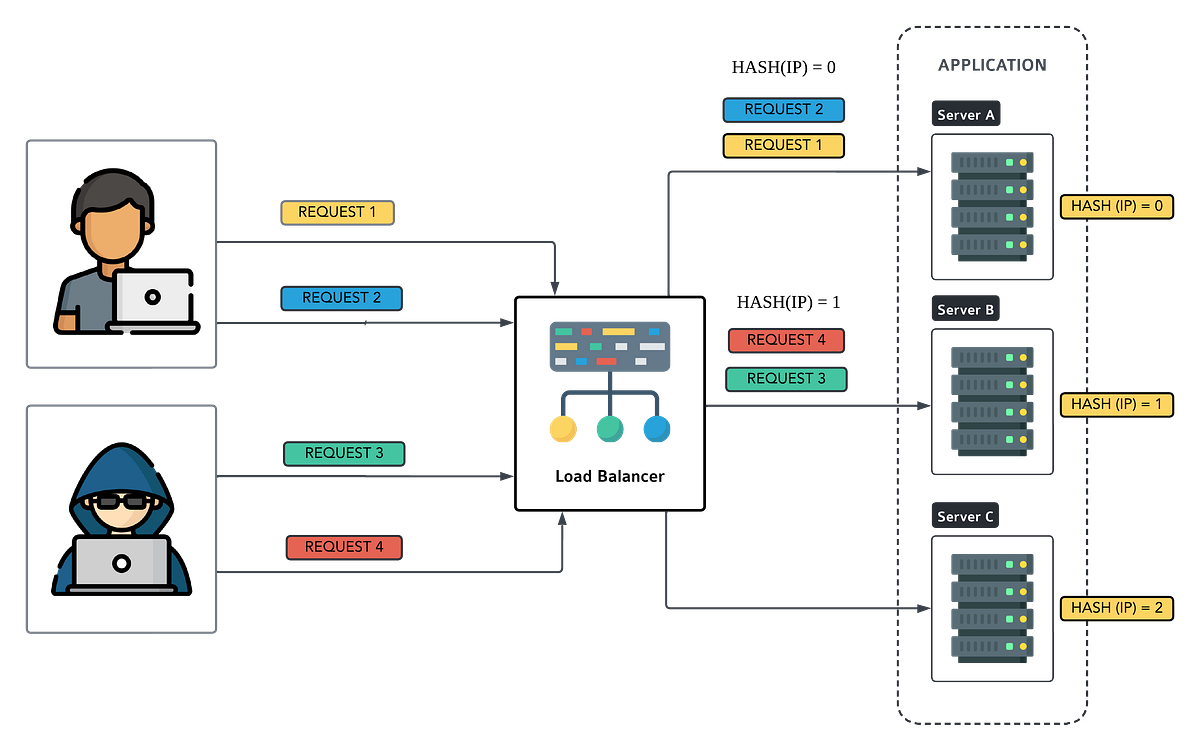
IP and URL Hash algorithms ensure that requests from the same client (identified by IP or URL) are consistently routed to the same server. It’s like assigning each guest a designated dining table — no matter how many times they visit, they’ll always sit at the same spot.
Example:
In an e-commerce website using IP Hash, if you add items to your cart from Server 1, subsequent requests related to your session will always go to Server 1 until your session ends.
Best Practice:
When session persistance are important for your system, this method will be ideal for you.
NGINX Configuration:
upstream backend {
    ip_hash;
    server backend1.example.com;
    server backend2.example.com;
    server backend3.example.com;
}
server {
    location / {
        proxy_pass http://backend;
    }
}
The ngx_http_upstream_module module is used to define groups of servers that can be referenced by the proxy_pass…nginx.org
Least Connection
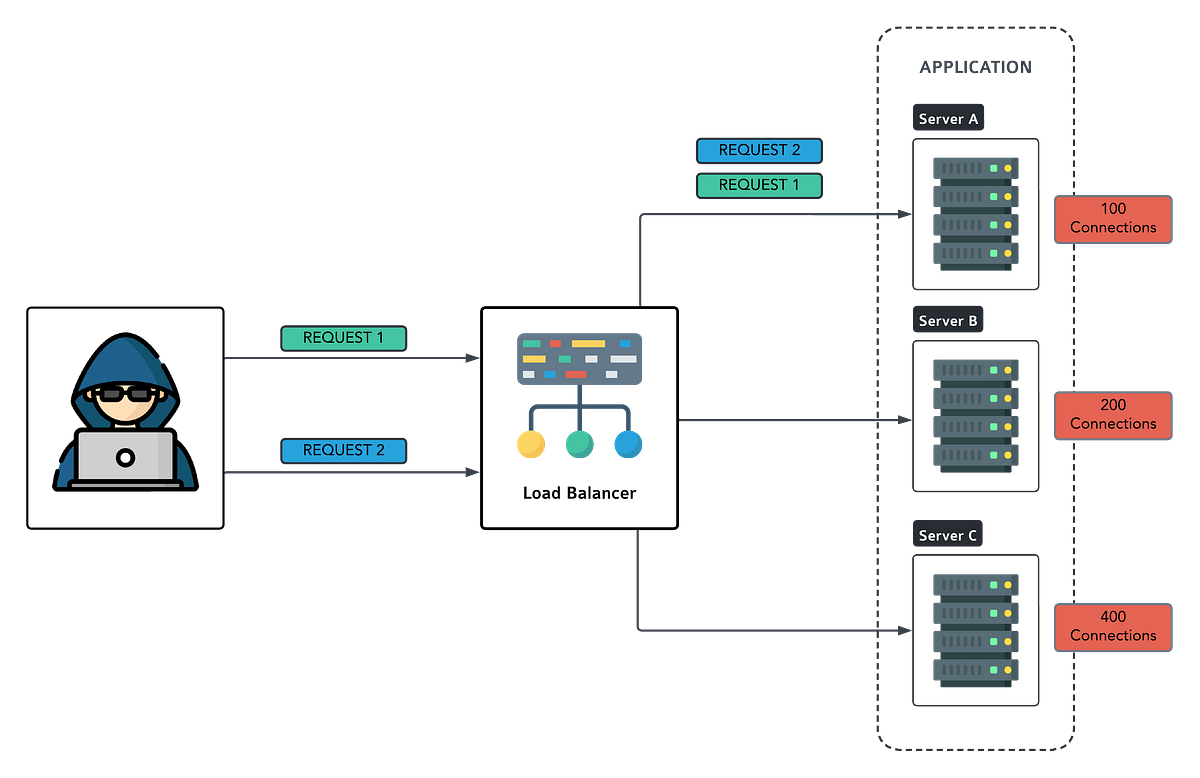
Least Connection is all about fairness. It routes new requests to the server with the fewest active connections. It’s like choosing the checkout line with the shortest queue at a supermarket.
Example:
Imagine a messaging app where users are connected to servers to send messages. When a new user joins, they are directed to the server with the fewest active connections, ensuring balanced load distribution. In layman term, if server A has 5 connections and server B has 3, new requests go to B.
Best Practice:
Least Connection algorithm ensures efficient resource utilization by directing traffic to servers with the lightest load.
NGINX Configuration:
upstream backend {
    least_conn;
    server backend1.example.com;
    server backend2.example.com;
    server backend3.example.com;
}
server {
    location / {
        proxy_pass http://backend;
    }
}
The ngx_http_upstream_module module is used to define groups of servers that can be referenced by the proxy_pass…nginx.org
Least Response Time
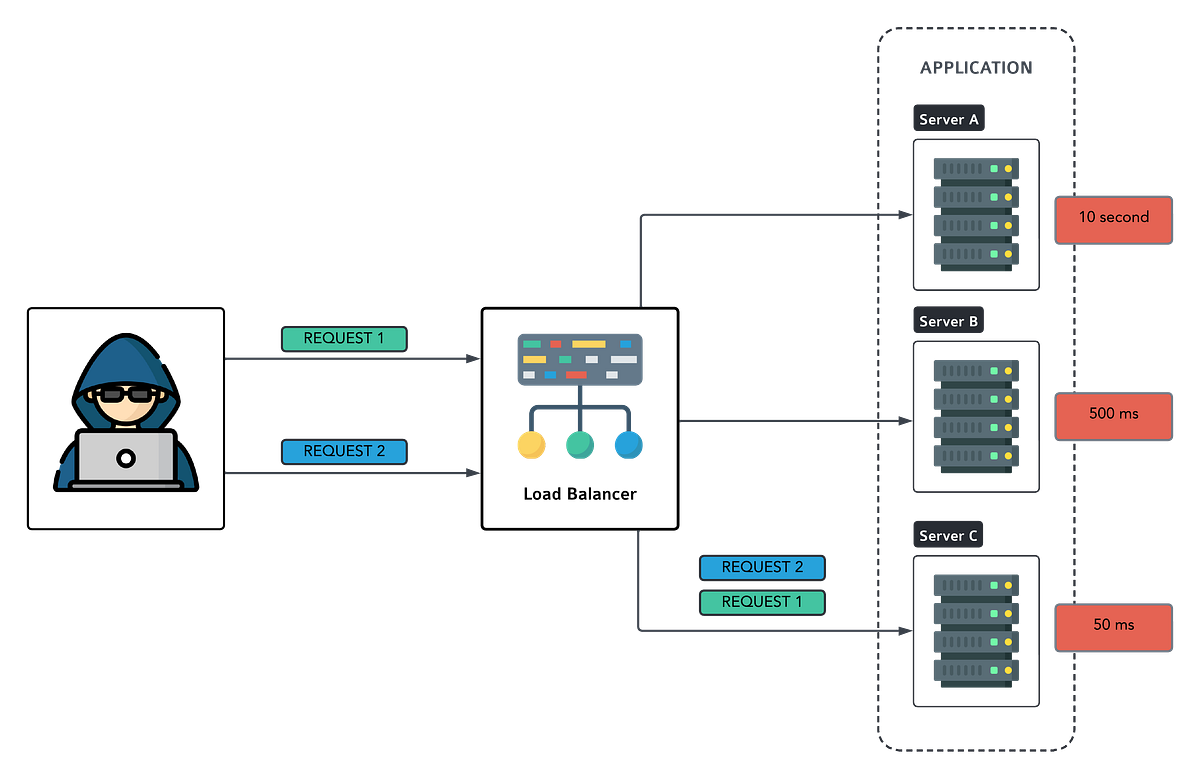
Least Response Time algorithm sends new requests to the server with the lowest average response time. It’s like choosing the fastest-moving lane in heavy traffic.
Example:
In a file-sharing platform, when a user uploads a file, the request is directed to the server with the lowest average response time, ensuring speedy delivery. In layman term, if server A responds in 500ms and server B in 300ms, new requests go to B.
Best Practice:
Least Response Time optimizes user experience by prioritizing servers with the quickest response times. So, monitor your server health and response times regularly.
NGINX Configuration:
upstream backend {
    least_time header;
    server backend1.example.com;
    server backend2.example.com;
    server backend3.example.com;
}
server {
    location / {
        proxy_pass http://backend;
    }
}
The ngx_http_upstream_module module is used to define groups of servers that can be referenced by the proxy_pass…nginx.org
NGINX offers a various of load balancing algorithms to suit your needs, whether you’re running a small blog or a large scale e-commerce platform. By understanding these algorithms — from Round Robin to Least Response Time — and implementing them effectively, you can ensure optimal performance, reliability and scalability for your website. Experiment with these configurations, monitor their impact,and fine-tune as needed to cater to your specific traffic patterns.
With NGINX’s powerful capabilities at your disposal, you’re well-equipped to handle any influx of visitors and deliver a seamless online experience.
Now, let’s hear from you:
Which load balancing algorithm do you find most intriguing? How do you plan to implement it in your website’s architecture? Share your thoughts and experiences in the comments below!
Found this helpful?
If this article saved you time or solved a problem, consider supporting — it helps keep the writing going.
Originally published on Medium.
View on Medium