AWS keeps quiet about what NAT Gateway actually costs. I learned it the hard way.
The AWS bill arrived and I stared at it for a full minute.
Not because the number was enormous. Because I had no idea what “NatGateway-Hours” was, why there were four line items for it and why it had been running non-stop for 30 days on an environment that got used maybe two hours a day.
That was my introduction to NAT Gateway. And I made every beginner mistake possible before I understood what I was actually paying for.
What I Did Wrong (All of It)
Let me be honest about the mistakes before I explain the concept. Because the tutorials won’t tell you these things.
Mistake 1: I left NAT Gateway running in staging 24/7.
I followed a VPC setup guide that said “attach a NAT Gateway to your private subnet so instances can reach the internet.” I did exactly that. Staging, dev, production. Same setup across the board. The NAT Gateway in my staging environment ran 720 hours that month. I used it for maybe 15 hours total.
Mistake 2: I put NAT Gateway in every subnet.
I had a private subnet for app servers and another private subnet for databases. The database subnet had no business touching the internet. I gave it a NAT Gateway anyway because I copy-pasted the architecture diagram without thinking about which subnets actually needed outbound internet access.
Mistake 3: I didn’t understand data processing charges.
NAT Gateway doesn’t just charge you per hour. It charges you per GB of data processed. Every byte your EC2 instance sends or receives through NAT Gateway costs money. I was running a Lambda that pulled data from an external API every five minutes. Multiply that by 30 days and the data processing charge quietly stacked up alongside the hourly charge.
Mistake 4: I spun up a NAT Gateway per Availability Zone.
Someone told me NAT Gateway is not highly available across AZs by default, so I created one per AZ. Good advice for production. For a staging environment running a side project, I had deployed three NAT Gateways for two EC2 instances.
What NAT Gateway Actually Is
A NAT Gateway is a managed AWS service that lets instances in a private subnet initiate outbound connections to the internet without being directly reachable from the internet.
Your EC2 in a private subnet has no public IP. It cannot reach apt-get update, cannot call an external API, cannot download a Docker image without something to translate its private IP to a public one for outbound traffic. NAT (Network Address Translation) is that something.
Here is the flow:
Private EC2 (10.0.1.5)
    → NAT Gateway (has Elastic IP, lives in public subnet)
        → Internet Gateway
            → Internet
The response comes back through the same path. Your EC2 never gets a public IP. The internet sees the Elastic IP of the NAT Gateway.
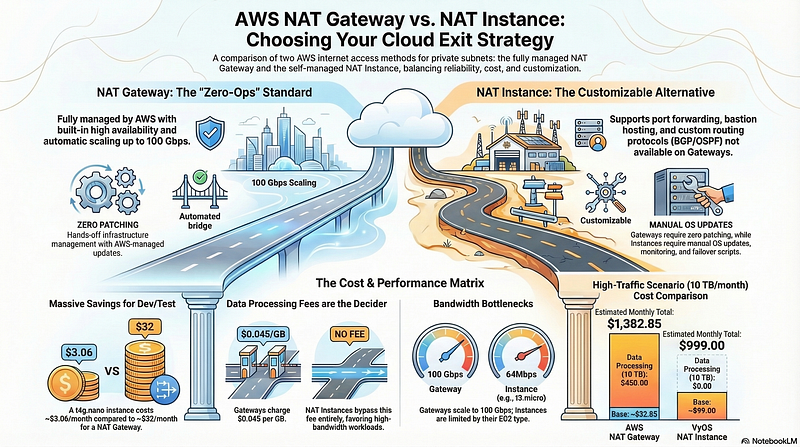
NAT Gateway is fully managed. AWS handles availability, bandwidth scaling and patching. You pay for that convenience.
What a NAT Instance Is
A NAT Instance is just a regular EC2 instance running a special AMI that does the same job. It sits in your public subnet, has a public IP and has IP forwarding enabled with iptables masquerade rules set up.
There is one extra step: you have to disable the source/destination check on the instance. By default EC2 drops packets that are not addressed to it. NAT needs to forward packets addressed to other IPs, so you turn that check off.
# Disable source/dest check via AWS CLI
aws ec2 modify-instance-attribute \
  --instance-id i-0123456789abcdef0 \
  --no-source-dest-check
The routing is the same. Your private subnet route table points 0.0.0.0/0 to the NAT Instance instead of the NAT Gateway.
Private EC2 (10.0.1.5)
    → NAT Instance (EC2 in public subnet, source/dest check off)
        → Internet Gateway
            → Internet
It does the same job. You manage it yourself.
The Real Pricing Difference (ap-southeast-5, Malaysia)
AWS ap-southeast-5 is the Malaysia region. Here is what NAT Gateway costs there. The rates below are based on published AWS pricing. Always verify at the AWS VPC pricing page for the latest numbers, as regional rates can change.
NAT Gateway charges around $0.059 per hour plus $0.059 per GB of data processed. A NAT Gateway running 24/7 for a full month costs roughly $43 before a single byte of data passes through it. That is the idle cost. Add data transfer on top.
Three NAT Gateways across three AZs for a staging environment (the setup I had) comes out to around $130/month just sitting there doing nothing useful.
Compare that to a NAT Instance. A t4g.nano in ap-southeast-5 costs around $0.0046 per hour on-demand. Running 24/7 for a month costs roughly $3.40. A t4g.micro for slightly more headroom lands around $6.80 per month.
That is the gap. $130 versus $4 for doing the same job on a low-traffic environment.
So Why Does Everyone Recommend NAT Gateway?
Because in production, the tradeoffs are real.
NAT Gateway scales automatically up to 100 Gbps. A t4g.nano is a burstable instance: it can spike to 5 Gbps momentarily, but it cannot sustain high throughput continuously. Under real load, a small NAT Instance will start dropping packets and slowing down. If your production workload pushes traffic through NAT consistently, a t4g.nano will not hold up.
NAT Gateway is highly available within an AZ without any configuration. A NAT Instance is a single EC2. If it crashes, your private subnet loses internet access until you intervene.
NAT Gateway requires zero maintenance. No OS patches, no monitoring for instance health, no recovery scripts. A NAT Instance means you own the uptime.
For production with real traffic and an SLA, NAT Gateway earns its cost. The mistake is applying production architecture to every environment by default.
The Simple Rule Nobody Tells You
If your outbound traffic is huge. Genuinely huge, like you are moving gigabytes per hour through NAT on a regular basis. Then NAT Gateway starts making sense. The managed scaling, the consistent throughput and the per-GB pricing become worth it when the alternative is babysitting an EC2 that is constantly hitting its network ceiling.
But let’s be honest. Most of us are not FAANG. Your staging environment is not serving 400 million users. Your side project is not processing petabytes of data. Your dev VPC is not a hyperscaler. If your outbound traffic is low, a NAT Instance on t4g.nano handles it without breaking a sweat and without bleeding your AWS bill dry every month.
High outbound traffic, real production scale: use NAT Gateway. Low outbound traffic, anything non-production: use NAT Instance. That is the whole decision.
The Actual Decision
Ask two questions before you deploy a NAT Gateway.
Is this environment production? If no, a NAT Instance on t4g.nano or t4g.micro is almost always sufficient.
Does this subnet actually need outbound internet access? A database subnet that only talks to your app layer within the VPC does not need NAT at all. Remove it.
For personal projects and dev environments, a NAT Instance on t4g.nano at $3.40/month is the call. For staging with moderate traffic, t4g.micro handles it fine. Add a CloudWatch alarm on CPU and network so you know if it is struggling. For production with SLA requirements, NAT Gateway with one per AZ. For database and internal subnets that never touch the internet, no NAT at all. Use VPC Gateway Endpoints for S3 and DynamoDB instead, which are free.
Setting Up a NAT Instance (The Actual Steps)
AWS no longer maintains official NAT AMIs, but a plain Amazon Linux 2023 instance works fine with a few commands.
Launch a t4g.nano in your public subnet with a public IP assigned. Then SSH in and run:
# Enable IP forwarding
sudo sysctl -w net.ipv4.ip_forward=1
echo "net.ipv4.ip_forward = 1" | sudo tee -a /etc/sysctl.conf

# Check your actual interface name first. On AL2023 ARM (t4g) it is ens5, not eth0
ip link show
# Set up NAT masquerade (replace ens5 with your interface name)
sudo iptables -t nat -A POSTROUTING -o ens5 -j MASQUERADE
sudo iptables -A FORWARD -i ens5 -o ens5 -m state \
  --state RELATED,ESTABLISHED -j ACCEPT
sudo iptables -A FORWARD -i ens5 -o ens5 -j ACCEPT
# Save iptables rules (Amazon Linux 2023)
sudo yum install -y iptables-services
sudo service iptables save
sudo systemctl enable iptables
Important: On AL2023 t4g instances, the network interface is named ens5 not eth0. Run ip link show to confirm yours before setting the iptables rules. If you use the wrong interface name, NAT will silently not work and you will spend an afternoon wondering why.
What I Do Now
Production VPCs get NAT Gateway per AZ. That cost is non-negotiable when real users depend on availability.
Everything else gets a NAT Instance on t4g.nano with a CloudWatch alarm if CPU or network throughput climbs. I also schedule non-production NAT Instances to stop overnight using AWS Instance Scheduler, which cuts the already-cheap cost even further.
Database and cache subnets get no NAT. S3 access uses a Gateway VPC Endpoint. SSM for EC2 access uses Interface VPC Endpoints so I never need a bastion or NAT for management traffic.
The bill dropped. Not because I picked the cheaper option blindly but because I stopped applying the same architecture to every environment and actually understood what I was paying for.
Use NAT Instance everyone. Ditch the blood sucker NAT Gateway away.
If your AWS bill has a line item you cannot explain, that is the one worth investigating first.