
Nowadays social media is very popular and most favourite customer experience to use social media as their authentication in many websites. The moment you allow users to login using their social media profile, you can skip the validating process of their email because the social media provider already verified them. Hence, It gives a better user experience as users don’t need to create and remember their login credentials for your website. It also saves your time from building a verification flow.
In this article, we will discuss step by step on how to integrate Facebook Login in Laravel using Laravel Socialite. Laravel Socialite package handles flow for social login without hassle — pretty simple.
Without further ado, let’s get started.
Create Migration File
For fresh Laravel project, if you are not migrating yet, you can edit the users migration file. To integrate social login in the application, we need to add 2 more columns which is social_provider_name and social_provider_id to the user migration file.
social_provider_name indicate — the name of the social media
social_provider_id indicate — the unique id for user social media account
Your migrations will look like this.
Schema::create('users', function (Blueprint $table) {
    $table->id();
    $table->string('name');
    $table->string('email')->unique()->index();
    $table->timestamp('email_verified_at')->nullable();
    $table->string('social_provider_name')->nullable();
    $table->string('social_provider_id')->nullable();
    $table->string('password')->nullable();
    $table->rememberToken();
    $table->foreignId('current_team_id')->nullable();
    $table->string('profile_photo_path', 2048)->nullable();
    $table->timestamps();
});
For existing project, you may create a migration file to alter the users table. Your migrations will look like this
Schema::table('users', function (Blueprint $table) {
    $table->string('social_provider_name')->nullable();
    $table->string('social_provider_id')->nullable();
});
Installation
Now install the Laravel socialite package for facebook login. You may run the command below
composer require laravel/socialite socialiteproviders/facebookNow, we need to add new configuration in environment file and also service configuration file.
Alter .env file and add below keys at the bottom of the file
FACEBOOK_CLIENT_ID=
FACEBOOK_CLIENT_SECRET=
FACEBOOK_REDIRECT_URI=
Alter config/services.php file and add below array
'facebook' => [
    'client_id' => env('FACEBOOK_CLIENT_ID'),
    'client_secret' => env('FACEBOOK_CLIENT_SECRET'),
    'redirect' => env('FACEBOOK_REDIRECT_URI')
],
Setup Facebook Developer Account
To make it work, we need Client ID and Client Secret Key from Facebook Developer account. You can browse facebook developer in your browser. Facebook have quite strict when using their services. So, they will be a lot to filled in.
First create an app and fill in your app detail
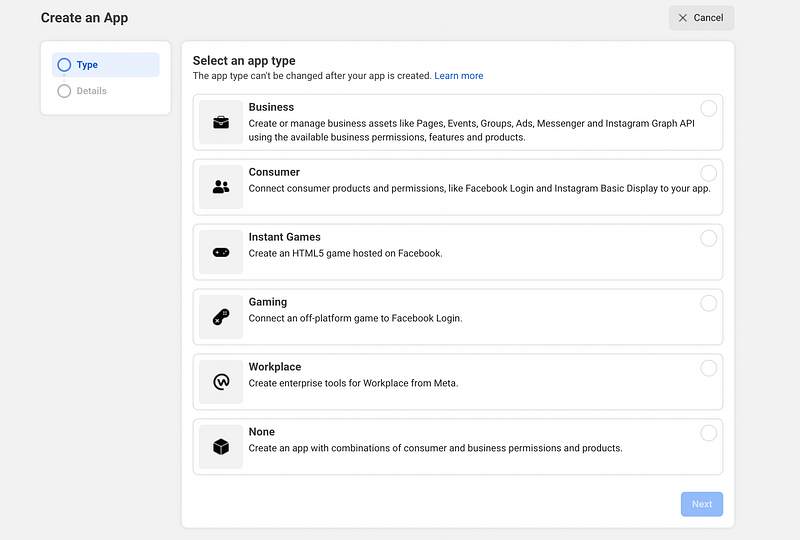
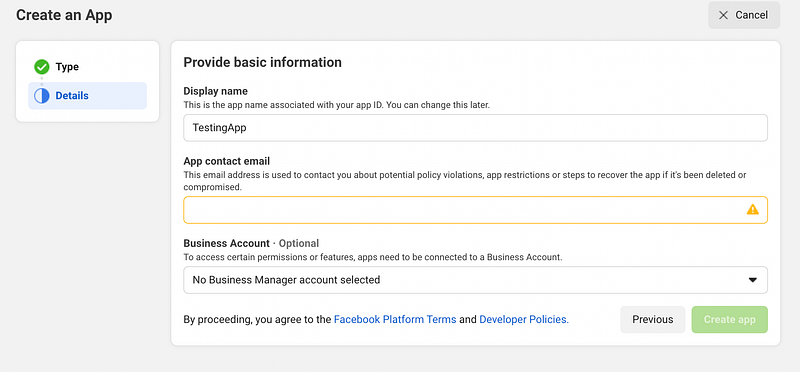
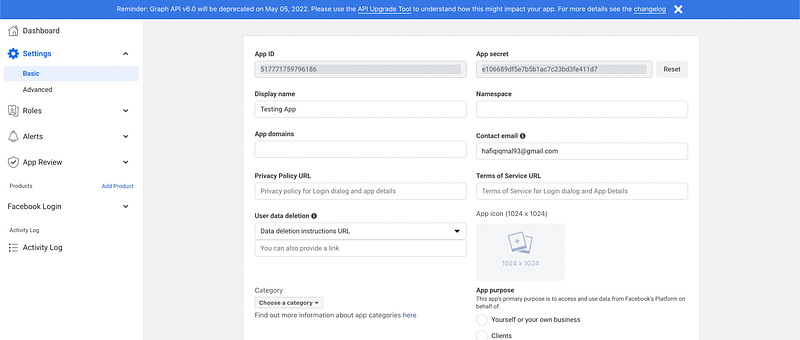
After create an app, please complete all the details in Setting menu. Those information are required for facebook to give you integrate with them. Like i said, they are pretty strict
After complete it, go to the product and add Product
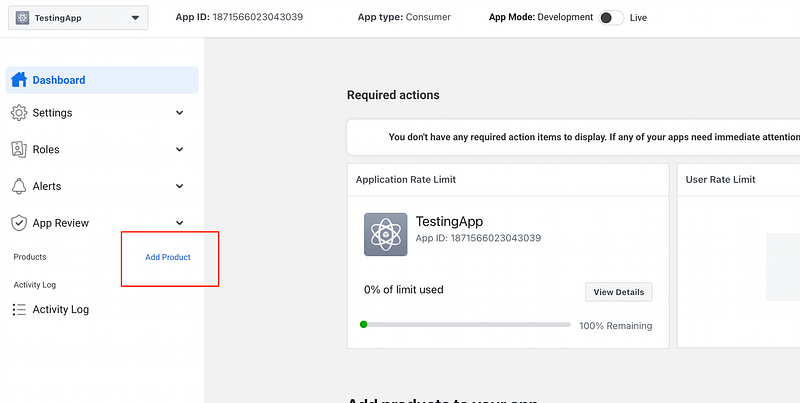
Choose Setup Facebook Login. For now we are using Web application, so just choose Web.

After that, you might notice that there is a warning
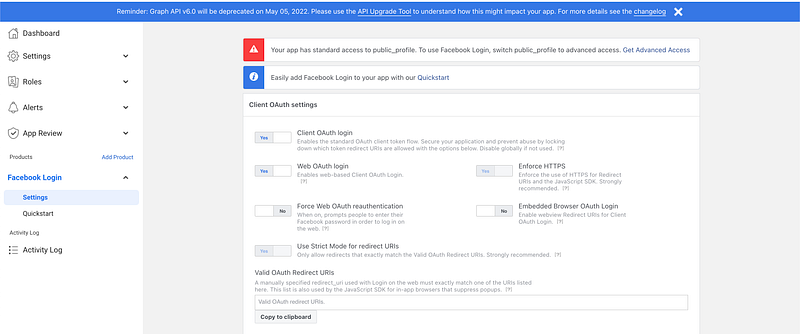
Your app has standard access to public_profile. To use Facebook Login, switch public_profile to advanced access. Get Advanced Access
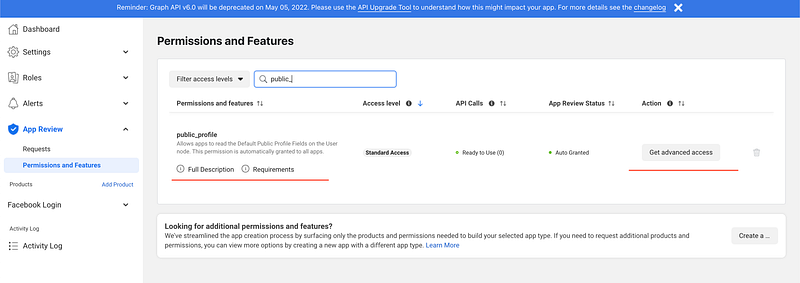
Facebook restrict that, you must applied for advance access in order to use login features. Go to the App Review, and find the required permission. Click on the Get Advance access button and just follow the steps
After complete request, we need to declare our the redirect URL,
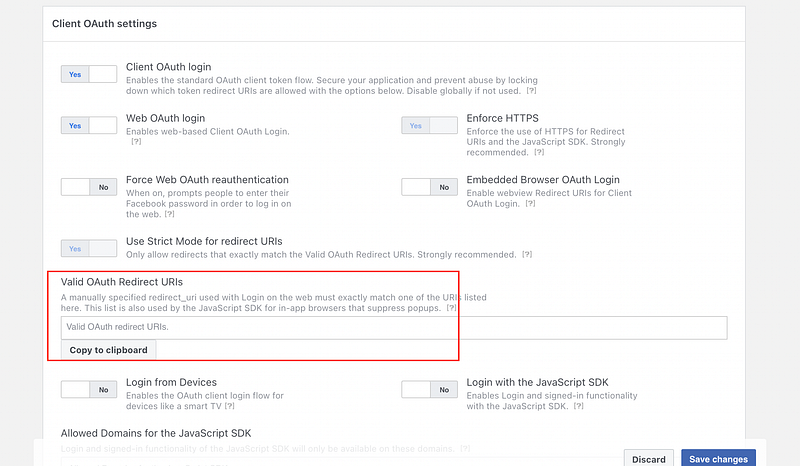
For this tutorial, we will use redirect callback URL as
http://localhost:8010/socialite/auth/facebook/callback
If you are using localhost, you don’t need to fill the redirect URI. Only for staging and production url can be filled.
So, why we need redirect callback? It is because users will be redirected to this path after they have authenticated with Facebook. You can add many redirect URL such as for Production URL, Staging URL and for your local URL. The path will be appended with the authorization code for access, and must have a protocol. It can’t contain URL fragments, relative paths, or wildcards, and can’t be a public IP address.
After that, you may find your client ID and Client secret key at the Settings Page. Copy the Client ID, Client Secret and callback URL and replace it in your .env file
FACEBOOK_CLIENT_ID=XXXXXX
FACEBOOK_CLIENT_SECRET=XXXXXXX
FACEBOOK_REDIRECT_URI=http://localhost:8010/socialite/auth/facebook/callback
Create Socialite Controller and Routes
Next, we will create a controller to handle to routes.
- Route for trigger the facebook login
- Route for receiving callback information from facebook redirect URI
php artisan make:controller FacebookSocialiteController
The controller will look like this
class FacebookSocialiteController extends Controller
{
    public function handle(Request $request)
    {

    }
    public function handleCallback(Request $request)
    {

    }

}
Referring to the socialite documentation, it pretty simple approach. We can just add the piece of socialite handle code into our controller
public function handle(Request $request)
{
return Socialite::driver('facebook')->redirect();
} public function handleCallback(Request $request)
{
$sUser = Socialite::driver('
}
Now, as you can see handleCallback method handle the user information from facebook callback URI. Let’s create a logic from the user that we received. You might want IF authenticated user is not exist yet in the database, you can create automatically. IF exist, then we update the information and auto-login them.
public function handleCallback(Request $request)
{
$sUser = Socialite::driver('facebook')->user(); $user = User::query()->whereEmail($sUser->getEmail())->first(); if (!$user) { // IF not exist
$user = User::create([
'name' => $user->getName(),
'email' => $user->getEmail(),
'profile_photo_path' => $user->getAvatar(),
'social_provider_id' => $user->getId(),
'social_provider_name' => '
'email_verified_at' => now(),
]);
} else {
$user->update([
'name' => $user->getName(),
'email' => $user->getEmail(),
'profile_photo_path' => $user->getAvatar(),
'social_provider_id' => $user->getId(),
'social_provider_name' => '
]);
} return redirect()->login('dashboard')->withMessage('Login Success');
}
The controller logic is finished. Now we need to register the routes. Open web.php or any routes where your system located,
Route::prefix('socialite')->group(function () {
   Route::get('auth/facebook/authenticate', [FacebookSocialiteController::class, 'handle'])
    ->name('connect')->middleware('signed');

   Route::get('auth/facebook/callback', [FacebookSocialiteController::class, 'handleCallback']);

});
Lastly, Create a button
<a href="{{ URL::signedRoute('connect', ['facebook']) }}">
        Facebook
</a>
You may put it in login page where user able to reach the button like this sample page below
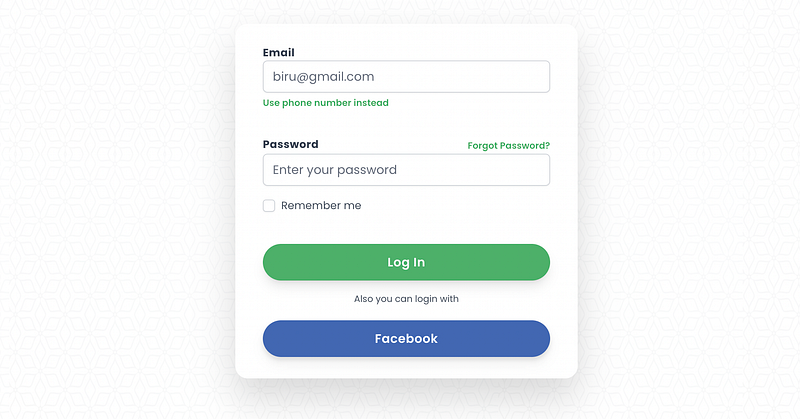
At this point, you might be able to logged in using your facebook account. If you encounter any errors, may drop a comment or google it 😅. That’s all guys! Thanks for your time
References
Found this helpful?
If this article saved you time or solved a problem, consider supporting — it helps keep the writing going.
Originally published on Medium.
View on Medium