Cross-platform, searchable field-level database encryption

Most of the system nowadays may contain sensitive personal data in the database. If an unauthorised person gains access to the database, all sensitive information can be viewed, which is obviously undesirable right?
The solution that most developer do is to encrypt the data before storing it so that unauthorized person cannot read it but your programme can still decrypt it when you need to display or operate with the data. The most common encryption are symmetric encryption such as AES.
However, encryption makes it harder to search over the data once it is encrypted which is both what encryption is needed for and a huge operational downside without a proper searching algorithm. Here is where Cipherweet, a searchable field-level blind-indexing database come in handy.
What is CipherSweet
CipherSweet is a backend library developed by Paragon Initiative Enterprises for implementing searchable field-level encryption. It works as a normal encrypt and decrypt values but in a very secure way. Plus, it is also able to create blind indexes for the related fields which can be used to perform searches on encrypted data. It uses blind indexing with the fuzzier and Bloom filter strategies to allow fast searching with a minimal data leakage.
For more deeper information, you may read here.
Integrate CipherSweet in Laravel
For this article, we will try to implement CipherSweet in Laravel project using a package from Spatie— laravel-ciphersweet. This package is a wrapper over CipherSweet which allows us to easily use it with Eloquent models with very minimal implementation.
Lets get started
Install the package via composer:
composer require spatie/laravel-ciphersweet
Publish and run the migrations
php artisan vendor:publish --tag="ciphersweet-migrations"
php artisan migrate
This will create a new table blind_indexes . This table will be use to store a hashed index value along with morph column.
Generate CipherSweet encryption key
Before start, we need to generate an encryption key. This can be achieve using a command:-
php artisan ciphersweet:generate-keyAfter generate it,
Here is your new encryption key
7a83bdb0cf86601f4aa10340e3cbbd0a28511c4c3a089b9fe11846541ea9e4bf
First, you should encrypt your model values using this command
ciphersweet:encrypt <MODEL-CLASS> 7a83bdb0cf86601f4aa10340e3cbbd0a28511c4c3a089b9fe11846541ea9e4bf
Next, you should add this line to your .env file
CIPHERSWEET_KEY=7a83bdb0cf86601f4aa10340e3cbbd0a28511c4c3a089b9fe11846541ea9e4bf
Add the key to your .env file. This encryption key is used to encrypt your values at rest when update or create action performed.
CIPHERSWEET_KEY=XXXXXXXXX
Preparing model and attributes
To start, add interface CipherSweetEncrypted and UsesCipherSweet trait in your selected model. Let’s say we use User model
class User implement CipherSweetEncrypted {
    use UsesCipherSweet;
    ...
    ...
}
After that, you’ll need to implement the configureCipherSweet method to configure which field use want to encrypt using CipherSweet.
public static function configureCipherSweet($encryptedRow): void
{
   $encryptedRow
      ->addField('staff_id')
      ->addBlindIndex('staff_id', new BlindIndex('staff_id_index'));
}
The example above will encrypt the staff_id field on the User model. It also adds a blind index in the blind_indexes table which allows you to search on it.
If you want to encrypt more than 1 column,
public static function configureCipherSweet($encryptedRow): void
{
   $encryptedRow
      ->addField('staff_id')
      ->addField('email')
      ->addBlindIndex('staff_id', new BlindIndex('staff_id_index'))
      ->addBlindIndex('email', new BlindIndex('email_index'))
}
Encrypting model (Existing data)
Warning!
Before run this command, please make sure do a full backup of your database. Once you run the CipherSweet encryption model command, it will encrypt everything and it irreversible.
> php artisan ciphersweet:encrypt \\App\\Models\\User YOUR_KEY
 10/10 [▓▓▓▓▓▓▓▓▓▓▓▓▓▓▓▓▓▓▓▓▓▓▓▓▓▓▓▓] 100%
You need to have double backslash in order the check if the model class is exist.
The command will update all the encrypted fields and blind indexes of the model. If you have a lot of rows, this process can take a long time since encryption is a resource intensive operation. Don’t worry if it times out for some reason, the command is always restartable and only tries to encrypt models when it’s needed.
Generate Fake Data
Let’s create a fake data using faker in Tinker to see as if works
php artisan tinker
And create 10 fake user
\App\Models\User::factory(10)->create();
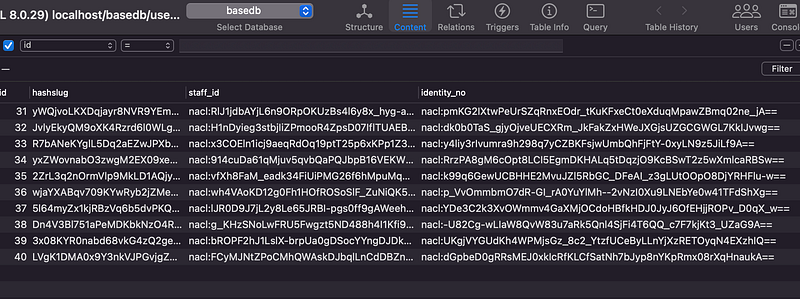
When you open the database, you will see the data generated are encrypted as per requirement
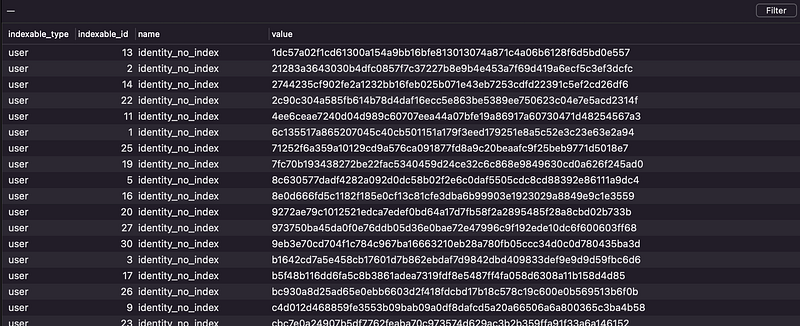
If you open the blind_indexes table, you should see their blind index value in hash related to the model ids
Searching on blind indexes
Good thing about blind indexes is that even though values are encrypted, you can still search them. The blind indexes will have been built up when you ran the command to encrypt the model values. The package also provides a whereBlind and orWhereBlind scope to ease you searching on blind indexes
The first parameter is the column, the second the index name you set up when calling ->addBlindIndex, the third is the raw value, the package will automatically apply any transformations and hash the value to search on the blind index. For example :
$user = User::query()
   ->whereBlind('staff_id', 'staff_id_index', '565838422')
   ->orWhereBlind('email', 'email_index', 'hafiq@terato.com')
   ->first();
When you query, if the result found, you would not get the encrypted value because it already decrypted on the fly.
Rotating Key (Optional)
In case where you suspect that somebody got a hold of your encrypting key, this package provide the ability for you to re-encrypt the values. You can simply generate another encrypting key :-
php artisan ciphersweet:generate-keyAnd use the new generated encryption key in the encryption model command
php artisan ciphersweet:encrypt "App\User" <your-new-key>
This will update all the encrypted fields and blind indexes of the model. Once this is done, you can update your environment or config file to use the new key. Just to make sure you backup first before re-encrypt to avoid data lost.
Conclusion
CipherSweet is a very powerful library. Please note that don’t over engineer for something that not necessary for your system because when it come to encryption, performance and resource would be intensive and comes with some downsides.
References
Found this helpful?
If this article saved you time or solved a problem, consider supporting — it helps keep the writing going.
Originally published on Medium.
View on MediumYou might also like
The orWhere Trap: How SQL Operator Precedence Breaks Multi-Tenant Data Isolation in Laravel
March 24, 2026
Laravel Jetstream database session with multiple user table
September 29, 2021