PgBouncer takes 30 minutes to set up. Not setting it up might cost you the next time traffic spikes.
Most Laravel applications running on PostgreSQL share a quiet design flaw. It’s not a bug in your code. It’s not a misconfiguration in Eloquent. It’s the fundamental way PHP and Postgres work together, and if you’ve never thought about it, you’re probably one traffic spike away from learning it the hard way.
Here’s the short version: every request your Laravel app handles opens a new connection to Postgres. When the request ends, that connection closes. At low traffic, this is fine. At scale, it’s a problem. At unexpected scale, it’s an incident.
Let me show you why, and what to actually do about it.
What Happens When Laravel Talks to Postgres
PostgreSQL handles connections differently from MySQL. Each Postgres connection spawns a dedicated backend OS process. Not a thread. A process.
That means when 50 concurrent requests hit your Laravel app, Postgres spins up 50 separate processes. Each one consumes RAM, gets a scheduler slot and needs the kernel to context-switch between it and everything else running on your server. Studies and community benchmarks put this overhead at roughly 5 to 10 MB per connection when you account for the process itself plus shared memory allocations, though the exact number depends on your workload and shared_buffers configuration.
The default PostgreSQL max_connections is 100. Out of the box, that's your ceiling.
So you’ve got 100 connection slots. Some of those are reserved for superusers. Some are used by your background jobs, your cron tasks, your Horizon workers, your scheduler. Now you’re running a Laravel app under any meaningful production load and you’re competing for the same 100 slots that every other process on that server wants.
When you hit the ceiling, new connection attempts fail. Not “wait a moment and retry” fail. Just fail. Your users get a 500 error. Your logs fill up with FATAL: remaining connection slots are reserved for non-replication superuser connections and your on-call phone starts buzzing.
You can raise max_connections. But that's treating the symptom, not the cause. Raising it to 500 means Postgres now has to juggle 500 processes when you're busy, and the overhead compounds. There's a well-documented degradation curve where throughput drops as connections increase past a certain point because of context-switching pressure alone.
The actual fix is connection pooling. Specifically, PgBouncer.
What PgBouncer Does
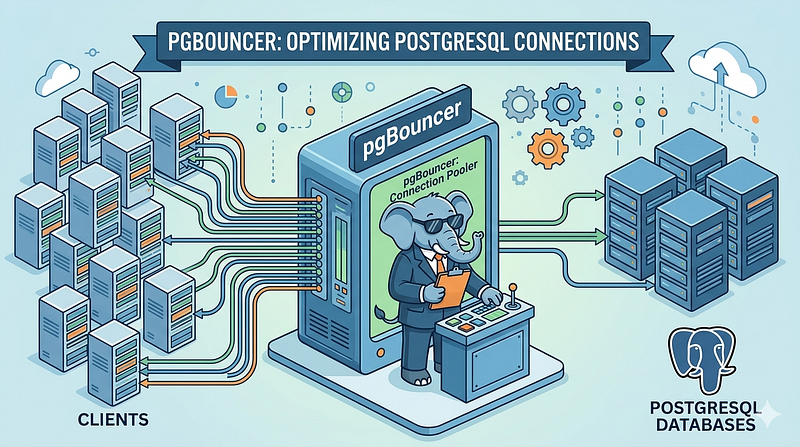
PgBouncer sits between your application and Postgres. Your Laravel app connects to PgBouncer on a port (say, 6432). PgBouncer maintains a smaller pool of real Postgres connections and hands them out as needed.
From your application’s perspective, it’s talking to Postgres. It sends queries, gets results. Normal. Behind the scenes, PgBouncer is multiplexing hundreds of application connections onto a handful of actual database connections. Your app thinks it has 200 open connections. Postgres sees 20.
This is not a new idea. PgBouncer has existed since 2007. The latest stable release as of December 2025 is 1.25.1. It’s maintained, well-understood, and runs as a single lightweight process that uses almost no resources itself.
The question isn’t whether it works. The question is why you haven’t set it up yet.
The Three Pooling Modes (and the One You Should Use)
PgBouncer supports three pool modes:
Session mode assigns one Postgres connection per client connection for the duration of the session. It’s the safest option because it preserves all session-level state, but it provides the least benefit. You’re still holding a real Postgres connection for every connected client. For long-lived connections, this is basically useless for pooling purposes.
Transaction mode assigns a Postgres connection for the duration of a transaction, then returns it to the pool when the transaction commits or rolls back. This is where the real gains come from. A hundred simultaneous clients can share ten Postgres connections as long as they’re not all in active transactions at the exact same moment. For typical web request patterns, they’re not.
Statement mode releases the connection after each individual SQL statement. Almost no applications work correctly with this. Skip it.
For a Laravel application, transaction mode is what you want. The pool efficiency is dramatically better and most CRUD-heavy workloads fit the pattern well.
There’s one catch, and it’s the one thing that trips people up.
The Prepared Statement Problem
Laravel uses PDO under the hood. PDO, by default, sends prepared statements as named protocol-level statements. These statements are tied to a specific Postgres backend process.
In PgBouncer transaction mode, a client’s connection might be handed a different Postgres backend process after each transaction. If your prepared statement was created on backend process A and your next query tries to execute it on backend process B, Postgres returns an error: prepared statement "pdo_stmt_00000001" does not exist.
This is the bug you’ll hit in production if you drop PgBouncer in front of Laravel without addressing prepared statements.
There are two ways to handle it.
Option 1: Disable PDO prepared statements in Laravel.
In your config/database.php, add the following option to your Postgres connection:
'pgsql' => [
    'driver' => 'pgsql',
    'host' => env('DB_HOST', '127.0.0.1'),
    'port' => env('DB_PORT', '6432'), // PgBouncer port
    'database' => env('DB_DATABASE', 'forge'),
    'username' => env('DB_USERNAME', 'forge'),
    'password' => env('DB_PASSWORD', ''),
    'charset' => 'utf8',
    'prefix' => '',
    'schema' => 'public',
    'sslmode' => 'prefer',
    'options' => [
        PDO::ATTR_EMULATE_PREPARES => true,
    ],
],
This forces PDO to emulate prepared statements in PHP rather than using native Postgres prepared statements. The query is constructed locally and sent as a plain SQL string. Works fine for the vast majority of use cases.
One gotcha: when you enable this, Laravel’s default Postgres PDO connection doesn’t handle boolean values correctly. It casts them to 1 or 0 instead of the true or false strings Postgres expects. This will break queries with boolean columns.
The community fix is the vermaysha/pgbouncer-laravel-extension or t1nkl/postgres-pgbouncer-extension packages. Both provide a custom connection class that handles the boolean type casting correctly. Install one, swap the driver to the custom class name they expose, and you're done.
Option 2: Use PgBouncer 1.21 or later with max_prepared_statements.
PgBouncer 1.21 added native support for prepared statements in transaction mode. When you set max_prepared_statements to a non-zero value in your PgBouncer config, PgBouncer tracks named prepared statements and ensures they're available on whatever backend process your client ends up on.
Since the current release is 1.25.1, this option is available. The configuration looks like:
[pgbouncer]
max_prepared_statements = 200
This is the cleaner solution if you want to avoid messing with PDO configuration. That said, it does add a small amount of PgBouncer-side tracking overhead. For most apps it’s negligible. Test both and pick whichever fits your setup.
A Minimal PgBouncer Config That Works
Here’s a configuration you can actually start from. This assumes you’re running PgBouncer on the same server as your app, and Postgres is on a separate host (or localhost, if it’s all on one box).
[databases]
myapp = host=127.0.0.1 port=5432 dbname=myapp
[pgbouncer]
logfile = /var/log/pgbouncer/pgbouncer.log
pidfile = /var/run/pgbouncer/pgbouncer.pid
listen_addr = 127.0.0.1
listen_port = 6432
auth_type = md5
auth_file = /etc/pgbouncer/userlist.txt
pool_mode = transaction
max_client_conn = 200
default_pool_size = 20
server_reset_query = DISCARD ALL
ignore_startup_parameters = extra_float_digits
The important numbers here are max_client_conn and default_pool_size. The first is how many application connections PgBouncer will accept. The second is how many real Postgres connections it will hold per (user, database) pair.
With this config, 200 application connections share 20 real Postgres connections. That’s a 10:1 reduction in Postgres-side process overhead.
You’ll need to create the userlist.txt with your Postgres credentials. PgBouncer expects an MD5 hashed password there. The format is:
"username" "md5<hash>"The hash is the MD5 of the password concatenated with the username. You can generate it with:
echo -n "passwordusername" | md5sumThen prefix the result with md5.
Session State You’re Probably Not Thinking About
Transaction mode breaks anything that relies on session-level state persisting across transactions. The things that catch people out:
Advisory locks are session-scoped. If you’re using Postgres advisory locks for distributed locking in your app (including Laravel’s Cache::lock() when backed by Postgres), they won't behave correctly in transaction mode. The lock acquired in one request may be held on a different backend process than the one handling the next request.
Temporary tables are session-scoped. If your code creates a TEMP TABLE within one transaction and expects it to exist in a subsequent transaction within the same "session," that will fail.
SET commands for session variables won’t persist either.
If you’re using any of these, test with transaction mode carefully before deploying. Session mode may be the right call, even at reduced efficiency. Most Laravel apps don’t use session-level Postgres features, but it’s worth auditing your codebase before assuming.
Also: if you’re using server_reset_query = DISCARD ALL, PgBouncer will issue a DISCARD ALL before returning a connection to the pool. This resets temporary tables, prepared statements (when using session mode), and session parameters. Keep it in for cleanliness.
Monitoring It
After you’ve deployed PgBouncer, you need to verify it’s actually working. Connect to PgBouncer’s admin console (it exposes a pseudo-database called pgbouncer):
psql -h 127.0.0.1 -p 6432 -U pgbouncer pgbouncerThen run:
SHOW POOLS;This shows active client connections, idle server connections, waiting clients and more. If cl_waiting is non-zero, clients are queuing for connections. You either need to raise default_pool_size or look at why your queries are holding connections longer than expected.
SHOW STATS;This gives you query throughput per second and total bytes transferred. Useful as a baseline.
Integrate these into your existing monitoring stack. If you’re on Prometheus, there’s a pgbouncer_exporter (maintained at jbub/pgbouncer_exporter on GitHub) that exports PgBouncer metrics in the Prometheus format. Point Grafana at it and you'll have dashboards showing connection utilization in real time.
The Part Where I Tell You This Is Not Optional
Here’s my honest assessment: if you’re running a Laravel app on Postgres in production and you have more than a handful of concurrent users, you should have PgBouncer. Full stop.
Not “consider it.” Not “evaluate when you scale.” Now.
The argument against it is usually “we haven’t had problems yet.” That’s survivorship bias dressed up as engineering judgment. You haven’t had a traffic spike that exposed the problem. Or you have had degraded performance and attributed it to something else. Or your max_connections is set to 500 and you're just paying the overhead quietly.
The argument for it is that it takes about 30 minutes to install, configure and test. The operational overhead after that is nearly zero. PgBouncer is one of the most boring, reliable pieces of infrastructure in the Postgres ecosystem. The fact that it’s been around since 2007 and is still the standard answer is a feature, not a red flag.
The prepared statement issue trips people up, but it’s a known, documented problem with known solutions. The boolean casting issue in Laravel is annoying but handled by community packages that have existed for years.
There’s no good reason not to do this, and at least one very bad reason to skip it: your app falling over at the worst possible moment because Postgres ran out of connections while your users were trying to use it.
Set up PgBouncer. Update your port. Handle the prepared statements. Then move on to something that actually requires more than 30 minutes of your time.