The toolchain is the easy part. The gate is what changes everything.
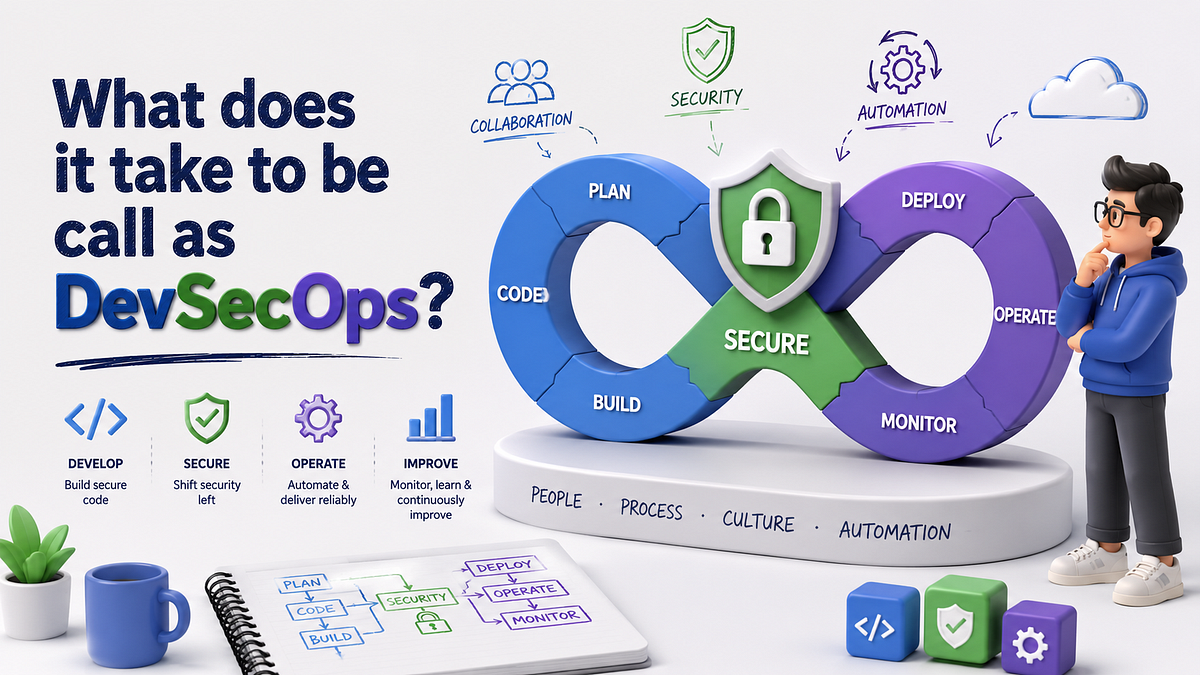
Read Here for FREE
The pipeline runs. PHP 8.4 matrix workers finish their test jobs in just over 6 minutes each. A SonarQube SAST scan runs for 14 minutes and returns no critical findings. Trivy inspects the container image and comes back clean. The dependency audit takes fifteen seconds and flags nothing. Deploy runs. 5 minutes later, the application is live.
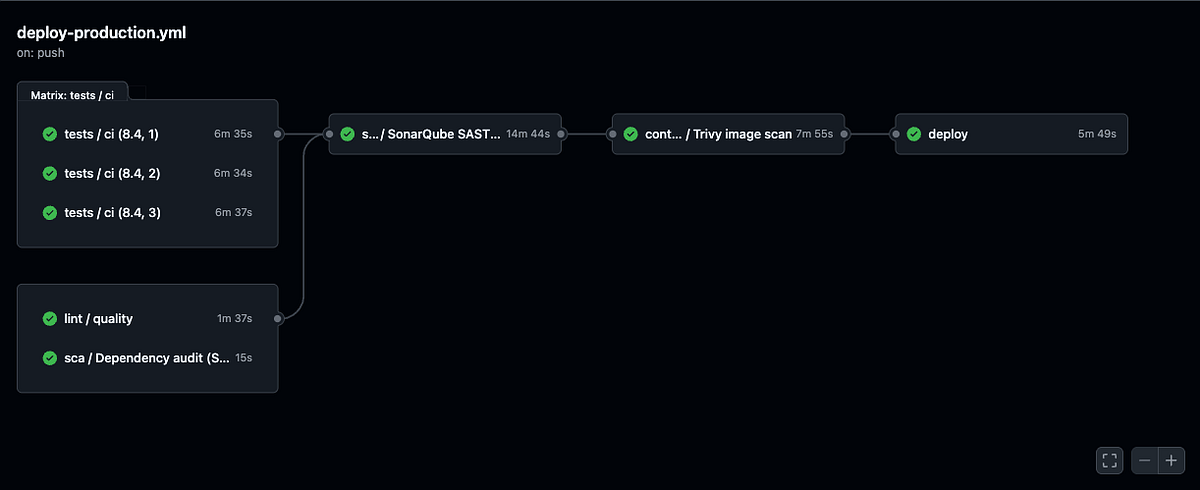
Can you call this DevSecOps? ☝️
The question is less obvious than it sounds. You have SAST, SCA and container scanning running on every push. That is more than most teams ship with. The pipeline is real. The tools are real. The scans are real. But whether the label applies comes down to one question you probably have not answered explicitly: does a failing scan block the deploy, or does it just produce a report that sits in a dashboard until someone remembers to look?
The answer to that question is the entire difference. But it is not the only question worth asking. Before the label sticks, 4 more deserve honest answers: where does security actually fit in your development cycle? Do you need enterprise-grade tooling to legitimately claim DevSecOps? And what does the term even mean when you ask a developer versus a security practitioner?
Is That Pipeline Already DevSecOps?
Short answer: almost.
The toolchain is right. SonarQube for static analysis, Trivy for container vulnerabilities, a dependency audit for third-party libraries: these cover 3 of the most common attack surfaces. The fact that all run on every push, not on a weekly schedule or only in staging, is itself meaningful.
Most teams do not do this.
But having the right tools in your pipeline is not the same as having DevSecOps. The distinction is governance. A pipeline with security tools tells you when something is wrong. A DevSecOps pipeline prevents the wrong thing from shipping. Those are related but different outcomes.
The gap almost always lives in the same 2 places: the tools are not configured to fail the build when they find something and there is no defined process for who fixes a finding and when. Fix those 2 things and the pipeline described above becomes DevSecOps in a meaningful sense, not just in the marketing sense.
What Each Layer of That Pipeline Actually Covers?
Before getting to the governance question, it is worth being precise about what SAST, SCA and container scanning each see, since its do not overlap.
SAST (SonarQube in this case) reads your source code without executing it. It looks for patterns that indicate vulnerabilities: SQL queries built from user input without parameterization, output written to the DOM without escaping, secrets committed into version control, functions with known dangerous behaviour. It catches problems in your own code at the static analysis layer, before any runtime context exists.
Here is what a SonarQube SAST scan would catch in a PHP codebase:
// Raw query using a URL parameter directly, no binding. SAST flags this pattern.
$userId = $_GET['id'];
DB::statement("SELECT * FROM users WHERE id = $userId");
The fix is not complicated. Laravel’s Eloquent ORM handles parameterization automatically, which is one reason SAST findings tend to close faster in a Laravel project than in a raw PHP one. The ORM removes the injection surface entirely:
// Eloquent's findOrFail binds internally, no raw interpolation possible
$user = User::findOrFail($request->integer('id'));

// Or for a raw query, bind the value explicitly with a placeholder
$user = DB::selectOne('SELECT * FROM users WHERE id = ?', [$request->integer('id')]);
SCA (Software Composition Analysis, the dependency audit job in the pipeline above) reads your composer.lock or package-lock.json and checks each pinned library version against published CVE databases. A fifteen-second runtime suggests this is probably GitHub’s built-in Dependency Review action or a lightweight Snyk configuration. It will not catch vulnerabilities in your own code. Its scope is strictly third-party dependencies with public advisories.
Container scanning (Trivy) inspects the built image: the base OS packages, the runtime environment, anything layered into the final artifact. It catches vulnerabilities that neither SAST nor SCA see. Packages installed by the Dockerfile or pulled in by the base image are invisible to both source-level tools. Trivy runs post-build, which means it catches problems that would survive into production regardless of how clean the application code is.
Together, these cover a meaningful surface.
Datadog’s 2026 State of DevSecOps report found that 87% of organisations are running at least one known exploitable vulnerability in deployed services. A pipeline with all scanners puts a team materially ahead of that majority.
So what is missing?
The Difference Between a Scanning Pipeline and a DevSecOps Pipeline
CI/CD ships changes. DevSecOps governs risk. The machinery looks similar; the outcome is different.
A scanning pipeline runs security tools and produces output. A DevSecOps pipeline enforces security policy: a finding does not just get logged, it changes what can happen next. That distinction lives entirely in whether the gates are configured.
Gates That Block
When a scanner finds something, does anything stop?
By default, most security tools produce findings. They write them to a log, surface them in a dashboard, append them to a JSON artifact and exit the job with code 0 so the deploy continues unaffected. The finding ages in a dashboard until someone looks at it, which is sometimes never.
That is useful. It is not a gate.
The configuration change for Trivy is one line:
- name: Container security scan
  uses: aquasecurity/trivy-action@master
  with:
    image-ref: your-image:${{ github.sha }}
    format: 'table'
    exit-code: '1'
    severity: 'CRITICAL,HIGH'
    ignore-unfixed: true
exit-code: '1' makes Trivy fail the job when it finds a critical or high CVE. Pair that with a GitHub branch protection rule requiring the job to pass before any PR can merge and you have a security gate. Not a report. A gate.
SonarQube has an equivalent: quality gates. A quality gate is a configurable pass/fail threshold applied to every code analysis result. The conditions you set can include things like no new blocker-level issues, security rating must be A, new code coverage above a minimum threshold. When set up correctly and connected to your repository via the SonarQube GitHub integration, a failing quality gate blocks the pull request. A green badge in the PR when it passes; a red one that prevents the merge when it does not.
Without this configuration, SonarQube is a dashboard. Configure it, add branch protection and it becomes a gate.
The distinction matters more than it sounds. A scan that does not block a bad deploy is a log file. A scan that blocks a bad deploy is a control. DevSecOps requires controls.
Remediation Ownership
When the scan finds something, who owns fixing it?
This is where most teams that have added scanning to their pipelines stop short. The scans run on schedule, findings accumulate in a dashboard nobody owns and 6 months later nobody can tell you which issues are real, which are false positives and which slipped into production anyway. This is not a hypothetical; it is the standard outcome when tooling gets added without a process attached to it.
A DevSecOps process answers the ownership question automatically. The finding gets filed, assigned to the developer who introduced it, tracked to a sprint and closed when fixed. SonarQube can assign issues to the committer automatically. GitHub’s Dependency Review action outputs findings in a format you can parse into GitHub Issues with a short workflow step.
This is process, not tooling. The tooling is already there.
A lightweight SLA works well for small teams: CRITICAL findings resolved within 72 hours, HIGH findings within the current sprint. Not enterprise compliance theatre. Just a policy that findings do not age indefinitely.
Feedback Before the Push
The pipeline runs after code reaches the remote branch. By that point, the developer has written the code, reviewed it, opened a PR and moved on mentally. Catching a vulnerability at this stage is valuable. It also costs a context switch, a fix and another pipeline run.
DevSecOps at scale shifts the feedback loop earlier. SonarLint, the IDE plugin for SonarQube, surfaces findings in the editor as the developer types, before any push happens. The same issue that would fail a quality gate in CI appears as an inline warning in VS Code or IntelliJ while the code is being written.
This does not replace the CI gate. The gate still needs to exist, because not everyone installs the plugin and because the pipeline is the enforcement boundary. SonarLint reduces how often the gate has to fire. For a solo team, IDE integration is a quality-of-life improvement. The gate is not optional.
Where DevSecOps Actually Lives in Your Development Cycle?
DevSecOps is not a single job that runs in CI. It is a set of controls distributed across every phase of the development cycle, each one catching a different class of problem that the others would miss.
Mapping the tools to the phases makes the design logic clearer.
In the editor (pre-commit): SonarLint and similar IDE plugins catch code-level issues before anything touches the repository. This is the cheapest feedback you can get. No pipeline cost, no context switch, no PR to revise. A developer writing a raw SQL query sees the SAST flag inline, in the same window, while the intent is still fresh.
At the pull request (pre-merge): SAST and SCA both belong here. SAST runs on the new code; SCA checks whether any dependency changes introduce known vulnerabilities. The branch protection rule ties both jobs to the PR: no green checks, no merge. This is the enforcement gate. It is the line between “security as advisory” and “security as policy.”
At build time (post-merge, pre-deploy): Container scanning runs here because the image does not exist until after the build. Trivy sees the final artifact, including the base image layers and anything added by the Dockerfile. A PHP application can have clean source code and a CVE-ridden base image; only a post-build scanner finds that combination.
In staging (scheduled or pre-release): DAST belongs here. Dynamic testing sends real requests to a running application and looks for vulnerabilities that only appear at runtime. Scheduling DAST weekly against a staging environment is realistic for a small team. Blocking every push on DAST results is not: the scans are slow and the findings require human triage before they are actionable.
In infrastructure definitions (anytime): If the deployment uses Terraform, CloudFormation or Kubernetes manifests, IaC scanning checks the configuration itself. Trivy handles this in addition to container analysis. An overly permissive IAM role in a Terraform file is invisible to every application-layer scanner. IaC scanning is the only tool that sees it.
The pattern across all phases is the same. Each tool is positioned at the earliest point in the cycle where it can usefully fire. IDE feedback costs nothing but developer attention. CI gates cost a pipeline run. DAST costs a full staging deploy. The cost of catching a finding rises with how late in the cycle the tool runs. DevSecOps is, in part, an exercise in moving that cost as early as possible.
Do You Actually Need Enterprise-Level DevSecOps?
Nope. And conflating enterprise DevSecOps with DevSecOps itself is probably the most common reason teams avoid formalising their security practices.
Enterprise DevSecOps involves compliance dashboards, SIEM integration, policy-as-code frameworks, mandatory penetration testing schedules, security architecture reviews for every feature, dedicated AppSec engineers embedded in each squad and audit trails that satisfy ISO 27001 or SOC 2 reviewers. All of that is real and useful at scale. None of it is required to legitimately call a pipeline DevSecOps.
The core requirements for DevSecOps are 3 things:-
- Security tools integrated into the pipeline
- Gates that enforce findings
- A remediation process that assigns ownership.
All are achievable with the tooling already available to a solo developer.
SonarQube Community Edition is free. Trivy is open source. GitHub’s Dependency Review action is included in every repository. GitHub branch protection rules are free on public repos and included in Team plans. The financial barrier to building a compliant DevSecOps pipeline on this stack is effectively zero.
What enterprise tooling adds is scale, auditability and specialization. A large organisation needs to aggregate findings across hundreds of repositories, track compliance posture over time, assign security work to dedicated teams and produce reports that satisfy external auditors. That requires tooling that a single-repository project simply does not need.
The useful question is not “do we have enterprise DevSecOps?” It is “do our security findings change what ships?” A solo developer running SonarQube with a quality gate and Trivy with exit-code: '1' is doing DevSecOps. A team of fifty with a dedicated security team but no enforcement gates is doing security theatre.
The label is earned by the gate, not by the headcount.
DevSecOps Through Two Lenses: Developer vs. Security Practitioner
Ask a developer what DevSecOps means and ask a security practitioner the same question. You will get two accurate but structurally different answers. Understanding both makes it easier to build something that actually works for both groups.
The Developer’s View
From the development side, DevSecOps shows up as friction or as feedback, depending on how it is implemented.
Bad implementation feels like friction. Security reviews that block releases for weeks, vulnerability scanners that produce hundreds of findings with no prioritization, compliance requirements that require documenting decisions nobody cares about, gates that fire on false positives and eat pipeline time. Developers learn to route around processes that slow them down without obviously helping anything.
Good implementation feels like feedback. A SonarLint warning that catches a SQL injection before the PR opens, a Trivy gate that fails a build because the base image has a critical CVE (and points to the specific package that needs updating), a Dependency Review comment in the PR that lists the new CVEs introduced by upgrading a library. All of these give the developer information they can act on immediately, in the context where the decision was just made.
Developers accept DevSecOps most readily when it behaves like a good linter. Fast. Specific. Actionable. Quiet when there is nothing to say. The CI gate that fails 5 seconds after a push with “SonarQube quality gate failed: 1 new blocker issue, line 47” is useful. The weekly email with a PDF attachment of 140 medium-severity findings from a tool nobody knows how to use is not.
The other thing developers notice is accountability. When a finding gets automatically assigned to the person who introduced it, the pipeline is no longer a shared responsibility that diffuses into nobody’s responsibility. The code you write is the code you fix. This changes the mental model from “security is the security team’s problem” to “security is part of shipping.”
The Security Practitioner’s View
From the security side, DevSecOps is primarily about control coverage and verifiability.
A traditional security model relies on periodic audits. Penetration tests scheduled quarterly, code reviews done by the AppSec team before major releases, vulnerability scans run on a monthly cycle. The problem with periodic controls is that they create windows. A vulnerability introduced on day two of a sprint can reach production 3 weeks before the next scheduled scan. By then it may already be exploited.
DevSecOps replaces periodic controls with continuous ones. Every commit triggers a SAST scan. Every dependency change triggers a SCA check. Every build triggers a container scan. The window between introduction and detection shrinks from weeks to minutes.
For security practitioners, the gate is what makes this meaningful. Without enforcement, continuous scanning is just continuous monitoring. Monitoring tells you what is wrong. A gate prevents the wrong thing from happening. The distinction matters because the goal is not awareness of risk; it is reduction of risk. A dashboard full of findings represents awareness. A pipeline that blocks a vulnerable deploy represents reduction.
Security practitioners also think about audit trails in a way developers typically do not. A gate that blocks a deploy creates a record: what was found, when, in which commit and what happened as a result. That record is useful for post-incident analysis, compliance evidence and trend analysis. A report that nobody acted on creates no useful record of anything.
The tension between the 2 groups is real. Developers optimise for throughput; security practitioners optimise for certainty. DevSecOps is the negotiation layer between them. Gates represent the agreed-upon contract: below this threshold, we do not ship. Above it, security gets out of the way and the developer ships. Neither group gets everything they want. Both groups get enough to do their job.
Giving the Pipeline Its Due
None of this is a criticism of the pipeline described above. It is context.
A matrix of parallel test runners across PHP 8.4 versions, combined with SAST, SCA and container scanning running on every push, is not a toy setup. It is a production-grade CI configuration that the majority of teams shipping real software do not have. The Datadog data makes this concrete: 87% of organisations are running code with known exploitable vulnerabilities. A clean Trivy scan and a passing SonarQube analysis already puts a team well outside that group.
There is a useful detail from the same Datadog report: only 18% of vulnerabilities labeled critical at the scanning layer remain critical once runtime context is applied. A pipeline that does quality scanning is already doing more accurate prioritization than most teams manage manually. The issue is not the scanning. It is what happens when the scan finds something.
A pipeline that scans but does not gate produces security awareness. A pipeline that gates produces security accountability. DevSecOps is the latter.
What a Complete Picture Also Includes
Two additional layers exist in a full DevSecOps setup that the pipeline above does not cover. They are not urgent for a small team, but worth knowing.
DAST (Dynamic Application Security Testing) tests the running application, not the code. It sends malformed requests, probes authentication flows, tries injection patterns against live API endpoints. SAST reads code; DAST attacks it. Some vulnerabilities only manifest at runtime: race conditions in request handling, authentication bypasses that depend on session state, business logic flaws that exist in technically correct code. OWASP ZAP and Burp Suite’s CI integration handle this category. For a solo team, scheduling DAST weekly against a staging environment is more practical than blocking every push. DAST is slow and generates noise that needs triaging before it becomes actionable.
IaC scanning covers the infrastructure definitions themselves. If the deployment uses Terraform, CloudFormation or Helm charts, misconfigured security groups, overly permissive IAM roles and unencrypted storage buckets represent vulnerabilities that no amount of SAST will find. Trivy handles IaC scanning too, beyond container images. It can scan Terraform files for misconfigurations against the same Aqua Security rule sets it uses for container analysis.
Three Changes That Close Most of the Gap
For a team running SAST, SCA and container scanning without enforcement, 3 changes move from “pipeline with security tools” to “DevSecOps pipeline”:
- Add
exit-code: '1'to the Trivy step. Configure a SonarQube quality gate with at minimum a no-new-blocker-issues rule. Make the scans consequential: a finding should change whether the code can ship. - Add branch protection rules in GitHub requiring both scan jobs to pass before merging. The branch protection rule is the enforcement boundary. Without it, a developer can merge a PR manually even when a scan job has failed.
- Create a lightweight SLA for findings: CRITICAL within 72 hours, HIGH within the current sprint. Assign on creation. Do not let findings accumulate.
Once those 3 are stable, add SonarLint to the team’s editors. The gate still runs; the IDE integration reduces how often it has to fire.
The Gate Is What Changes It
The first time SonarQube quality gate blocks a production deploy because a PR introduced a blocker-level security issue, that is when a scanning pipeline becomes a DevSecOps pipeline. The tools were already there. The gate changed what they meant.
DevSecOps is not a certification you earn by installing the right tools, hiring a security team or passing an audit. It is the outcome of a specific design decision: making security findings consequential. When a vulnerable dependency cannot merge, when a SAST finding cannot deploy, when a container with a known exploit cannot reach production: that is DevSecOps. The label follows the gate. Not the other way around.
The pipeline described at the top of this article is one configuration change and one process decision away from earning it.


