Why losing your TOTP device reveals your security architecture and how Laravel developers should build recovery systems that truly protect accounts
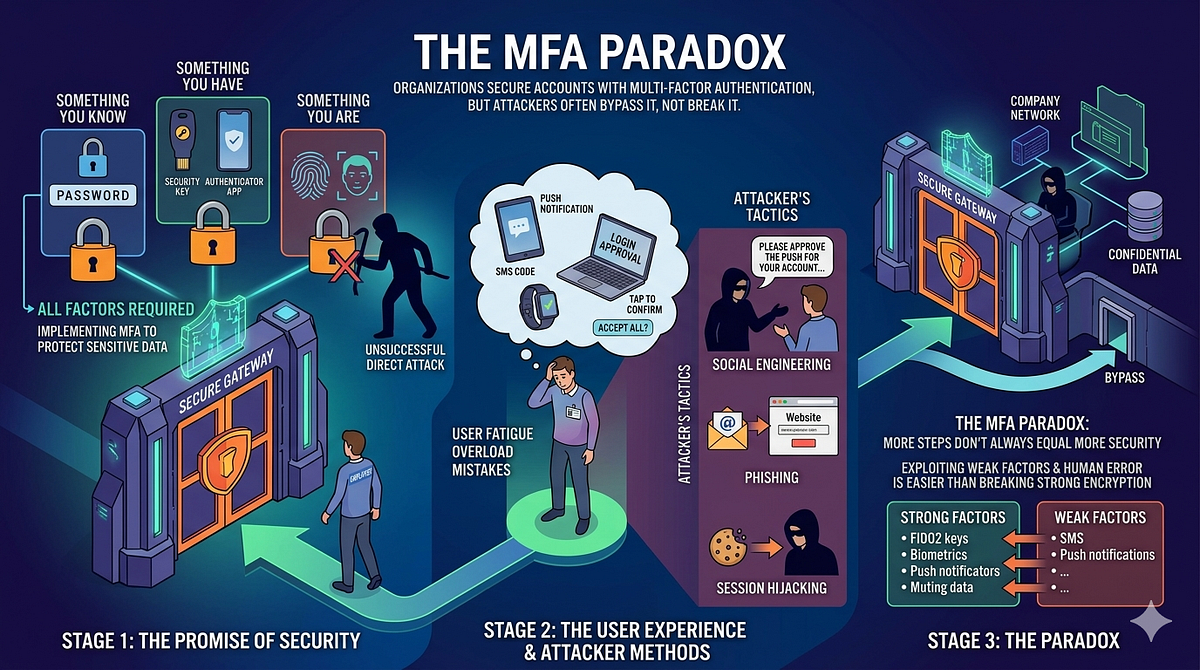
Multi-factor authentication has become the standard defense against account takeover. Yet for most users, the relationship with MFA is fragile. They store recovery codes nowhere, they skip backup authenticators and then their phone gets wet, stolen or upgraded. The moment they try to log in to their account, they face a choice that reveals something important about how security-conscious a platform really is: will you help them regain access, and if so, how much security are you willing to trade away?
This tension between usability and security is not academic. It’s where most real-world account recovery systems fail. A company might implement industry-standard TOTP-based MFA but then hand users a recovery path so weak that the MFA becomes theater. Conversely, a platform might refuse all recovery and lock users out permanently, which sounds secure until a paying customer loses access and the support team has no legitimate pathway to help them.
The challenge is that account recovery is itself a threat surface. Every recovery mechanism is an attack vector. Attackers know that losing a phone is common, so they exploit recovery flows by impersonating users. This is not a theoretical attack. The Okta breach of 2023 demonstrated that even companies with sophisticated security infrastructure can see attackers bypass their controls through session hijacking and lateral movement. The June 2024 Twilio/Authy incident exposed phone numbers for millions of users, a reminder that SMS-based recovery methods distribute keys to multiple channels that can all be compromised.
Building account recovery correctly means making hard choices about what information proves you are who you claim to be. It means implementing controls that slow down recovery, not to be annoying but to give legitimate users time to notice if someone else is trying to take their account. It means writing code that logs every step of the process so you can investigate if something looks wrong.
This article explores three distinct approaches to MFA account recovery, the security trade-offs each makes and how to implement them safely in Laravel.
The TOTP Lock-Out Problem
TOTP, or Time-based One-Time Passcode, is a standardized algorithm defined in RFC 6238. When a user adds TOTP to their account, they scan a QR code with an authenticator app like Google Authenticator, Authy, 2FAS, Microsoft Authenticator or dozens of others. That app stores a shared secret. Every 30 seconds, it generates a six-digit code based on the current time and that secret. The server validates the code against the same algorithm.
The problem is location. That secret lives on the user’s phone. If the phone is lost, stolen or broken, the secret is inaccessible. The user cannot generate codes. Without a code, they cannot log in, even if they know their password.
The standard solution is recovery codes. When a user enables TOTP, the app generates and displays ten or more single-use backup codes. The user is supposed to print these and store them in a secure location. If the user loses their phone, they can use a recovery code instead of a TOTP code to log in. In theory, this solves the problem. In practice, it does not.
Most users do not print recovery codes. Those who store them often save them in their password manager, the same password manager used to store account passwords, which means an attacker who compromises the password manager compromises the entire authentication stack. Users may screenshot the codes and email them to themselves, sending them in plaintext across email servers. Some users save them to a Notes app without any encryption. The recovery codes are supposed to be a backup plan but they become a second copy of the master key stored in an even less secure location.
There is another layer to the problem: the authenticator app itself.
Google Authenticator, the most widely used TOTP app, did not support cloud backup until April 2023. For years, if you lost your phone, you lost every TOTP secret on it. Even now, many users continue using older versions of Google Authenticator or choose non-syncing alternatives like 2FAS and FreeOTP specifically because they do not want cloud backup to store their secrets. These users have created a deliberate air gap where they want their secrets to exist only on the physical device. This design choice is reasonable from a threat model standpoint but it means that anyone who loses that device and never saved recovery codes will face complete lockout.
This is not a niche problem. In surveys of developers and security professionals, losing access to a TOTP device is one of the most common causes of account lockout. Users do not plan for this scenario. They enable MFA because they are told to, not because they have thought through what happens if the device fails.
The No-Recovery Policy
Some organizations simply refuse to help. GitHub, for example, requires that organizations use a team recovery strategy where more than one person has access to sensitive accounts. But for individual users on GitHub, if you lose access to your TOTP device and did not save recovery codes, GitHub will not recover your account. You lose access.
This is the most secure policy from a purely defensive standpoint. Every recovery mechanism is an attack surface. If you eliminate recovery entirely, you eliminate that attack surface. An attacker cannot social engineer support staff to bypass MFA because there is no recovery process. An attacker cannot forge identity documents or compromise email because recovery never happens.
The cost is that legitimate users lose accounts. A developer who loses their phone and uses GitHub to store production deployment keys may face hours or days of downtime while they set up a new phone and new credentials. A small business owner might lose access to critical intellectual property. The user bears the full cost of losing their device, which creates a strong incentive for careful device security but also means that bad luck (a stolen phone, a device failure) permanently closes the door.
This policy makes sense for certain kinds of accounts. Government intelligence agencies, cryptocurrency exchanges and organizations managing high-value assets can justify telling users that device security is their responsibility and that loss of the device means loss of account access. The user accepted those terms when they chose to use single-factor authentication alternatives.
But for most web applications, no-recovery is not sustainable. Users will leave. They will give bad reviews. They will sue if they lose data they reasonably expected to recover. More importantly, a harsh no-recovery policy might actually degrade security. Users who know they will be locked out forever if they lose their device might choose not to enable MFA at all. An account with password-only authentication is less secure than an account with a recovery mechanism, even if the recovery mechanism introduces some attack surface.
Manual Recovery with Staff Review
The opposite extreme is manual recovery entirely managed by support staff. When a user cannot authenticate with TOTP and has not saved recovery codes, they contact support. A staff member verifies their identity through multiple channels before unlocking the account.
This approach places significant responsibility on support staff, but it allows for flexibility and human judgment. The process might work like this:
The user submits a recovery request and provides identifying information: the email address associated with the account, the name on the account and the approximate date when the TOTP was enabled. The support team looks up the account and begins verification.
The first check is billing information. If the account has a payment method on file, support might ask the user to confirm the last four digits of the credit card. If the account was registered with a specific company domain email, support verifies that the user still controls that email by sending a token that can only be opened in that mailbox. If the account has API keys, SSH public keys or other authentication credentials stored, support might ask the user to confirm a public key fingerprint from their records (information only the user would know).
Critical principle: none of these checks alone is sufficient. Email verification is not enough because an attacker might compromise the email account first. A credit card last-four is not enough because that information sometimes appears on financial statements that leak. The user must pass multiple checks and the checks must be independent. An attacker who compromises the email account should still not be able to complete recovery without also being able to answer questions about the billing details or provide the SSH key fingerprint.
Once the support staff member has verified identity through multiple methods, the recovery should not be instant. NIST SP 800–63B, which provides government-standard guidance on authentication and identity verification, recommends a cooldown period when access is recovered. This cooldown typically lasts at least 3 days. During the cooldown period, the legitimate user receives notifications on all contact channels associated with the account: email, phone number and any backup contact methods. This gives the user time to notice if someone else is attempting to recover their account and to cancel the recovery before it completes.
The notification should not come from the support team. It should be an automated message: “A request was submitted to recover your account at X time. If this was you, the recovery will complete at X time. To cancel this recovery, click [link].”
That cancellation link is critical. It should be a signed URL that expires after 7 days. When the user clicks it, they revoke the recovery request. This gives a legitimate user who suspects fraud a way to block the recovery without having to contact support again. Conversely, if a fraudster is attempting to take over the account, a legitimate user will see this notification and be able to shut it down immediately, provided they still have access to their email or phone.
Once the cooldown period passes and the user has not cancelled, the support staff member reviews the recovery request one more time. A different staff member should verify the decision to ensure that no single person is making the final call. Only then does the recovery proceed.
In a Laravel application, this workflow requires a database table to track recovery requests:
Schema::create('mfa_recovery_requests', function (Blueprint $table) {
    $table->id();
    $table->foreignId('user_id')->constrained()->cascadeOnDelete();
    $table->string('ip_address')->nullable();
    $table->text('user_agent')->nullable();
    $table->timestamp('request_initiated_at');
    $table->timestamp('recovery_eligible_at');
    $table->enum('status', ['pending', 'approved', 'cancelled', 'completed'])->default('pending');
    $table->text('verification_notes')->nullable();
    $table->foreignId('reviewed_by_user_id')->nullable()->constrained('users');
    $table->timestamp('reviewed_at')->nullable();
    $table->timestamp('completed_at')->nullable();
    $table->timestamps();
});
The support flow uses queued notifications to send messages to all contact methods:
class MFARecoveryRequested implements ShouldQueue
{
    public function __construct(
        public MfaRecoveryRequest $request,
        public User $user,
    ) {}

    public function handle()
    {
        // Send email
        $this->user->notify(new MFARecoveryNotification($this->request));
        // Send SMS to phone if available
        if ($this->user->phone_number) {
            Notification::route('vonage', $this->user->phone_number)
                ->notify(new MFARecoverySMSNotification($this->request));
        }
    }
}
The cooldown is enforced by a scheduled command:
class ProcessMFARecoveryRequests extends Command
{
    public function handle()
    {
        $readyRequests = MfaRecoveryRequest::where('status', 'approved')
            ->where('recovery_eligible_at', '<=', now())
            ->get();

        foreach ($readyRequests as $request) {
            $request->update(['status' => 'completed']);
            $request->user->mfa()->disable();
            Log::info('MFA recovery completed', [
                'user_id' => $request->user_id,
                'request_id' => $request->id,
            ]);
        }
    }
}
The cancellation URL is a signed route that can only be activated by the user who requested recovery:
Route::middleware('auth')->group(function () {
    Route::post('/mfa/recovery/{request}/cancel', function (MfaRecoveryRequest $request) {
        $this->authorize('cancel', $request);
        $request->update(['status' => 'cancelled']);


        return response()->json(['message' => 'Recovery cancelled']);
    })->name('mfa.recovery.cancel');
});
The strength of manual recovery is that humans can detect unusual patterns. If a recovery request comes from an IP address in a different country than the user’s typical location, support staff might ask additional questions. If the user normally logs in from one device and suddenly there is a recovery request from a different device, that might warrant investigation. The support team has context that automated systems do not.
The weakness is that it scales poorly. As the user base grows, the cost of support staff also grows. Manual recovery requires training to ensure that staff members follow the verification protocol correctly. Staff members might face social engineering attempts. A attacker who can convince a support representative to skip a verification check can bypass the entire system.
Semi-Automated Recovery with Staff Review
Between no recovery and fully manual recovery lies a middle path: semi-automated recovery. The system collects identity verification data automatically but still routes everything through staff review before taking action.
In this model, when a user initiates recovery, the application automatically gathers available verification factors:
- API keys or tokens stored in the user’s account (presented as fingerprints, not the full values)
- SSH public keys with their fingerprints
- A list of IP addresses that have successfully authenticated in the past 90 days
- DNS records for any domains the user has added to the account (if the user can read a DNS record, they control the domain)
- Billing address and zip code on file
- Last-four digits of payment methods
- List of third-party applications connected to the account
The application then asks the user to verify themselves by confirming details that only they would know. This might mean asking them to confirm the fingerprint of an SSH key or to add a specific DNS TXT record to a domain they claim to control or to confirm a billing zip code. Once the user provides these details, the system records them and flags the recovery request as “identity verified in system.”
A staff member then reviews the request. The human does not need to re-verify identity because the system has already done so through multiple factors. The staff member is checking for anomalies: Is this recovery request consistent with the user’s typical account activity? Is the IP address reasonable? Is there anything suspicious about the request? If everything looks normal, the staff member approves the request, which triggers the same cooldown and notification sequence as manual recovery.
This approach reduces the burden on support staff while maintaining human judgment as a final check. It also creates a paper trail: every recovery request has a record of what identity verification was performed and by what system, making it easier to investigate if something goes wrong.
In Laravel, the semi-automated flow uses validation methods that chain together:
class MFARecoveryController extends Controller
{
    public function store(Request $request)
    {
        $user = User::findByEmail($request->email);

        $verifications = [
            'api_keys' => $this->verifyApiKeys($user, $request->input('api_key_fingerprint')),
            'domain_ownership' => $this->verifyDomainOwnership($user, $request->input('dns_record')),
            'billing' => $this->verifyBillingDetails($user, $request->input('zip_code')),
        ];

        $verified = collect($verifications)->filter(fn($v) => $v)->count() >= 2;

        if ($verified) {
            $recoveryRequest = MfaRecoveryRequest::create([
                'user_id' => $user->id,
                'ip_address' => $request->ip(),
                'user_agent' => $request->userAgent(),
                'status' => 'identity_verified',
                'recovery_eligible_at' => now()->addDays(3),
                'verification_notes' => json_encode($verifications),
            ]);
            dispatch(new MFARecoveryRequested($recoveryRequest, $user));
            return response()->json(['message' => 'Recovery request submitted']);
        }

        return response()->json(['error' => 'Identity verification failed'], 422);
    }

    private function verifyApiKeys(User $user, $fingerprint)
    {
        $keys = $user->apiKeys()->pluck('fingerprint')->toArray();

        return in_array($fingerprint, $keys);
    }

    private function verifyDomainOwnership(User $user, $dnsRecord)
    {
        $domains = $user->domains;
        foreach ($domains as $domain) {

            $records = dns_get_record($domain->name, DNS_TXT);

            foreach ($records as $record) {
                if (strpos($record['txt'] ?? '', $dnsRecord) !== false) {
                    return true;
                }
            }
        }

        return false;
    }

    private function verifyBillingDetails(User $user, $zipCode)
    {
        return $user->billing_zip_code === $zipCode;
    }
}
The staff review UI shows all verified factors:
class AdminMFARecoveryRequest extends Resource
{
    public function fields(NovaRequest $request)
    {
        return [
            ID::make(),
            BelongsTo::make('user'),
            Text::make('Status'),
            Json::make('Verification Notes'),
            Text::make('IP Address'),
            Text::make('User Agent'),
            DateTime::make('Request Initiated At'),
            DateTime::make('Recovery Eligible At'),
            Action::make('Approve')
                ->confirm('This will complete after the cooldown period')
                ->action(function (MfaRecoveryRequest $model) {
                    $model->update(['status' => 'approved']);
                }),
        ];
    }
}
What Not To Do
Three common mistakes destroy otherwise reasonable recovery systems.
Allowing a single factor to bypass MFA entirely
If a user can reset their MFA by confirming their email address, then MFA is not actually protecting the account. An attacker who compromises the email account can disable MFA without ever knowing the TOTP secret. This is why SMS-based MFA earned its poor reputation: many applications treated SMS verification as both the second factor during normal login and the sole recovery mechanism for account access. The result was that breaking into the email account was sufficient to break into the account.
Laravel developers sometimes make this mistake by accident when they use Laravel Fortify’s default recovery configuration. Fortify allows users to generate backup codes, but if a developer does not enforce that users save those codes and does not implement a separate recovery flow for when codes are lost, they have created a single point of failure. The account is protected by MFA in normal cases but unprotected in recovery cases, which means the protection is illusory.
Security questions for account recovery
NIST Special Publication 800–63B explicitly deprecated knowledge-based authentication (KBA) in 2017 and recommends against it for any new authentication systems. Security questions fail because the answers are either public (mother’s maiden name can be found on genealogy sites, first pet’s name might be mentioned in social media history) or they are things users will inevitably forget. An attacker researching a target can often answer these questions through a combination of public records and social engineering.
A security question about “the name of your favorite childhood game” might seem obscure, but users will not remember an answer they typed once years ago. Users will forget which teacher they were thinking of when they answered “name of your second grade teacher.” They will provide a different answer from the one they originally recorded. The support team must decide whether to accept slight variations, which opens the door to attackers who can make educated guesses. Or support staff must reject variations, which locks out legitimate users.
Logging users in automatically after a password reset without re-verifying MFA
Some applications send the user a password reset link and, when the user sets a new password, immediately log them in. This creates a window where an attacker who controls the user’s email can reset the password, log in to the account and take actions before the legitimate user notices. If the account has MFA enabled, that attacker should not be able to log in without the TOTP secret. But if the password reset flow bypasses re-verification of MFA, the attacker logs in successfully. The password reset becomes a de facto MFA bypass.
In Laravel, this mistake manifests when developers use Laravel Fortify’s password reset feature without re-verifying MFA:
// Do not do this:
Auth::login($user);
return redirect('/dashboard'); // User is logged in immediately after password reset
// Do this instead:
return redirect()->route('auth.verify.mfa');
The Recent Context: 2024–2025 Breaches and Standards
The threat landscape for account recovery has shifted recently. The Okta breach of 2023, though primarily attributed to compromised service accounts, demonstrated that even organizations with sophisticated security infrastructure can see attackers move laterally through accounts that should have been protected by MFA. The lesson was that MFA is only as strong as the surrounding authentication and session management practices.
More directly relevant to account recovery was the Twilio/Authy breach of June 2024. Attackers obtained phone numbers for millions of Authy users through SIM swap and other phone-based attacks. This breach highlighted why phone numbers and SMS are poor choices for a sole recovery mechanism. Phone numbers are not secret. Telecom companies have poor security practices. SIM swaps are trivially easy to execute against many carriers. Any recovery mechanism that depends on SMS or phone ownership as a single factor is unsafe.
The FIDO Alliance’s push toward passkeys, which accelerated in 2024 and continued into 2025, offers a fundamentally different approach to account recovery. Passkeys, which are asymmetric cryptographic credentials, can be synced across devices via iCloud Keychain, Google Password Manager or other secure synchronization services. This means a user who loses their phone does not necessarily lose their passkey, because the passkey exists on multiple devices or is recoverable through their cloud backup. Passkeys are not without recovery challenges, but they solve the “I lost my phone and now I cannot authenticate” problem in a way that TOTP does not.
NIST released the second public draft of SP 800–63B-4 in August 2024, updating its guidance on authentication, lifecycle management and recovery. The updated standard recommends that organizations implement rate limiting on recovery attempts, maintain audit logs of all recovery actions and ensure that recovery mechanisms do not weaken the primary authentication method. The standard also emphasizes that recovery must include out-of-band verification: the system must use a different communication channel than the one an attacker likely has access to.
For practical purposes, this means that if an attacker compromises your email account, the recovery mechanism should not rely solely on confirming an email token. The user should receive a separate notification via SMS or a trusted device, creating an opportunity for them to intervene if the recovery is fraudulent.
Building the Right Recovery Strategy for Your Application
Choosing a recovery strategy requires understanding your threat model. If your application manages high-value assets (cryptocurrency, financial accounts, critical infrastructure) a no-recovery or minimal-recovery policy might be appropriate. The user’s responsibility for device security is non-negotiable.
If your application is a SaaS tool used by developers or technical users, they are more likely to enable MFA and more likely to understand device security. These users also have the knowledge to configure complex recovery mechanisms. They can set up SSH keys, understand API authentication and use password managers correctly.
If your application serves non-technical users (a social network, a photo storage service, a writing platform) you need recovery mechanisms that non-technical users can navigate. These users will lose their phones. They will forget where they saved recovery codes. They will not understand SSH public key fingerprints. For these users, the recovery flow must be simple, even if it requires more support staff time.
The most practical approach for most web applications is semi-automated recovery with staff review. Collect identity verification data automatically. Let users prove their ownership of email addresses, domains, API keys and payment methods. Route everything through staff review so that human judgment catches anomalies. Implement mandatory cooldown periods and notifications so that legitimate users have time to block fraudulent recovery attempts.
In Laravel, this means building on established packages but extending them carefully. Laravel Fortify provides a foundation for MFA implementation. The pragmarx/google2fa-laravel package provides TOTP generation and validation. But neither provides a complete recovery solution out of the box. A production Laravel application needs a custom recovery implementation tailored to the data the application already collects and the verification methods the application can support.
The Reality of Recovery in Practice
Understanding account recovery theory is different from operating it in practice. Support teams often face pressure to recover accounts quickly. A user who cannot access their account might be unable to work, unable to access critical data or simply frustrated after weeks of being locked out. This creates a natural incentive to speed up the recovery process, to approve requests without waiting for the full cooldown period and to trust a user’s identity claim without verifying it through multiple channels.
This pressure is where many breaches happen. An attacker calls support and claims to be a user. They know the user’s email address (from a previous public breach) and can guess or socially engineer the user’s phone number. If the support team is under time pressure to resolve tickets quickly, a social engineer might convince them to skip steps in the verification process. By the time the legitimate user notices that their account was compromised and recovery requests were made in their name, the attacker has already changed the password, disabled MFA and exfiltrated data.
The solution is to make the verification process a non-negotiable standard. The support team should have no discretion to skip verification steps or shorten cooldown periods. This protection applies both to the customer support team and to the user. When support staff know they must follow a standard process, they cannot be pressured to deviate from it. When users know that recovery takes time and requires verification, they expect it and do not become angry at the support team.
This also means that support staff should not have MFA bypass access. Some organizations give support teams the ability to log into user accounts or disable MFA without going through the normal recovery process. This is a critical security mistake. If a support account is compromised, an attacker can use it to take over any user account. The support team becomes the single point of failure for the entire system.
Instead, support teams should be able to view recovery requests, ask users to verify themselves and approve requests through the recovery flow. They should never be able to directly disable a user’s MFA or reset a user’s password without triggering the normal security checks.
Monitoring and Alerting on Recovery Attempts
A production system needs visibility into recovery attempts. Not every recovery is suspicious, but patterns of recovery attempts can reveal attacks.
Alert on these conditions: multiple failed verification attempts from the same IP address, recovery requests for multiple different user accounts from the same IP address, recovery requests initiated from an IP address that has never authenticated for that user before and recovery requests that are immediately followed by password changes and API key generation.
In Laravel, this monitoring can be implemented through events and listeners:
class MFARecoveryAttempted
{
    public function __construct(
        public User $user,
        public MfaRecoveryRequest $request,
        public bool $verified,
    ) {}
}

//
class MonitorRecoveryAttempts implements ShouldQueue
{
    public function handle(MFARecoveryAttempted $event)
    {
        $recentAttempts = MfaRecoveryRequest::where('ip_address', $event->request->ip_address)
            ->where('created_at', '>', now()->subHours(24))
            ->count();
        if ($recentAttempts > 3) {
            Log::warning('Unusual recovery activity detected', [
                'ip_address' => $event->request->ip_address,
                'attempt_count' => $recentAttempts,
            ]);
            Notification::route('slack', config('slack.security_channel'))
                ->notify(new SuspiciousRecoveryActivityNotification($event));
        }
    }
}
These alerts should trigger investigation but should not automatically block recovery. The system should remain visible to users so that legitimate users can request recovery without encountering rate limiting that is too aggressive. The goal is to detect patterns that humans can investigate, not to prevent all recovery attempts.
The Future of Account Recovery
The long-term direction of authentication is toward passwordless systems. Passkeys, which the FIDO Alliance has standardized and Apple and Google have adopted in their platforms, eliminate the need for passwords entirely. Instead of a password and a TOTP device, a user authenticates with a passkey, which is a cryptographic credential.
Passkeys are stored in device secure enclaves or synced through cloud services like iCloud Keychain. When a user loses their phone, they can log in on a new phone by signing in to their cloud account. The passkey is available on the new device. This means the recovery problem largely disappears. If you do not have a password to reset and your passkey exists in cloud backup, you can recover your account by proving you control your cloud account.
This does not eliminate the recovery problem entirely. A user who forgets their Apple password is still locked out of their iCloud Keychain and thus their passkeys. But it moves the recovery burden up one level, and cloud account recovery is a problem that cloud providers like Apple and Google have invested significant resources into solving.
For Laravel applications, this means considering passkey support now, even if passwords remain the primary authentication method for some years. Libraries like Laravel Fortify are beginning to add passkey support. As passkey adoption increases, account recovery flows will gradually become simpler because the need for recovery decreases.
In the meantime, the three approaches described in this article (no recovery, manual recovery with staff review and semi-automated recovery with staff review) remain the practical options for most web applications. Choose the one that matches your threat model and your users’ needs, implement it carefully with proper logging and notifications and test it thoroughly by actually using the recovery flow yourself.
The recovery request table should log everything: IP addresses, user agents, timestamps, verification methods attempted, verification results, staff review notes and final actions taken. This logging serves two purposes. First, it allows you to investigate security incidents and understand how a compromise happened. Second, it provides documentation for legitimate users who want to know why their recovery was denied or delayed.
The entire recovery flow should be rate-limited. A user should not be able to submit unlimited recovery requests. This prevents brute force attacks where an attacker submits many recovery requests hoping that one will slip through. A reasonable limit is one recovery request per user per day. In Laravel, this can be enforced using the RateLimiter facade:
RateLimiter::attempt(
    'mfa-recovery:' . auth()->id(),
    $perDay = 1,
    function () {
        // Create recovery request
    },
    $decaySeconds = 86400,
);
Recovery requests should time out. If a user requests recovery but does not complete the verification process within 48 hours, the request expires and they must start over. This prevents an attacker from submitting a recovery request and then returning to complete it days later after compromising other factors. A scheduled command can clean up expired requests:
class PruneExpiredMFARecoveryRequests extends Command
{
    public function handle()
    {
        MfaRecoveryRequest::where('status', 'pending')
            ->where('created_at', '<', now()->subHours(48))
            ->delete();

        $this->info('Expired recovery requests pruned');
    }
}
All notifications should be non-phishing. Do not send a link that automatically completes the recovery. Send a notification that recovery was requested and that it will complete at a specific time unless the user cancels it. The action required from the user is to notice and intervene if something is wrong, not to click a link. A Mailable for notifications should be designed to make cancellation obvious and easy:
class MFARecoveryNotification extends Mailable
{
    public function build()
    {
        $cancelUrl = URL::signedRoute(
            'mfa.recovery.cancel',
            ['request' => $this->request->id],
            now()->addDays(7)
        );

        return $this
            ->subject('Account recovery initiated for your account')
            ->markdown('emails.mfa-recovery', [
                'request' => $this->request,
                'cancelUrl' => $cancelUrl,
                'completionTime' => $this->request->recovery_eligible_at,
            ]);
    }
}
The email template should prioritize the cancellation action:
# Account Recovery Initiated

A request was submitted to recover access to your account at {{ $request->created_at->format('F j, Y h:i A') }}.

**If this was you**, no action is needed. Your account access will be restored on {{ $completionTime->format('F j, Y h:i A') }}.

**If this was not you**, click the button below immediately to cancel this recovery request. This will prevent anyone from accessing your account.

[Cancel Recovery]({{ $cancelUrl }})

If the button doesn't work, you can also reply to this email to contact support immediately.
This approach ensures that even a non-technical user understands what happened and how to respond if something looks wrong.
Testing Recovery Flows Before They Are Needed
Many organizations only discover problems with their recovery flows when a legitimate user needs to use them. By that time, if the flow is broken or confusing, the user has already lost access to their account and cannot complete the recovery process. The only way to catch these problems before they cause damage is to test the recovery flow while you still have access to the account.
This means that when you build an MFA recovery system, you should personally test it. Disable your own MFA. Attempt recovery. Go through the full verification process, wait for the cooldown period and verify that you can log back in. This test is not theoretical. It will expose gaps in your documentation, bugs in your code and support team training issues.
During this test, note every point where you felt confused or lost. These are points where legitimate users will also be confused. If you cannot figure out what to do next, the support team may need to document the process better or simplify the flow.
Test failure cases too. What happens if you misremember your billing zip code? What happens if you provide an incorrect API key fingerprint? The error messages should be helpful without revealing which factors exist for your account. An error that says “API key fingerprint incorrect” tells an attacker that this account has API keys. An error that says “Unable to verify identity” tells them nothing.
In a development environment, test edge cases: recovery requests from IP addresses in different countries, recovery requests submitted minutes apart, recovery requests that span the cooldown boundary. Use Laravel’s testing framework to write tests for the recovery flow:
public function testRecoveryRequiresFactor()
{
    $user = User::factory()->create();
    $user->mfa()->create();

    $response = $this->post('/api/mfa/recovery', [
        'email' => $user->email,
        'api_key_fingerprint' => 'invalid',
    ]);
    $response->assertStatus(422);
    $this->assertNull(MfaRecoveryRequest::first());
}

public function testRecoveryEnforcsCooldown()
{
    $user = User::factory()->create();
    $user->mfa()->create();

    $user->apiKeys()->create(['fingerprint' => 'test-key']);
    $this->post('/api/mfa/recovery', [
        'email' => $user->email,
        'api_key_fingerprint' => 'test-key',
    ])->assertOk();

    $recovery = MfaRecoveryRequest::first();
    $this->assertTrue($recovery->recovery_eligible_at->isFuture());
    $this->actingAs($user)->post('/mfa/recovery/approve')
        ->assertForbidden();

    $this->travelTo($recovery->recovery_eligible_at);
    $this->post('/mfa/recovery/approve')
        ->assertOk();
}
These tests run automatically before each deployment, ensuring that future code changes do not break the recovery flow.
Implementation Checklist for Laravel Developers
When implementing MFA account recovery in Laravel, use this checklist to ensure you have covered the essential security requirements:
- [ ] Recovery requests are stored in a database table with comprehensive metadata including IP address, user agent, timestamp and verification results.
- [ ] Identity verification uses multiple independent factors. No single factor is sufficient to complete recovery.
- [ ] A mandatory cooldown period of at least 3 days applies to all recovery requests before they can be processed.
- [ ] Users receive notifications on all contact methods (email and SMS) when recovery is initiated.
- [ ] Users can cancel pending recovery requests through a signed URL that expires after 7 days.
- [ ] At least two staff members review and approve recovery before it completes to prevent individual error or compromise.
- [ ] All recovery actions are logged with user ID, staff member ID, timestamp and verification methods used.
- [ ] Recovery requests time out and are deleted after 48 hours if not completed.
- [ ] Subsequent authentication immediately after account recovery requires MFA re-verification regardless of how recovery was performed.
- [ ] Rate limiting prevents more than one recovery request per user per 24-hour period to prevent brute force attempts.
- [ ] Failed identity verification attempts are logged and monitored for patterns but do not create a recovery request.
- [ ] Users are notified if recovery is denied and provided with a clear escalation path to contact support.
- [ ]IP addresses and user agents on recovery requests are checked against recent authentication history for that account with significant deviations triggering additional scrutiny.
- [ ]The recovery flow never reveals which verification factors exist for an account and all failure messages are generic.
- [ ]The cancellation URL for recovery requests uses cryptographic signatures so that users cannot bypass the authentication check.
- [ ]Staff review interfaces require authentication and require multiple staff approvals before recovery is processed.
Conclusion
MFA account recovery is not a problem to solve quickly. It is a problem to solve carefully, with attention to the specific threat model your application faces and the users it serves. The most secure approach is no recovery at all, but that is not practical for most applications. The most user-friendly approach is to ask for minimal verification, but that weakens security.
The path forward is to build recovery systems that are careful but not cruel. Require multiple forms of verification so that an attacker cannot take over an account by compromising a single contact method. Implement cooldown periods so that legitimate users have time to notice fraud. Use staff review to catch anomalies that automated systems might miss. Log everything so that you can investigate if something goes wrong.
In any framework language, this means using existing packages as a foundation but building a custom recovery flow that matches your application’s data and your users’ needs. It means queued notifications, scheduled jobs to enforce cooldowns and careful logging of every step. It means testing the recovery flow yourself by losing your phone and seeing what it takes to regain access.
The goal is not to make recovery impossible. The goal is to make recovery something only the legitimate user can accomplish, while giving that user reasonable tools to prove their identity and the confidence that if something goes wrong, they have a way to fix it.
Sources
- NIST SP 800–63B: Enrollment and Identity Binding
- NIST SP 800–63B-4 Second Public Draft (August 2024)
- RFC 6238: Time-Based One-Time Password Algorithm
- Google Authenticator Cloud Backup Feature (April 2023)
- Twilio Authy Security Incident (June 2024)
- FIDO Alliance Passkey Specifications
- GitHub Account Recovery Documentation
- Laravel Fortify Documentation
- Laravel Scheduled Tasks Documentation
- Laravel Queued Notifications Documentation
- Laravel Signed Routes Documentation