Three failure modes that survive code review and only show up at 2x normal traffic.
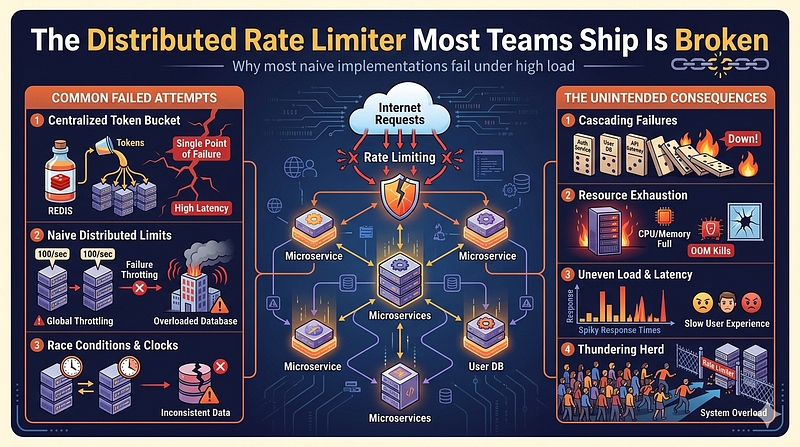
Rate limiting is one of those features developers implement with confidence, ship to production and then forget about. It works in testing. The code is simple. A counter in Redis, an expiry, a 429 response if the count exceeds the threshold. What could go wrong?
A lot. Actually.
The patterns I see most often in production codebases have at least one of three bugs: a race condition that lets bursts slip through, a window boundary exploit that doubles the effective rate limit or a multi-instance leak that makes the limit multiply by the number of pods running. None of these show up in low-traffic tests. All of them matter when a client hammers your API, a scraper decides to push limits or your system lands in a security audit.
The Race Condition You’re Probably Shipping
The most common implementation looks like this:
def is_allowed(redis_client, key, limit, window_seconds):
    count = redis_client.incr(key)
    if count == 1:
        redis_client.expire(key, window_seconds)
    return count <= limit
This is the pattern Redis’s own documentation presents as a starting example before explaining why it is problematic. The issue is that INCR and EXPIRE are two separate commands. If your process crashes, gets killed or takes a scheduling hit between those two lines, the key never gets an expiry set. The counter persists indefinitely. A client that triggers that bad path gets rate-limited forever, until someone manually flushes the key or the next deployment clears state.
The subtle version of this bug is worse. Under high concurrency, two threads can both execute incr(key), both get back count == 1 and both call expire(key, window_seconds). This is incidentally harmless here since they set the same expiry. But you are now relying on accidental correctness rather than a sound implementation.
Redis MULTI/EXEC looks like a fix but isn't. A transaction groups commands into an atomic batch, but it cannot branch on intermediate results. You cannot say "run INCR, then EXPIRE only if count was 1" inside a transaction, because the transaction enqueues all commands before any of them run. You would have to EXPIRE unconditionally on every request, which resets the window on every call and makes your rate limiter useless.
The correct implementation uses a Lua script:
local key = KEYS[1]
local limit = tonumber(ARGV[1])
local window = tonumber(ARGV[2])

local count = redis.call("INCR", key)
if count == 1 then
    redis.call("EXPIRE", key, window)
end
return count
Redis executes Lua scripts atomically. No other command can run between INCR and the conditional EXPIRE. The conditional logic runs server-side, so you get the branching the transaction model cannot provide. This has been the correct pattern since Redis 2.6, when EVAL was introduced. That release was in 2012. Teams are still writing the broken two-command version in 2026.
If your current implementation does not use Lua or a library that wraps this correctly, you have a race condition.
The Fixed Window Exploit No One Reviews Seriously
Even with the race condition fixed, the fixed window algorithm has a structural problem that no amount of atomic operations will solve.
Here’s the exploit: your limit is 100 requests per minute. A client sends 100 requests at 11:59:59 and another 100 at 12:00:01. Both windows report exactly 100 requests. The rate limiter allows both batches. The client sent 200 requests in 2 seconds without a single 429.
This is not a theoretical concern. It is a documented characteristic of fixed window rate limiting. Anyone reading security research on API abuse knows to look for this. For most internal APIs it probably does not matter. For public-facing APIs with billing implications, per-user quotas or meaningful scraping concerns, it does.
Sliding window algorithms address this. The basic sliding window counter keeps a log of request timestamps using a Redis sorted set with timestamps as scores. On each request, it counts only entries within the last N seconds.
import time

def is_allowed_sliding(redis_client, key, limit, window_seconds):
    now = time.time()
    window_start = now - window_seconds

    pipe = redis_client.pipeline()
    pipe.zremrangebyscore(key, 0, window_start)
    pipe.zadd(key, {str(now): now})
    pipe.zcard(key)
    pipe.expire(key, window_seconds + 1)
    results = pipe.execute()

    request_count = results[2]
    return request_count <= limit
The window is always the last N seconds, not a clock-aligned bucket. A client sending 100 requests at 11:59:59 and 100 more at 12:00:01 will see the first 100 still in the window at 12:00:01, and the rate limiter will correctly reject the second batch.
Note that this pipeline is not fully atomic. The four commands run in sequence without other commands interleaving within the pipeline, but they are not a single atomic operation the way a Lua script is. For a sliding window this is generally acceptable since zremrangebyscore and zadd on the same key are idempotent in their effects under normal concurrency. If you need guaranteed atomicity, wrap the equivalent logic in a Lua script.
The tradeoff with the sorted set approach is memory. Each request within the window stores an entry. At very high request rates this adds up. For APIs serving humans rather than automated clients at extreme volume, this is rarely a problem. For high-throughput systems, a sliding window counter that stores counts per sub-window rather than per request is a reasonable middle ground.
The point is: if you’re using fixed window, understand the boundary condition and make a deliberate choice. Defaulting to it because it is simpler without thinking about the implications is not a technical decision. It is inertia.
The Multi-Pod Problem Kubernetes Made Inevitable
Here is where things get expensive.
The fixed window and sliding window approaches above both assume a single shared Redis instance. If each pod maintains its own in-memory counter without coordination, your rate limit is not 100 requests per minute. It is 100 * pod_count requests per minute. A deployment with 10 pods means clients get 1,000 requests per minute before hitting any limit.
Some teams discover this when traffic increases and they scale up. The rate limit that appeared to work at 2 pods becomes silently ineffective at 10. No alert fires. No error appears. Clients just get more requests through than intended, indefinitely.
The fix is straightforward: always use a shared external store for rate limiting state. Redis is the standard choice. But teams often run per-instance rate limiting specifically to avoid the Redis round trip on every request, which is a legitimate concern. A synchronous Redis call on every API request adds latency and creates a dependency on Redis availability.
If you need to avoid per-request Redis latency, the practical options are:
Local state with periodic sync. Each pod maintains a local counter and synchronizes with Redis on a short interval (say, every 100ms). This eliminates the per-request round trip at the cost of allowing short-term over-limit during the sync window. Whether that tradeoff is acceptable depends on what your rate limit is protecting.
Infrastructure-level rate limiting. Your API gateway, Nginx, or load balancer handles rate limiting before the request reaches your application code. AWS API Gateway, Kong and Nginx’s limit_req_zone directive all support rate limiting with shared state at the infrastructure layer. This removes the problem from your application entirely.
For most teams the infrastructure approach is the right answer. Rate limiting is a cross-cutting concern. It should not live in the same codebase as your business logic if you can avoid it.
Where to Actually Put Your Rate Limiter
The question of where rate limiting lives matters more than which algorithm you choose.
Application-level rate limiting fires too late. By the time a request reaches your application code, you have already accepted the TCP connection, parsed the HTTP headers and possibly read the entire request body. This work happened before you checked whether the client is allowed. If your load balancer sits in front of your application, the load balancer handles requests before your application does. Requests you reject at the application layer still consumed load balancer resources, connection pool slots and thread time.
Rate limiting at the edge (load balancer, API gateway, CDN) stops traffic earlier in the stack and keeps your application from doing unnecessary work. The downside is that infrastructure-level rate limiting is typically coarser. It usually keys on IP address or API key from request headers. Application-level rate limiting can key on arbitrary request attributes: user ID from a decoded JWT, account tier, specific endpoint, request body content.
The practical setup: use infrastructure-level rate limiting as a broad defense against abuse, and use application-level rate limiting for fine-grained business rules. These are complementary layers, not competing ones. Infrastructure rate limiting stops the scraper and the DDoS attempt. Application rate limiting enforces “free tier users get 1,000 API calls per day.”
If you only have one layer, make it the infrastructure layer. The application-level business rules are easier to add later. The infrastructure-level abuse protection is what you actually need running on day one.
What to Use Instead of Writing It Yourself
If you are writing rate limiting logic from scratch after reading this, stop.
For Python services, slowapi wraps rate limiting built on limits, which handles Lua-based Redis operations correctly and supports multiple backends. For Laravel, the built-in RateLimiter facade uses atomic Redis operations when Redis is configured as the cache driver. It handles the Lua atomicity problem for you. For Go, golang.org/x/time/rate covers in-process rate limiting and go-redis/redis_rate provides distributed rate limiting with a sliding window implementation over Redis.
If you control your infrastructure, put Nginx in front of the problem. limit_req_zone with the burst parameter handles the token bucket algorithm at the web server layer with minimal configuration and has been production-proven for years.
http {
    limit_req_zone $binary_remote_addr zone=api_limit:10m rate=10r/s;

    server {
        location /api/ {
            limit_req zone=api_limit burst=20 nodelay;
        }
    }
}
The burst parameter here allows up to 20 queued requests before rejecting. nodelay means queued requests are served immediately rather than spread over time. Adjust to match your actual requirements.
The code you write for rate limiting is infrastructure code. It needs to be correct under concurrent load, it needs to degrade gracefully when Redis is unavailable and it needs to be tested with concurrent requests at and above the limit. If you haven’t sent two requests simultaneously to your rate limiter at the exact threshold, you have not tested whether it works.
One Thing Before You Move On
Check your current rate limiter implementation for these three things right now: separate INCR and EXPIRE calls with no Lua wrapping, a fixed window algorithm on a public endpoint you care about and rate limit state that lives inside the application process rather than a shared external store.
If you find any of the three, you have a known defect in production. The question is not whether someone will hit it. The question is whether it will be a client with good intentions testing your limits or someone actively trying to get around them.
Fix the Lua issue this week. Move rate limiting to the infrastructure layer this quarter. The sliding window is a good-to-have unless you have a specific reason to care about the boundary condition.
The rest is tuning.