It audits the settings around your code, not the code itself.

A tagged release is about to leave your GitHub repository, tests are green, CI is green, and composer audit has nothing interesting to say.
That is the exact moment the wrong repository setting matters most.
Laravel package maintainers already know how to think about dependency risk. The easier mistake is assuming that dependency risk is the whole supply chain. Your package does not reach users through composer.lock alone. It reaches them through a GitHub repository, a tag, a workflow token, a branch rule, and whatever settings everybody meant to tighten after the next release.
Moat reviews the security posture of your GitHub organization and repositories, then surfaces recommendations to…github.com
That is why Laravel Moat is more useful than it first appears. The official announcement describes it accurately as a read-only review tool for a GitHub user, organization, or repository. The better way to say it is this: Moat turns GitHub’s scattered control panel into one maintainer-side security review you can read in a single sitting.
Moat is reviewing your maintainer surface, not your application
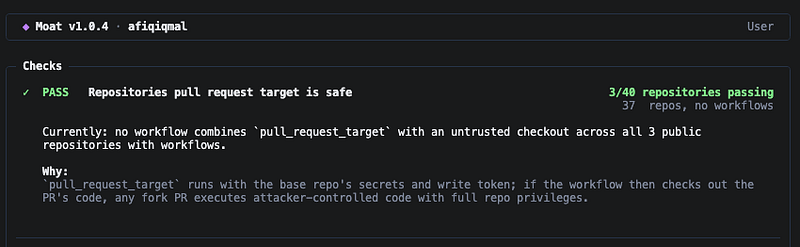
Moat does not scan your Laravel codebase or inspect composer.lock, and it definitely does not harden anything for you. The repository is explicit about that, which is part of why the tool feels trustworthy.
What it does inspect is the layer around release integrity:
- Account and organization controls like two-factor authentication and default member permissions
- Lock down repository controls like branch protection, signed commits, direct collaborators, webhooks,
SECURITY.mdand private vulnerability reporting - Actions controls cover workflow token permissions, pinned actions, fork pull request approval and
pull_request_targetmisuse - Then come the maintenance checks: Dependabot alerts, Dependabot security updates, secret scanning, push protection and immutable releases
That list is why Moat belongs in a maintainer workflow, not in the same mental bucket as a code scanner.
The package is also refreshingly small in scope. You install a binary, point moat at an organization, user, or owner/repo slug, and hand it GitHub access. Authentication resolution is explicit too: GITHUB_TOKEN, then GH_TOKEN, then gh auth token. For organization audits it asks for admin:org, repo, and workflow, which is exactly what it needs to read member policy, repository settings, and workflow files. That kind of specificity matters. Security tools that cannot tell you why they need access are exhausting.
The getting-started path is almost boring, which helps:
brew tap laravel/moat https://github.com/laravel/moat
brew install laravel/moat/moat

moat your-org
moat owner/repo
That is enough to make the point. Moat does not ask you to rewire your workflow or sign up for another dashboard. It gives you a report.
The useful mental model is release integrity, not “GitHub hygiene”
The phrase “GitHub security review” can sound softer than it is. This is not about making your profile look tidy. It is about reducing the number of ways a bad actor can push, alter, or distribute code under your package name.
If I were reading a Moat report for a Laravel package I care about, I would process it in this order:
- Can an attacker get maintainer-level access too easily?
- If they do, can they rewrite what a release means?
- If they touch CI, how much power does the workflow inherit?
- If a researcher finds a problem first, do they have a private way to tell me?
That sequence is more useful than scanning the report from top to bottom because it groups findings by blast radius.
Start with the takeover paths, not the cosmetic ones
Moat starts with the obvious controls for a reason. Organization-wide two-factor enforcement, checking whether members actually have 2FA enabled, and keeping new members at no permissions by default are not glamorous settings. They are the settings that decide whether a stolen password becomes a repo compromise.
The direct collaborator check belongs in the same tier because GitHub defines outside collaborators as people who are not members of your organization but still have access to one or more repositories. That is not automatically wrong; contractors, temporary maintainers and emergency access all exist. But direct collaborator lists age badly, and old access paths are exactly the kind of thing nobody notices until an incident review.
If Moat tells you a repository still depends on direct collaborators, I would treat that as an access review problem first and a tooling problem second.
Then protect what a tag actually means
This is where Moat gets more interesting.
Signed commits, required pull request reviews, locked release branches, and immutable releases all answer the same question from different angles: can somebody change what downstream users think they installed?
GitHub’s immutable release docs are worth reading because they make the threat very concrete. Once an immutable release is published, the associated Git tag is locked to a specific commit and cannot be changed or deleted while the release exists. That matters for Composer consumers because a version string only has value if it still points to the same bytes tomorrow.
Required reviews and locked branches are less flashy, but they are the controls that stop a compromised contributor account from turning a release branch into an express lane.
This is also why Moat’s read-only posture is correct. A tool cannot tell you whether every package deserves signed commits tomorrow morning. It can tell you that the branch carrying v1.x is easier to rewrite than you probably intended.
The workflow findings are the ones that should slow you down
For Laravel maintainers, the most expensive red flags in a Moat report are usually in GitHub Actions.
That is because Actions sits at the intersection of code execution, secrets, release automation, and trust in third-party actions. Once that layer is loose, the rest of the controls start leaning on luck.
GitHub’s own docs say the GITHUB_TOKEN is scoped to the repository that contains the workflow. That sounds narrow until you remember what “the repository” contains for a package maintainer: source code, releases, tags, issues, pull requests, packages and often deployment or publishing logic. Repo-scoped is not the same thing as harmless.
Moat checks three workflow classes that belong together:
- Token blast radius: whether the default workflow token is read-only and whether workflows declare tight permissions:
- Action trust: whether third-party actions are pinned instead of referenced by moving tags
- Event safety: whether forked pull requests or
pull_request_targetcan run attacker-controlled code in a privileged context
Those are not niche checks. They describe the entire path from “malicious pull request” to “malicious release.”
GitHub’s workflow syntax docs spell out a detail many teams miss: if you specify any permissions entries, everything you do not specify becomes none. That is good. It means you can make the job ask for exactly what it needs instead of accepting the default shape of the token.
The pull_request_target finding is even sharper. GitHub warns that workflows triggered by pull_request_target run in the context of the base branch, can access secrets and get read/write repository permission unless you explicitly restrict permissions. GitHub also says to avoid that event if you need to build or run code from the pull request. That is the sort of warning people read once, forget and then reintroduce in a workflow tweak six months later.
Moat surfacing that class of issue is useful because the problem rarely lives in one obviously dangerous line. It lives in the combination:
- a privileged trigger
- a checkout of untrusted pull request code
- a token with more write access than the job needed
That is not a documentation problem anymore. That is a release path problem.
Not every red line deserves the same panic

One thing the existing coverage does not stress enough is that Moat findings are not equal. Some are “fix this before the next release” findings. Others are “stop pretending this can wait until Q4” findings.
I would read them like this:
- Fix now: unsafe
pull_request_targetusage on a repository that cuts releases - Fix now: workflow permissions left broad enough that a third-party action can write back to the repository
- Fix now: mutable release practices on packages that other teams install by tag
- Fix next: old direct collaborators nobody reviewed after the last team change
- Fix next: no private vulnerability reporting path
- Fix next: missing
SECURITY.md, which usually means the disclosure path only exists in somebody’s head
That ordering matters because teams love flattening security work into one generic backlog. Moat is more useful when you let it separate “this can rewrite a release” from “this will make incident handling clumsy.”
Secret protection and disclosure controls are less dramatic, and still worth fixing
Some Moat findings will feel more administrative than urgent. That does not mean they are filler.
Take secret scanning and push protection. GitHub’s docs draw a clean line between them: secret scanning helps you find exposed credentials after they are committed, while push protection blocks the push before the secret lands in history. Those are different failure windows. If you maintain packages in public repositories, that difference matters because public history is where clean-up starts getting expensive.
Private vulnerability reporting and SECURITY.md are in the same category. They do not stop an attack. They decide what happens when somebody else finds the bug before you do.
GitHub allows anyone to submit a private vulnerability report to a public repository if that feature is enabled. Without it, the fallback is usually worse: a public issue, a direct message that gets lost, or silence.
This is where Moat is strongest as an operational reminder. It treats response plumbing as part of security posture, which is correct. Maintainer security is not only about stopping bad events. It is also about receiving the first good warning in time.
A clean report is not a certificate, and a red report is not a verdict
This is the part existing coverage gets right and readers still need to hear twice.
Moat is a report, not enforcement, monitoring, package analysis, or a promise that your repository is safe once the score improves.
That limitation is a strength because it keeps the tool honest.
If a check does not fit your repository, Moat lets you disable it in moat.toml or declare extra release branches. That file is useful. It is also where teams can lie to themselves.
Turning off a check because the repository genuinely does not need it is healthy. Turning off a check because it is inconvenient is how “temporary” exceptions become permanent policy. If I adopt Moat on a team, I would want every off entry in moat.toml to survive one uncomfortable code review comment.
Moat is also clear that some checks will return N/A (plan) on GitHub Free private repositories. The README names those skipped checks explicitly, including signed commits, required reviews, release branch locking, linear history, secret scanning, and push protection. That is another reason the tool feels credible. It tells you when GitHub’s plan limits, not your repo settings, are the real boundary.
Organization defaults buy you more than repo-by-repo cleanup
If you maintain one package, the obvious move is to run Moat once and fix what hurts.
If you maintain several packages or a small org, the better sequence is this:
- Run Moat at the organization level first.
- Fix org-wide defaults before touching individual repositories.
- Run it again on repositories that publish packages or release binaries.
- Review workflow findings before cosmetic findings.
- Commit moat.toml only for documented exceptions.
- Re-run after workflow edits, release process changes, or maintainer roster changes.
The reason for that order is simple. Organization defaults prevent repeat mistakes. Repository fixes clean up what history already accumulated. Workflow fixes reduce the odds that a third-party action, a forked pull request, or a too-generous token becomes your next incident write-up.
I would also treat Moat as a review tool for new package repositories before the first tagged release. The cheapest time to fix GitHub posture is before users start trusting the tags.
The best thing Moat does is force GitHub back into the system diagram
That sounds obvious. It is not how many teams behave.
We still talk about repository settings as if they live outside the application. They do not. For an open source Laravel package, GitHub is part of the delivery system. It decides who can cut a release, what CI can mutate, whether secrets get blocked before commit, and how a vulnerability report arrives.
Moat is useful because it forces that reality into one readable report.
If your package ships through GitHub, your settings pages ship too.


