The axios supply chain attack is a masterclass in everything wrong with how we trust open source packages.
On March 30, 2026, a new npm package called plain-crypto-js@4.2.1 was published. It had no README, no repository link and no reason to exist. A moment later, Socket's automated malware detection flagged it. By then, it was already a dependency of the most popular HTTP client in the JavaScript ecosystem.
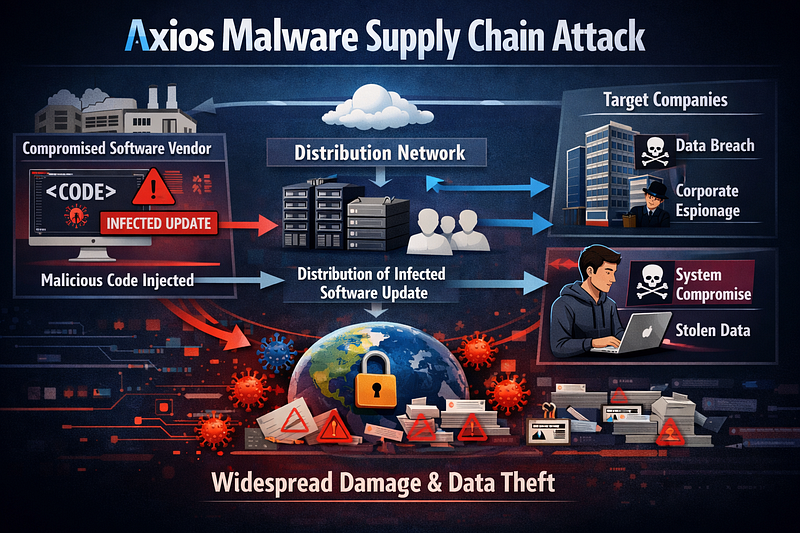
axios, the library that sits in the dependency tree of virtually every Node.js application, had been compromised. Not through a zero-day. Not through a sophisticated exploit chain. Through a hijacked maintainer account and an npm token that should not have existed.
What Actually Happened
Two malicious versions were published to npm within 39 minutes of each other: axios@1.14.1 at 00:21 UTC on March 31 and axios@0.30.4 at 01:00 UTC. Both the 1.x and 0.x release branches were hit. This was not accidental.
The attacker compromised the npm credentials of jasonsaayman, the lead maintainer of the axios project. Registry logs confirm the account was used to publish both versions. The attacker changed the account's registered email to ifstap@proton.me and published the poisoned packages directly via the npm CLI, bypassing the project's GitHub Actions CI/CD pipeline entirely. No corresponding GitHub commits or tags exist for either version. The attacker published only to npm, leaving no source trail on GitHub.
The only change in both versions: a new dependency, plain-crypto-js@^4.2.1. This package is never imported anywhere in the axios source code. It exists for one reason: to execute a postinstall script the moment you run npm install.
On the GitHub side, the compromised account had admin-level permissions. When other collaborators filed issues about the compromise, the attacker used jasonsaayman’s credentials to unpin and delete them.
more details: https://www.stepsecurity.io/blog/axios-compromised-on-npm-malicious-versions-drop-remote-access-trojan…github.com
One axios collaborator, DigitalBrainJS, wrote in issue #10604: “Since access to git and the npm repository is compromised, and his git permissions are higher than mine. I’m a collaborator, not an admin. I can’t revoke his access. Whatever I fix, he will ‘fix’ it after me.”
The timing was deliberate. The attack launched late at night, when response times from both npm’s security team and the project maintainers would be slowest.
What the Malware Does
The plain-crypto-js package contains a setup.js file that acts as a cross-platform Remote Access Trojan dropper. It targets macOS, Windows and Linux simultaneously.
The dropper uses a two-layer encoding scheme to hide its intent: reversed Base64 as the outer layer and XOR cipher as the inner layer. It dynamically loads fs, os and execSync at runtime rather than importing them at the top of the file. This is specifically designed to evade static analysis tools that scan for suspicious require() calls.
Once decoded and executed, the dropper contacts a command-and-control server at sfrclak.com:8000 (hosted on AS54290, Hostwinds LLC) to download platform-specific second-stage payloads. The C2 endpoint is POST /6202033, and it serves different binaries based on the platform identifier in the request body: packages.npm.org/product0 for macOS, packages.npm.org/product1 for Windows and packages.npm.org/product2 for Linux.
What arrives is a fully functional RAT written in C++.
On first contact, the RAT sends the victim’s unique ID, OS identifier and directory listings of Documents, Desktop and Config folders. After that, it beacons every 60 seconds via HTTP POST with base64-encoded JSON, reporting hostname, username, running processes, timezone, boot time and hardware information.
The RAT supports four remote commands from the C2:
runscript: Execute arbitrary shell commands, PowerShell scripts or AppleScriptrundir: Browse the filesystem with file names, sizes and timestampspeinject: Drop and execute a binary (using a reflective .NET loader on Windows)kill: Self-terminate and clean up
This is not a keylogger or a credential stealer. It is a full remote access platform. The attacker can run arbitrary code on your machine, browse your files and inject additional binaries at will.
The C2 communication uses a fake User-Agent string: mozilla/4.0 (compatible; msie 8.0; windows nt 5.1; trident/4.0). Internet Explorer 8 on Windows XP. In 2026. That string is distinctive enough to be a reliable network-level detection indicator.
Payload : https://socket.dev/npm/package/plain-crypto-js/files/4.2.1/setup.js
Full Code: https://socket.dev/npm/package/plain-crypto-js/overview/4.2.1
Platform-Specific Payload Locations
The RAT drops files in different locations depending on your operating system. Here is the full list of file system indicators of compromise.
macOS:
/Library/Caches/com.apple.act.mond- the main binary, a Universal Mach-O native executable disguised as an Apple system daemon/tmp/.XXXXXX.scpt- a temporary AppleScript used during the dropper stage/private/tmp/.*- additional temporary payloads
Windows:
%PROGRAMDATA%\wt.exe- a renamed copy of PowerShell used to execute the stage 1 payload%PROGRAMDATA%\system.bat- a hidden persistence loader%TEMP%\6202033.vbs- VBScript dropper (stage 1)%TEMP%\6202033.ps1- PowerShell payload (stage 1)%TEMP%\<GUID>.ps1- temporary script execution artifacts
On Windows, the RAT also writes a registry key for persistence:
HKCU\Software\Microsoft\Windows\CurrentVersion\Run
  Name:  MicrosoftUpdate
  Value: %PROGRAMDATA%\system.bat
That batch file re-downloads a fresh stage 2 payload from the C2 on every boot. Even if you delete the RAT binary, the persistence mechanism will pull it down again the next time the machine restarts.
Linux:
/tmp/ld.py- a Python RAT script- The malware also modifies shell profiles (
.bashrc,.zshrc) for persistence
After execution, the dropper deletes its own installation artifacts and replaces its package.json with a clean version. This is not cleanup. This is anti-forensics.
For threat hunting, here are the SHA-256 hashes of the stage 2 binaries:
Linux:   fcb81618bb15edfdedfb638b4c08a2af9cac9ecfa551af135a8402bf980375cf
macOS:   92ff08773995ebc8d55ec4b8e1a225d0d1e51efa4ef88b8849d0071230c9645a
Windows: 617b67a8e1210e4fc87c92d1d1da45a2f311c08d26e89b12307cf583c900d101
The Scale of the Blast Radius
Axios has over 100 million weekly downloads on npm. It is a dependency of React, Vue, Angular applications, Express backends, serverless functions, CLI tools and enterprise internal tooling. Every npm install that pulled the latest version of axios during the window between publication and npm taking down the malicious versions potentially executed the dropper.
The malicious dependency was staged 18 hours before the compromised axios versions were published. Three separate payloads were pre-built for three operating systems. Both release branches were targeted. Every trace was designed to self-destruct.
This is not an opportunistic attack. This is operational planning.
How It Was Caught
The security tool automated scanning flagged plain-crypto-js@4.2.1 within minutes of publication, at 00:05:41 UTC on March 31. Feross, Socket's founder, published the alert on X shortly after, which rapidly reached over 1.6 million views.
StepSecurity independently confirmed the compromise and published a detailed technical breakdown. The community response was fast: npm pulled both malicious axios versions and the plain-crypto-js package within hours.
The irony is that v1.x of axios already had OIDC-based trusted publishing configured through GitHub Actions. But as JamieMagee pointed out in the GitHub issue, the publish workflow was still passing NODE_AUTH_TOKEN as a secret. When both an npm token and OIDC are present, npm uses the token. The entire OIDC security setup was being silently bypassed by a legacy environment variable that nobody had removed.
Mitigation Plan: If You Installed axios@1.14.1 or axios@0.30.4
If you installed either compromised version, assume your system is compromised until you can prove otherwise. This is not overcautious. The dropper executes on install, not on import. If npm install ran, the payload ran.
Step 1: Confirm Whether You Are Affected
Check your lockfile and node_modules for the malicious versions:
# Check which version of axios is installed
npm list axios

# Search your lockfile for compromised versions
grep -E "axios.*1\.14\.1|axios.*0\.30\.4" package-lock.json

# Check if plain-crypto-js exists anywhere in your dependency tree
find node_modules -name "plain-crypto-js" -type d
If node_modules/plain-crypto-js/ exists in your project, the dropper executed. This package is not a dependency of any legitimate axios version.
Step 2: Check for RAT Artifacts on Your System
Look for every known file system IOC. Check all of these, not just the main binary:
# macOS - check all three artifact locations
ls -la /Library/Caches/com.apple.act.mond
ls -la /tmp/.??????.scpt 2>/dev/null
ls -la /private/tmp/.* 2>/dev/null

# Linux
ls -la /tmp/ld.py

# Windows (PowerShell) - check all five artifact paths + registry
Test-Path "$env:PROGRAMDATA\wt.exe"
Test-Path "$env:PROGRAMDATA\system.bat"
Test-Path "$env:TEMP\6202033.vbs"
Test-Path "$env:TEMP\6202033.ps1"
Get-ItemProperty "HKCU:\Software\Microsoft\Windows\CurrentVersion\Run" -Name "MicrosoftUpdate" -ErrorAction SilentlyContinue
The Windows registry key is the most critical check. If MicrosoftUpdate points to %PROGRAMDATA%\system.bat, the RAT has persistence and will re-download itself from the C2 on every reboot. Deleting the binary without removing the registry key accomplishes nothing.
Check for modifications to your shell profile that you did not make:
# Check for unexpected entries in shell profiles
diff <(git show HEAD:.bashrc 2>/dev/null) ~/.bashrc
diff <(git show HEAD:.zshrc 2>/dev/null) ~/.zshrc

# Look for suspicious cron jobs
crontab -l
Check your network logs for connections to the C2 infrastructure:
# C2 server: sfrclak.com / 142.11.206.73 / port 8000
# The beacon endpoint is POST /6202033
grep -r "sfrclak\|142\.11\.206\.73\|6202033" /var/log/ 2>/dev/null

# Look for the distinctive fake IE8 User-Agent in proxy logs
grep "msie 8.0; windows nt 5.1" /var/log/nginx/access.log 2>/dev/null
Step 3: Clean Your Node.js Environment
# Remove node_modules and lockfile completely
rm -rf node_modules package-lock.json

# Clear the npm cache (the compromised package may be cached)
npm cache clean --force

# Pin axios to the last safe version
npm install axios@1.14.0 --save-exact

# Reinstall with scripts disabled to prevent any postinstall from running
npm ci --ignore-scripts
The --save-exact flag is critical. It writes "axios": "1.14.0" into your package.json instead of "axios": "^1.14.0". The caret prefix is what allowed the malicious version to be pulled in the first place: ^1.14.0 resolves to "any compatible version 1.14.0 or higher," which included 1.14.1.
For the 0.x branch, the last safe version is axios@0.30.3.
Step 4: Rotate Every Secret the Machine Had Access To
If the dropper ran on your machine, assume every credential stored on that machine is compromised. The RAT fingerprints your entire system and can execute arbitrary commands.
Rotate immediately:
- npm tokens (run
npm token revokefor all tokens, then create new ones) - SSH keys (generate new keypairs, update authorized_keys on all servers)
- AWS/GCP/Azure credentials and access keys
- Database connection strings and passwords
- GitHub personal access tokens and deploy keys
- Environment variables from
.envfiles - API keys for any third-party service
If this was a CI/CD server, rotate every secret stored in your CI environment variables. GitHub Actions secrets, GitLab CI variables, CircleCI contexts, all of them.
Step 5: Audit Your CI/CD Pipelines
If your CI/CD pipeline ran npm install with the compromised version, the build server itself may be infected. Check your CI logs:
- Search for the compromised version in recent CI builds
- Look for
plain-crypto-jsin build output logs - Check if postinstall scripts ran during the build
For GitHub Actions specifically, consider switching to OIDC-based npm publishing and removing stored npm tokens from your repository secrets. This is exactly the gap that enabled this attack.
Step 6: Block Attacker Infrastructure at the Network Level
Add these to your firewall rules and DNS blocklists:
- Domain:
sfrclak.com - IP:
142.11.206.73 - Port:
8000
If you run a corporate network, push these blocks to your DNS resolver and proxy immediately. Any machine still beaconing to this C2 is actively compromised.
Step 7: Consider a Full System Rebuild
If you confirmed RAT artifacts on a production server or developer workstation, a clean reinstall is the only way to be certain the machine is clean. The RAT modifies shell profiles for persistence, copies itself to system directories and deletes its own installation traces. Removing the obvious files is not sufficient if the C2 server delivered additional payloads that you have not identified.
For production servers, rebuild from a known-good image. For developer machines, back up your code (not your dotfiles or system config), wipe and reinstall.
Why This Is Worse in the Age of Vibe Coding
When asked whether AI is playing a role in the rise of supply chain attacks, Feross was direct. The answer is yes, on both sides.
On the defender side: AI-powered scanners like Socket’s caught this malware within six minutes. That response time is genuinely impressive and probably prevented the blast radius from being an order of magnitude worse.
On the attacker side: Feross noted that the recent TeamPCP attacks against Trivy and LiteLLM have already stolen credentials that most teams have not rotated. The long tail of those compromises will play out over 6 to 12 months. Attackers are getting more organized, not less.
But the third factor is the most uncomfortable one. Far more code is being written now, with estimates suggesting 1.5 to 2x more than a year ago, and far more developers are vibe coding without reviewing what their AI agents install. Every unreviewed dependency is an attack surface. AI coding tools will happily add axios to your project. They will not check whether the latest version was published from a compromised account at midnight.
You did not install plain-crypto-js. axios did. And you trusted axios because everyone trusts axios. This is not an attack on code. It is an attack on the implicit trust model that the entire npm ecosystem is built on. Half the developers reading this probably have axios three levels deep in their dependency tree without knowing it.
The Systemic Problem
The axios attack is not a novel technique. Account takeover, malicious dependency injection and postinstall script abuse have been documented supply chain attack patterns for years. What makes this incident significant is the target’s scale and the attacker’s operational discipline.
A single npm token for a single maintainer account gave the attacker publishing rights to a package installed over 100 million times per week. The project had configured OIDC trusted publishing but never removed the legacy token that made it irrelevant. The security improvement was deployed but never completed.
This is the pattern that keeps repeating. The fix exists. The migration starts. The old credential stays alive because removing it is a small task that never becomes urgent. Until someone else uses it.
The axios team has since revoked the compromised tokens and npm has pulled the malicious versions. jasonsaayman responded on both GitHub and X, confirming the v0.x token has been removed and asking the community for help hardening his account. The immediate crisis is over.
The structural problem is not. Every npm package with a long-lived publish token and a single maintainer with admin rights has this exact attack surface. Dependency chains are now attack surfaces. One compromised package means millions of downstream applications exposed instantly. Security is not just your code anymore. It is your entire supply chain.
The question is not whether this will happen again. It is which package is next.