Wardley Maps make the call obvious once you stop trusting your gut.

A team I know spent eight months building an internal system. A senior engineer led it. The team used it for three weeks before someone subscribed to Linear for $96 a month and everyone quietly switched.
The eight months were not wasted because the team was bad. They were wasted because nobody stopped to ask a simple question: does this need to exist at all?
That question sounds obvious until you are in the room. In the room, it becomes “this SaaS tool does not do exactly what we want” and “we could build something better in a sprint” and “we already have the skills.” All of which are true. None of which are the right filter.
The right filter is not a gut check. It is a map.
The Two Ways Most Teams Get This Wrong
Most build vs buy decisions happen in one of two ways.
First, someone on the team has strong opinions. Usually the most technically capable person in the room. They have used a particular tool before, or they believe deeply in ownership over third-party dependencies, or they are genuinely excited about the problem. The outcome is decided by whoever argues longest.
Second, the decision is purely about cost. A SaaS license looks expensive on a budget line. Building looks free because the engineers are salaried anyway. So the team builds. (Software is never free. The salaried engineer has a queue, and everything else in that queue gets delayed.)
Both of these approaches optimize for the wrong thing. Neither one asks where the component sits in the actual landscape of what has been solved versus what is still novel. That is the only question that matters.
What a Wardley Map Actually Shows You
Simon Wardley created this mapping method while he was running a company called Fotango around 2005. The concept is not complicated: every component in your system sits somewhere on two axes.
The Y-axis runs from invisible to visible. Infrastructure you never think about sits at the bottom. The thing a user sees and touches sits at the top. Your database is near the bottom. Your checkout flow is near the top. Your onboarding wizard is near the top. Your cron jobs that nobody remembers exist are near the bottom.
The X-axis is where the build vs buy decision actually lives. Wardley calls it the evolution axis, and it has four stages running left to right.
Genesis is the stage where a capability barely exists. Nobody has fully figured it out. Every team that needs it is writing their own version from scratch because there is no established way to approach it. The tooling is rough, the documentation is thin, and the solutions are expensive and idiosyncratic.
Custom Built is the stage where the capability works but only bespoke solutions exist. Your engineering team is one of a small number even attempting this. Vendors are beginning to appear but they are immature.
Product is where the map starts to shift the decision. Mature vendors have solved the problem. Real tools exist with documentation, community support and years of production use behind them. You can buy something that handles 85% of your requirements and configure the rest.
Commodity is the stage where a capability has become infrastructure. Hosting. Email delivery. Logging pipelines. Object storage. DNS. These have been solved so completely and cheaply that building your own version is not a technical decision. It is a policy violation.
The rule the map produces is blunt: build to the left, buy to the right.
Why the Wrong Direction Is So Tempting
No team deliberately makes the wrong call. The problem is that most components feel custom to the people inside the company.
Your internal CRM feels unique because you have specific sales workflows nobody else has. Your notification system feels custom because you send particular types of alerts at particular triggers. Your deployment pipeline feels special because your stack has specific requirements.
Some of that is real. Most of it is not.
Wardley mapping forces you to ask a different question: what stage is this component at in the broader industry, not inside your team? If there are five established vendors solving this problem competently and their customers are not leaving, the component is in the Product stage. The fact that their solution does not perfectly match your workflow is not a Genesis-stage problem. It is a configuration and process problem. That distinction sounds small. It represents months.
I learned this the hard way once when I was about to spend significant time building a feature-flag system before a colleague asked if I had looked at LaunchDarkly or Flagsmith. I had not. Both do the job. Neither required three months of engineering. The component was Product-stage and I had mapped it as Custom Built because I had not stopped to look at the landscape.
Mapping forces the look.
The Buy Criteria: Three Tests
A component is a candidate for buying when it passes all three of these.
Test 1: Vendors with real customers exist. Not startups with landing pages. Actual customers who have been using the tool for more than a year and are not leaving. That is the Product-stage signal. If the vendor’s case studies are all from the last six months, you are closer to Custom Built than you think.
Test 2: This is not your differentiator. If building this component would not directly give your users a materially better experience or give your company a defensible strategic advantage, you should not be building it. Ticketing systems, time tracking, analytics dashboards, authentication, email delivery, invoice generation. None of them are differentiators. They are overhead. Your users did not choose you because of how you handle password resets.
Test 3: Maintenance scales badly against team size. Every line of custom code is a line someone debugs later. Custom tooling accumulates. The third-party library it wraps releases a breaking change. The engineer who built it leaves. The documentation was never written. At some point the maintenance burden of a custom-built commodity costs more annually than the SaaS license ever would. The question is not just what it costs to build. It is what it costs to keep running.
If all three pass: buy.
The Build Criteria: When Custom Is Actually Correct
There are real situations where building is the right answer. They are fewer than most engineers think, but they exist.
Build when the capability does not exist in the market. This is Genesis stage. You are working on something genuinely new. No vendor has solved it because the problem is not yet well understood. A specific type of fraud detection trained on domain-particular transaction patterns. Regulatory compliance tooling for a framework that was finalized six months ago. AI-driven document processing for a vertical that mainstream AI tools do not handle well. These are build situations because there is nothing to buy yet.
Build when the component is the product. Not central to the product. The product. If your core value proposition depends on a specific workflow and no existing tool can deliver that workflow without compromising it, build it. Map it first. Confirm it is genuinely in the Custom Built or Genesis stage for your specific use case. Then build it carefully, document it thoroughly and treat the maintenance cost as a first-class expense.
Build when the economics genuinely invert at your scale. This is uncommon in the Product stage, but it happens. If you are processing hundreds of millions of events and the per-event pricing of available tools would cost more than hiring an engineer dedicated to the infrastructure, the math changes. This is a calculation, not a feeling. Run the numbers before claiming it applies to your situation.
Notice that none of the build criteria say “we could build it better.” That case is almost always wrong. The teams that built Stripe thought about payments longer than yours will. The teams that built Datadog thought about observability longer than yours will. The fact that you can technically replicate some of their features is not the point.
Where MoSCoW Fits In
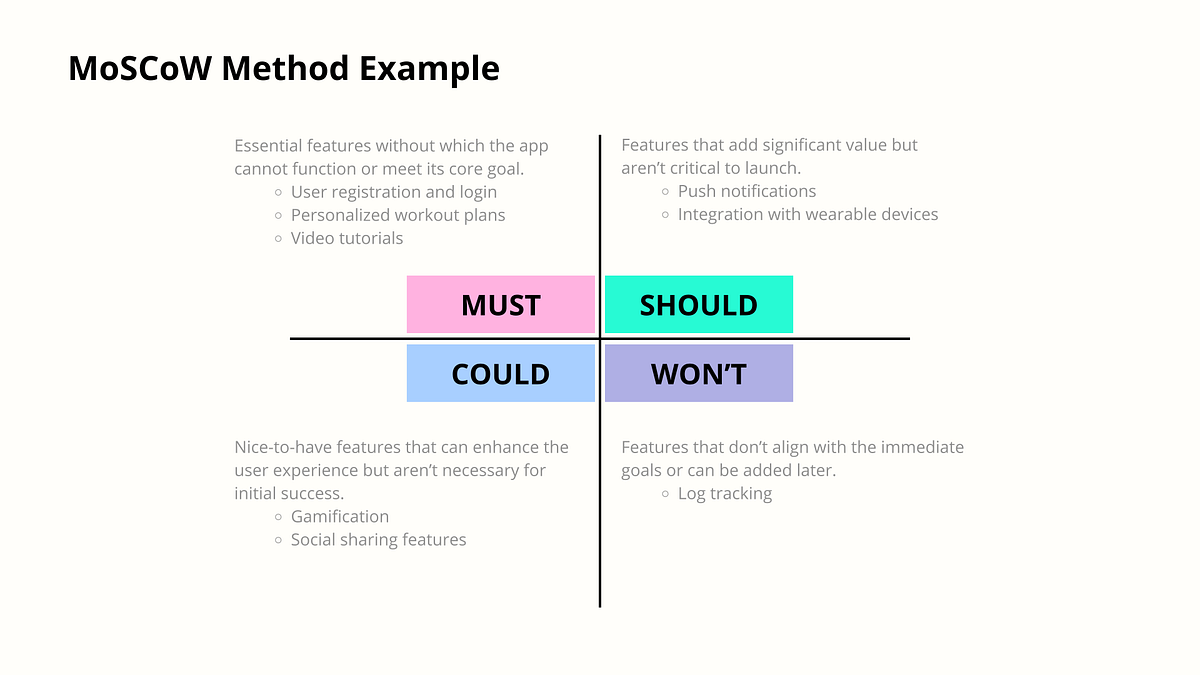
After you have placed a component on the Wardley map and established whether it is a build or buy candidate, you need a second pass to prioritize the decision against everything else competing for your team’s time.
MoSCoW is a prioritization method developed by Dai Clegg in 1994 for rapid application development. Each letter represents a category.
Must Have means the product does not ship without this. Not “the product is worse.” Does not ship. Authentication falls here. Without it, users cannot access anything.
Should Have means the product ships but is significantly impaired without it. Search functionality is often a Should Have. Users can navigate, but poorly. This gets built soon but not necessarily now.
Could Have means it is genuinely useful but the product works fine without it. Advanced analytics. Dark mode. Bulk exports. These are legitimate priorities later. They are not now.
Won’t Have is the most important category. This is where you formally agree, right now, not to build this thing in this cycle. Teams that skip the Won’t Have list wonder why they never finish anything. The Won’t Have list is what makes the rest of the list possible.
The combination of Wardley positioning and MoSCoW priority gives you a decision that holds under scrutiny. A Product-stage capability that is a Could Have is not getting built this quarter, and it is not getting investigated for custom development either. A Genesis-stage Must Have is getting built because you have no choice. The matrix is a small table with two axes. Drawing it before the sprint planning starts changes the conversation completely.
The Practical Three-Question Filter
Before any build vs buy decision reaches a technical discussion, three questions should be answered.
- Where does this sit on the evolution axis? If other teams in the industry are buying it, you are probably not at Genesis or even Custom Built. Do five minutes of market research before claiming you are doing something novel.
- Is this a differentiator? If removing this capability from your product would not affect your specific value proposition, it is not a differentiator. It is overhead dressed as strategy.
- What is the actual cost of building? Not the sprint estimate. Include six months of maintenance, the debugging sessions, the integration updates when an upstream API changes its contract, the documentation that will not get written, and the rotation risk when the engineer who built it leaves the company. Custom software has a carrying cost that most estimates do not include.
Most build decisions fail question three before they get to the others.
The Map Nobody Draws Until After
The reason most tech leads discover this framework after a painful experience rather than before is that strategic tools feel like overhead when a team is in execution mode. There is always a sprint to plan, a bug to fix, a feature request that is genuinely urgent.
But drawing the map is not a planning ceremony. It is a forcing function. It makes you articulate where your components sit in the broader world rather than from inside your company’s perspective. It prevents the comfortable illusion that everything your team builds is differentiating work when some of it is replicating what the market already solved.
The ticketing system from the beginning of this piece would have sat squarely in the Product stage on any honest Wardley map. Mature vendors. Real customers. Documented APIs. Years of production deployments. The decision to build it was not a technical failure. It was a positioning failure. Nobody asked where it sat on the map before the sprint started.
Draw the map first. The worst outcome is you learn that someone already solved this. Use the freed time for something your users will actually notice.