A follow-up to the most-argued post I have written, and the option neither side covered.
My team uses SSH to access EC2 instances. I published a post about it in March and said I had no regrets. It picked up many claps and comment threads. A few of those threads were genuinely uncomfortable to read, because they were right about things I had glossed over.
So here is the follow-up. What the responses got right. What I got wrong. And the option that neither the SSH defenders nor the SSM advocates mentioned once across all threads, even though AWS shipped it two years ago.
What the Responses Got Right
Key management does not scale without policy.
The most consistent criticism: I said “key pairs managed properly” as if that were a reasonable default. It is, for a small team with real discipline. For anything larger, it is not.
Here is what “managing keys properly” actually requires at thirty servers and fifteen engineers: a way to distribute public keys at scale, a process for revoking access when someone leaves, a rotation schedule with teeth, and a record of who has access to what. None of that is hard on its own. All of it tends to decay under deadline pressure.
The SSH model puts credential lifecycle entirely on you. If that makes you nervous, it should. The question is not whether you can manage it properly. It is whether you will, six months from now, in the middle of something more urgent.
One thing I should have named in the original post: SSH certificate authorities are the proper solution to this problem. Instead of distributing a public key to every instance, you sign a short-lived certificate with a central authority. The certificate expires in minutes or hours, not years. No rotation ceremony. No key to leak. AWS does not provide a managed SSH CA, but HashiCorp Vault does, and so does Smallstep. If you are serious about SSH at scale, that is the path. I did not mention it.
With Vault’s SSH secrets engine, the flow looks like this: a developer requests a signed certificate, Vault issues one valid for one hour, and the developer connects. When the hour is up, the certificate cannot be reused. No one revokes anything because there is nothing to revoke. If a developer leaves the team, you remove their Vault access and they are done. The instances themselves need no changes beyond trusting the CA public key, which you set once.
# Request a signed certificate from Vault
vault ssh -mode=ca -role=my-role user@host

# The signed cert is used for that session only
# After it expires, it cannot be reused
This is a different complexity trade-off from bastion-plus-key-file, and it is not zero effort to set up. But it is a legitimate answer to the key management problem that I left out.
Port 22 is still an attack surface, even restricted.
Another recurring point: restricting port 22 to your office IP or VPN CIDR is better than open-to-all, but it is not the same as closed. IPs change. Developers connect from airports. Rules that are “temporary” during an incident sometimes stay for months. Restricting port 22 reduces the risk meaningfully. It does not eliminate it.
This is a fair criticism. I stand by the bastion approach for small teams where the constraints are real, but I should not have written about restricted port 22 as if it were equivalent to no port 22.
SSM session timeout is configurable.
One claim I got wrong by omission: I described the 20-minute idle session timeout as a fixed limitation. It is not. The default is 20 minutes, but you can configure it to anywhere between 1 and 60 minutes in the Session Manager console under Preferences. A team willing to tune SSM’s settings can work around the timeout. My framing made it sound like they could not.
What Nobody Mentioned
All twelve comment threads were variations on the same debate: SSH is familiar and practical, SSM is secure and auditable, pick one. Nobody in any thread mentioned EC2 Instance Connect Endpoint.
AWS launched it on June 13, 2023. It is available in every commercial and GovCloud region. It costs nothing to use.
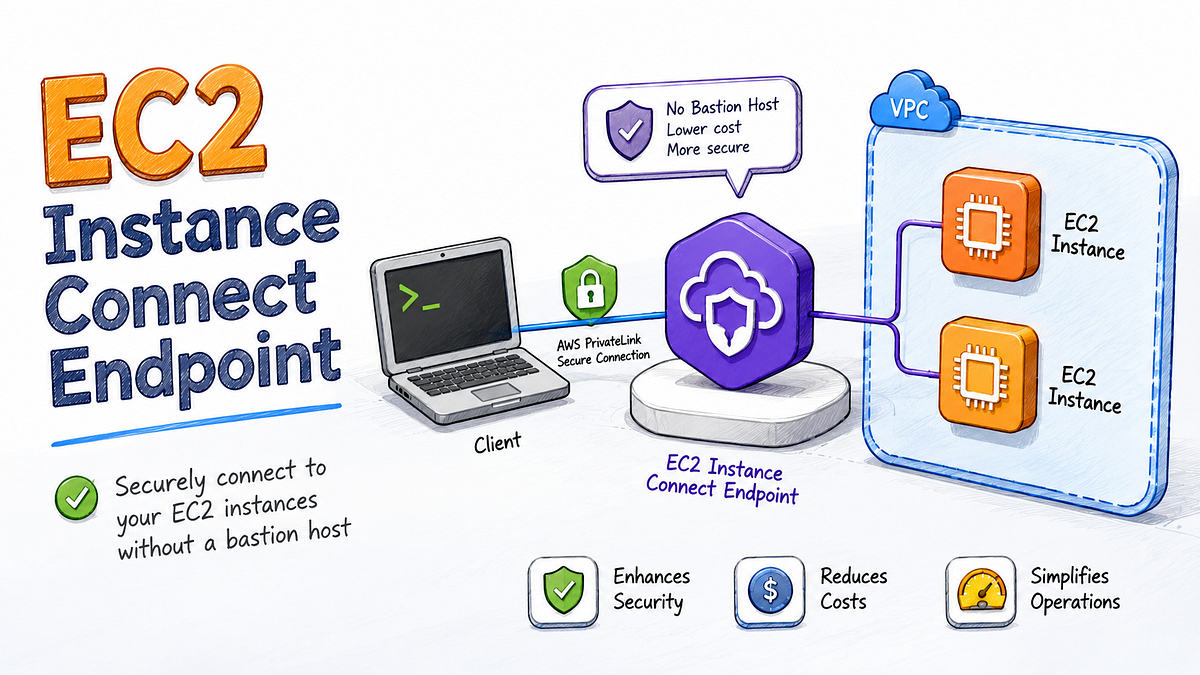
Here is what it actually does. You create an endpoint resource inside your VPC. It acts as a managed TCP proxy. When you connect, your machine tunnels to the endpoint over HTTPS, and the endpoint forwards that connection to your instance. No inbound port 22. Not on the instance. Not on any security group. IAM controls who can use the endpoint. Every connection attempt is logged to CloudTrail.
That is the SSM side of the equation.
The SSH side: the tunnel speaks SSH. Which means every tool in your existing workflow continues to work. VS Code Remote SSH. JetBrains Gateway. rsync. scp. ProxyJump chains. You add one ProxyCommand entry to your SSH config and then nothing else changes.
No SSM agent required on the instance either.
The setup has two parts. Before the endpoint, you need an IAM policy that allows your users to open a tunnel and push temporary SSH keys. The minimum permissions look like this:
{
  "Version": "2012-10-17",
  "Statement": [
    {
      "Effect": "Allow",
      "Action": [
        "ec2-instance-connect:OpenTunnel",
        "ec2-instance-connect:SendSSHPublicKey"
      ],
      "Resource": [
        "arn:aws:ec2:REGION:ACCOUNT_ID:instance-connect-endpoint/*",
        "arn:aws:ec2:REGION:ACCOUNT_ID:instance/*"
      ]
    },
    {
      "Effect": "Allow",
      "Action": "ec2:DescribeInstances",
      "Resource": "*"
    }
  ]
}
You can scope ec2-instance-connect:OpenTunnel to specific endpoint ARNs and ec2-instance-connect:SendSSHPublicKey to specific instance IDs or tags. If you have a team that should only access staging instances, this is where you enforce it, and CloudTrail records every attempt either way.
Then you create the endpoint (once per VPC):
aws ec2 create-instance-connect-endpoint \
  --subnet-id subnet-0123456789abcdef0
Then for quick one-off connections, the AWS CLI can handle the tunnel and ephemeral key injection in a single command:
aws ec2-instance-connect ssh --instance-id i-0123456789abcdef0That last command generates a temporary SSH key, pushes it to the instance for 60 seconds, and opens the session. No persistent key stored anywhere.
For VS Code Remote SSH, JetBrains, rsync or any tool that reads your SSH config, you add this:
# ~/.ssh/config
Host i-*
  User ec2-user
  ProxyCommand aws ec2-instance-connect open-tunnel --instance-id %h --remote-port 22
  IdentityFile ~/.ssh/your-key.pem
After that:
# Connect normally
ssh i-0123456789abcdef0

# File transfer works
scp i-0123456789abcdef0:/var/log/app.log ./app.log

# VS Code Remote SSH: add i-0123456789abcdef0 as a host and it resolves through the tunnel
No open port 22. No bastion to maintain. No SSM agent to debug. IAM controls access. CloudTrail logs sessions.
One security limitation worth naming directly, because this was at the centre of the original debate: EC2 Instance Connect Endpoint does not record session content. CloudTrail tells you that a connection happened, who made it and which instance it targeted. It does not record what was typed or what the output was. SSM Session Manager does. You can stream the full session, keystrokes included, to an S3 bucket or CloudWatch Logs. If your compliance requirement is keystroke-level session recording (PCI-DSS level 3 and above, certain SOC 2 auditor interpretations), SSM still wins that specific check. EICE does not close that gap.
For teams without that compliance requirement, the CloudTrail connection log is enough. But it is the right thing to know before choosing.
The one thing you give up beyond that: Termius from a phone. The endpoint tunnel requires a working AWS CLI session with valid credentials, which is not a realistic setup for midnight incident response from a mobile device. If that use case matters to your team, the bastion approach still solves it and nothing else currently does. For everything that runs on a laptop or desktop, EC2 Instance Connect Endpoint closes the gap that kept my team on SSH.
Why Neither Side Was Talking About It
My best guess: EC2 Instance Connect (the older service) has a reputation for being fiddly and requiring a public IP on the instance. That reputation is accurate for the original version. EC2 Instance Connect Endpoint is a different service, released separately in 2023, and it works precisely because it does not require a public IP. The naming is confusing enough that the two get conflated.
The SSM camp did not need to mention it because from their perspective, SSM already solves the “no open ports” problem. Why switch?
The SSH camp, myself included, was defending the tooling compatibility argument without looking hard enough at whether that argument was still necessary.
The Honest Three-Way Comparison
SSH over a bastion
- Open ports: port 22 restricted to known IPs
- Key management: manual, requires ongoing discipline
- Tooling: everything works, no additional configuration
- Mobile access: yes, Termius with ProxyJump out of the box
- Audit trail: none by default
- IAM integration: none
- Setup complexity: low
SSM Session Manager
- Open ports: none
- Key management: none, IAM controls access
- Tooling: limited, IDE plugins need reconfiguration, file transfer requires extra setup
- Mobile access: not practical
- Audit trail: full session content (keystrokes and output) streamed to S3 or CloudWatch Logs, plus connection metadata in CloudTrail
- IAM integration: full
- Setup complexity: medium, IAM policy debugging during incidents is genuinely painful
EC2 Instance Connect Endpoint
- Open ports: none
- Key management: ephemeral per-session keys, or no persistent keys at all
- Tooling: full SSH compatibility via ProxyCommand, one config change
- Mobile access: no, requires AWS CLI
- Audit trail: connection metadata only in CloudTrail (who connected, when and to which instance). No session content recording.
- IAM integration: full
- Setup complexity: low-medium, one endpoint resource and one SSH config block
When to Use What
Use SSH over a bastion when:
- Mobile access from a phone is part of your incident response workflow
- Your team is small (under ten people) and key discipline is real, not aspirational
- You have no IAM posture to speak of and the bastion is your access control layer
Use SSM Session Manager when:
- Compliance requires no open inbound ports anywhere in the account
- Your audit requirement is full session content recording (keystrokes and output, not just connection metadata). PCI-DSS, certain SOC 2 controls and some internal security policies require this. EICE cannot satisfy it.
- You are running Windows instances (RDP through SSM is genuinely less painful than the SSH equivalent)
- Your access pattern is automated scripts or pipelines, not interactive human sessions
- You need SSM Run Command for fleet-wide operations
Use EC2 Instance Connect Endpoint when:
- You want zero open ports without changing your SSH tooling
- Your team relies on VS Code Remote SSH, JetBrains Gateway or rsync
- You need IAM-based access control and a CloudTrail audit trail
- You are not planning to connect from a mobile device
If I were setting up a new environment today, I would start with EC2 Instance Connect Endpoint. Not because it is new, but because it removes the two arguments I used to have against SSM without removing the SSH tooling my team actually uses.
The responses on the original post were right about key management and right about port 22. They were not wrong that SSM is the better architectural choice for most teams. What neither side covered is that there is a path to zero open ports that does not ask you to give up your tools. The debate has been running on a two-option framing for two years. The third option has been sitting in the AWS docs the whole time.
If EC2 Instance Connect Endpoint is new to you, the AWS docs have a complete setup guide. The endpoint takes about five minutes to create and the SSH config change is three lines.


