The choice engineers treat as convenience is a decision about execution environment, security surface and operational trust.
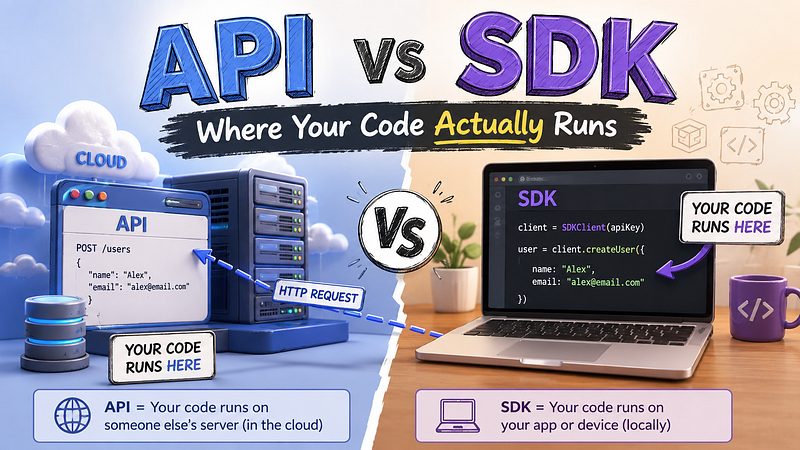
Pick Up Any Integration Docs. Every vendor gives you two paths.
Path A: a base URL, an API key, a request body shape, a response schema. Everything you need to make an HTTP call from scratch.
Path B: npm install stripe or pip install boto3. Then one import and two lines of code that read like plain English.
Almost every engineer picks Path B. That’s usually the right call. The problem is the decision gets made by muscle memory, not by understanding what is actually being chosen.
The difference between calling an API and using an SDK is not syntax. It is not the number of lines you write. It is where the code runs, who controls that code at runtime and what happens when something inside it breaks.
APIs Live on Their Server. SDKs Live in Yours.
That single sentence is what most integration guides skip.
When you call an API directly, you construct an HTTP request. Your code builds the headers, serializes the body and sends the payload over the network. The vendor’s infrastructure processes it. Their servers handle the business logic, run the computation, apply the rate limits. The result comes back as bytes over a TCP connection you opened. The vendor’s code never touched your process.
When you use an SDK, you import vendor code into your application. That code sits in your heap. It runs on your CPU. It opens network connections inside your process, manages a connection pool in your memory, handles retries on your thread pool. The vendor’s logic for request signing, error classification, exponential backoff, response deserialization: all of it executes inside your service.
Those are two meaningfully different operational arrangements. One is a data exchange. The other is a code deployment into your running application.
The Case Where the SDK Earns Its Keep
AWS Signature Version 4 is a useful illustration of why SDKs exist.
To call the S3 API directly, without the SDK, you need to construct a canonical request string from the HTTP method, URI path, query parameters and headers. You hash that string with SHA-256. You build a string-to-sign from the algorithm name, the request timestamp, a credential scope string and the hashed canonical request. You derive a signing key from your secret key using four rounds of HMAC-SHA256 with the date, region, service name and aws4_request. Then you compute the final signature and attach it to the Authorization header.
# Raw S3 API call, simplified (real implementation is ~60 lines before you handle
# date formatting, URL encoding, canonical header sorting and error cases)
import hmac, hashlib, datetime, httpx

def sign_key(key, msg):
    return hmac.new(key, msg.encode("utf-8"), hashlib.sha256).digest()
# ... plus canonical request assembly, credential scope, header sorting ...
With boto3, the same operation is:
import boto3

s3 = boto3.client("s3")
s3.put_object(Bucket="my-bucket", Key="file.txt", Body=data)
The SDK earns its keep when the auth protocol is genuinely complex. Stripe’s webhook signature verification, Google’s OAuth2 refresh flow, any AWS service using Signature V4. These are cases where the SDK encapsulates something painful and error-prone. Using the raw API here means owning and maintaining an implementation of that auth logic. Getting it subtly wrong is hard to detect until you’re debugging a 403 at 11pm.
That is the legitimate value proposition. Everything else is a convenience trade-off.
What Changes When Code Lives in Your Process
Memory and startup cost belong to you
The SDK loads with your application. Every dependency it brings, every in-memory cache it initializes, every connection pool it pre-warms. This is startup cost you absorb.
For long-running servers, this is usually invisible. For serverless functions, it is not. AWS rewrote their JavaScript SDK from v2 to v3 specifically to address this problem. v2 loaded the entire SDK regardless of which services you used. v3 ships each service as a separate package under the @aws-sdk/ scope, reducing bundle sizes by roughly 75%. The change was explicitly motivated by Lambda cold start performance. If you are still bundling the full aws-sdk v2 package into a Lambda function that only calls DynamoDB, you are paying for the full weight of S3, SQS, EC2 and every other service client you never use.
You control versioning (whether you want to or not)
With a raw API, the vendor deploys changes to their server. As long as the response contract does not break, you absorb those changes silently.
With an SDK, you pin a version and decide when to upgrade. On the surface, that looks like control. In a lot of cases it is: you can test upgrades against your integration before absorbing them, and your behavior is predictable across deploys because nothing changes without your deliberate action.
The other side of this: security patches do not reach you automatically. When a vulnerability is found in the SDK’s HTTP client or its dependency tree, the patched version sits in the registry waiting. Your service keeps running the old code until you update your lockfile, rebuild and redeploy. For teams with well-maintained dependency pipelines, this is a small operational overhead. For teams where package updates pile up unreviewed, it is a real exposure window.
Failure modes are wider
API failures have a predictable shape. An HTTP error code, a timeout, a connection reset. You handle these at the network boundary and you know what you are handling.
SDK failures are harder to predict. The SDK might silently absorb a 429 and retry. It might throw a library-specific exception type that wraps the underlying HTTP error in a class you need to import just to catch it. Internal SDK state (retry counters, connection pool state, backoff timers) can fail in ways that do not surface as clear error signals. When something breaks under load, the failure boundary is “somewhere inside the vendor’s code” rather than “the HTTP response.”
That is not a reason to avoid SDKs. It is a reason to read the error handling docs before you need them.
Their code runs in your trust boundary
This is the point most SDK discussions never make.
When you install a vendor’s SDK, you are granting execution rights inside your application. The SDK has access to anything your process has access to: environment variables, file handles, network interfaces, other libraries in the same heap. The vendor’s code runs with the same permissions your application code has.
This extends to the SDK’s dependencies. A well-maintained SDK from a credible vendor is not a practical security concern. The transitive dependency tree is the more interesting exposure. Several documented supply chain attacks have specifically targeted popular SDK-style packages precisely because once installed, arbitrary code runs inside the consuming application’s process at startup.
Auditing your dependency tree on every SDK install is not paranoia. It is the same discipline you would apply to any code deployment.
What Changes When Code Lives on Their Server
Network latency is present, but manageable
Direct API calls always involve a round trip. TLS handshake on the first connection, DNS lookup if nothing is cached, TCP setup. In warm, sustained-request scenarios, connection reuse makes this overhead small.
The difference between a well-configured SDK client and a well-configured raw HTTP client is usually minimal when both are reusing connections. The SDK wins when its retry and backoff logic is better than what you would write by hand. The raw client wins when you need precise control over connection behavior the SDK does not expose.
Rate limits live on two different sides of the wire
API rate limits are server-enforced. The vendor counts your requests and rejects them when you exceed the limit. This enforcement happens regardless of what the client does.
SDK rate limiting, where it exists, is client-side self-throttling. The SDK is choosing not to send requests that would exceed the limit. Useful for smoothing bursty load. Not a guarantee. The server still has its own counter, and misconfigured SDK concurrency settings can still produce 429s even when the SDK “thinks” it is within limits.
Raw API calls mean you own the HTTP scaffolding
Error parsing, pagination, request serialization, response deserialization, timeout configuration, retry logic: if you go raw, you write this. Not a lot of code, but it is code you now own. For a single simple endpoint, this is trivial. For a vendor with twelve endpoints your service calls, you are building a mini-SDK. At some point the wheel you are reinventing is the wheel the vendor already shipped.
The Decision Framework
Neither approach is categorically correct. Here is the question to ask first: what is the vendor’s auth protocol, and how complex is it?
Use the SDK when:
- The auth flow is complex (signature algorithms, token refresh, credential rotation)
- The SDK is actively maintained with a public vulnerability response history
- You have reviewed the SDK’s transitive dependencies and are comfortable with the surface
- Your runtime environment can absorb the SDK’s startup and memory cost
- You want tested retry and error handling logic out of the box
Use the raw API when:
- The auth is a static bearer token and the request structure is simple
- You need precise control over connection pooling or retry behavior
- You are in a constrained runtime (Edge functions, very small Lambda packages, embedded environments)
- The endpoint you need is not yet in the SDK
- You want to minimize your dependency surface intentionally
The hybrid pattern works well in production
Use the SDK for the complex parts: auth, the high-traffic endpoints that benefit from built-in retry logic. Use raw HTTP calls for the edge cases: admin endpoints you call once a day, operations the SDK does not support yet, situations where the SDK’s retry behavior is actively wrong for your use case.
The mistake is defaulting to one approach for everything. The SDK’s connection pool is not free. The raw HTTP client’s auth implementation is not free either.
Ask the Question Before the Install
Every new integration deserves one question asked before the package manager runs: where does this vendor’s code need to execute, and am I comfortable with everything that comes with that?
The answer is usually “install the SDK.” But it should be the answer you reached by thinking, not by reflex.
The execution environment question does not disappear once you pick a tool. It shows up again when the SDK ships a dependency update with a CVE in it, when your Lambda cold starts creep up after adding a new service client, when a retry storm from a misconfigured SDK floods the vendor’s API with requests you never explicitly made.
The engineers who stay ahead of these problems are the ones who understood the execution model from the start. Not the ones who ran npm install and moved on.


